الجمعة، 16 مارس 2018

Mickey and Minnie Mouse AR Emoji for the Galaxy S9 now available

Inking a deal with Disney for the AR Emoji feature on the Galaxy S9 and Galaxy S9+ was a masterstroke by Samsung, given the long-running collaboration Apple has had with the creator of iconic characters such as Mickey Mouse, Cinderella, and Donald Duck. Samsung had announced that it would be bringing numerous Disney characters as emoji options to the Galaxy S9 and S9+, and the company has kicked things off with Mickey Mouse, the most famous and classic of them all, and his love interest Minnie Mouse to coincide with the general market release of its latest flagships.

Mickey and Minnie Mouse AR Emoji for the Galaxy S9 now available

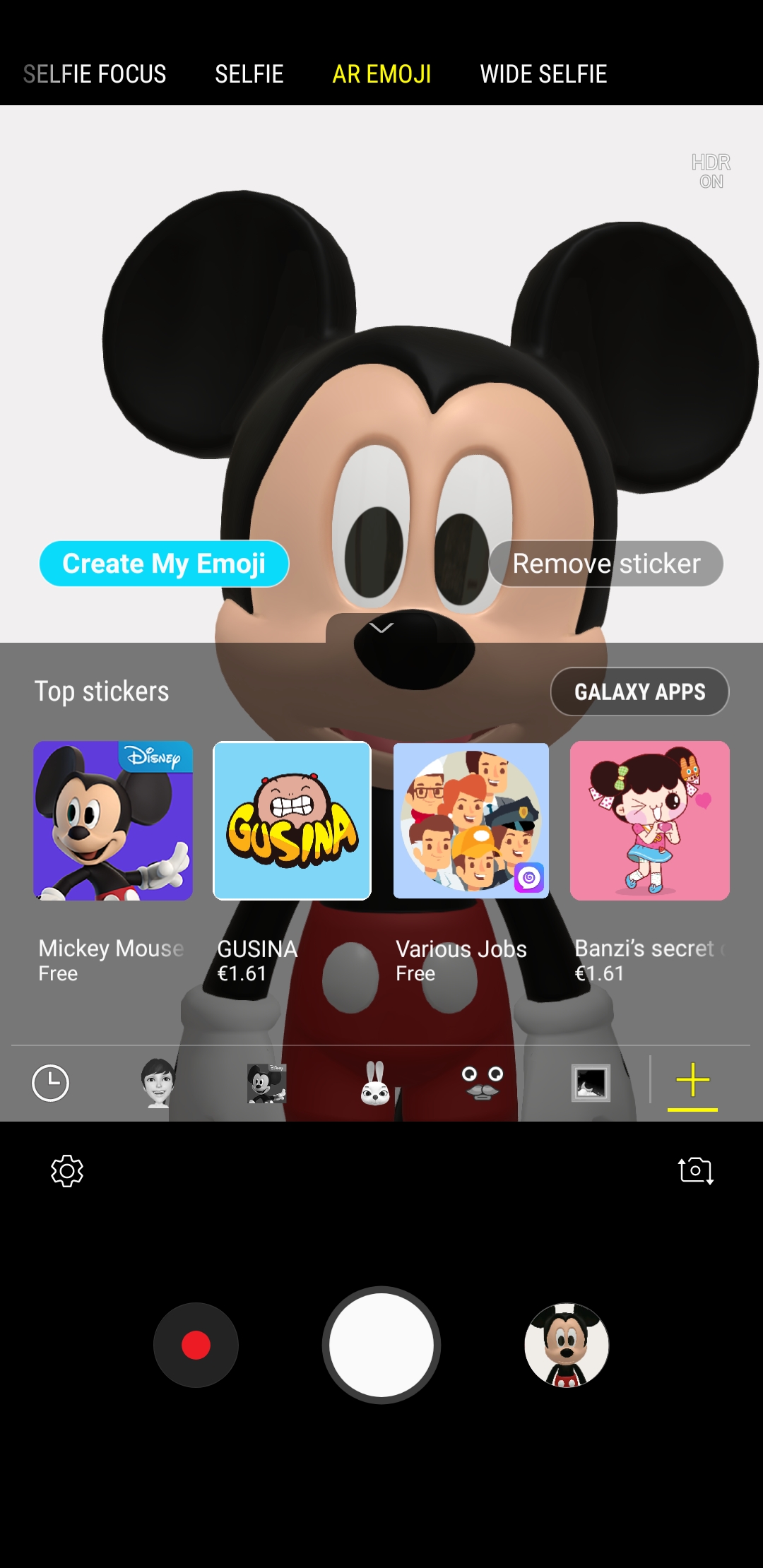
Both characters can be downloaded from the AR Emoji mode on the Galaxy S9 camera by tapping the ‘+’ button, as seen in the screenshot below. The new emoji options may not be available for everyone at the moment, but they should show up in every market where the Galaxy S9 and S9+ have gone on sale, unless Samsung has had a few licensing roadblocks in some countries (which the company has made no mention of, so fingers crossed that’s not the case). More Disney characters will be arriving to AR Emoji later on over the course of the year, including those from more recent films such as The Incredibles, Zootopia, and Frozen (well, recent compared to Mickey Mouse).

While Samsung’s AR Emoji is a far cry from the Animoji feature on Apple’s iPhone X when it comes to actually making the characters look like you, the Disney emojis are only meant to emote like you, something that the Galaxy S9 and Galaxy S9+ do well enough. For those unaware, AR emojis can be saved and sent across to people as GIF images, making them compatible with every smartphone.

Once you’ve downloaded the Mickey and Minnie Mouse emojis, head over to this post to see how you can start using the feature and, as Samsung officially notes, “bring magic” to your messages. Also let us know if you see the option to download these emojis on your S9 or S9+ so others can know if they are available in their region at this time.
The post Mickey and Minnie Mouse AR Emoji for the Galaxy S9 now available appeared first on SamMobile.


from SamMobile http://ift.tt/2FZeoFW
via IFTTT
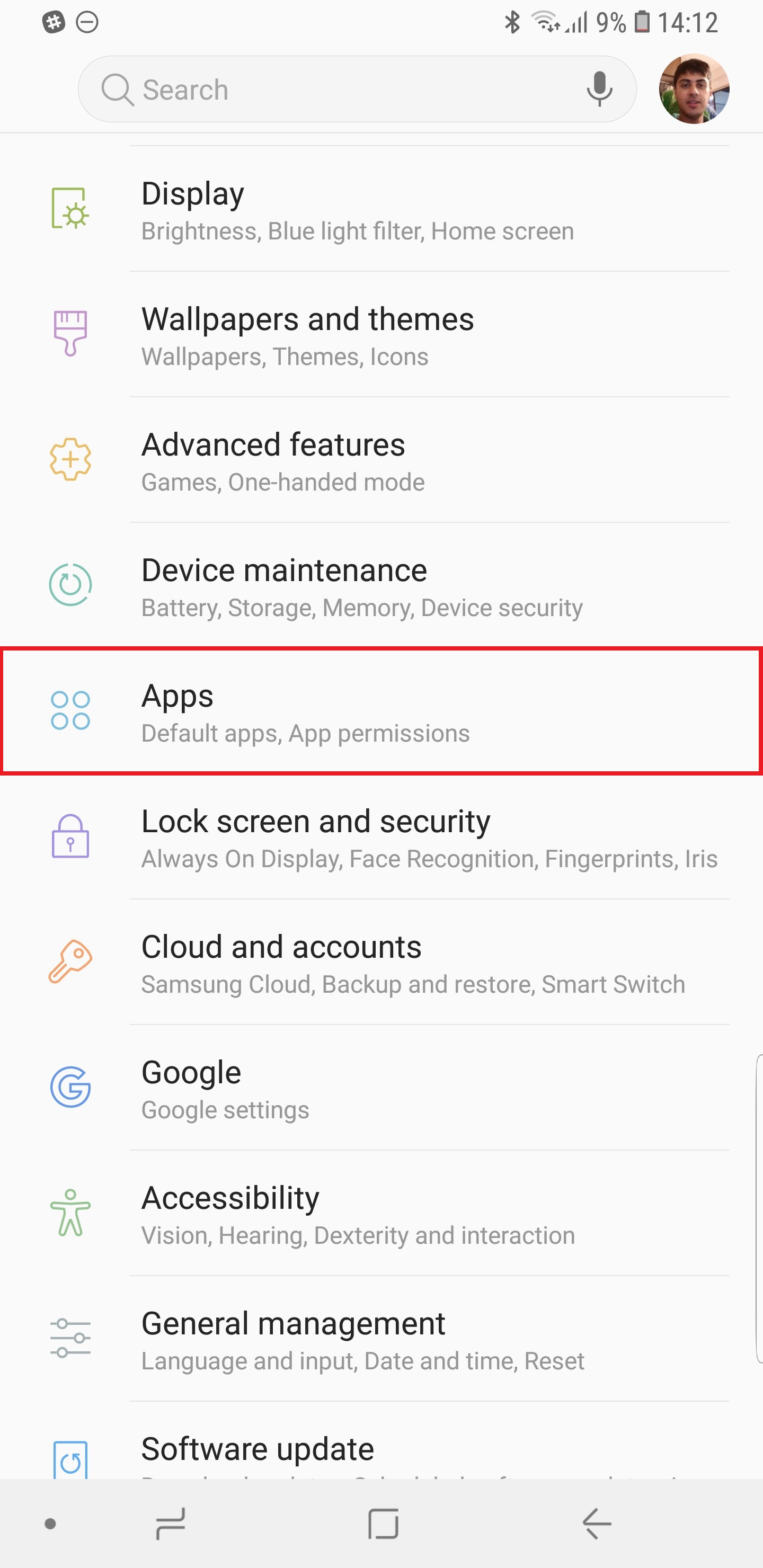
How to move apps to SD card on Galaxy S9 and Galaxy S9+

Some users might be unaware that Samsung allows users to move apps to external storage hence the need for this guide on how to move apps to SD card on Galaxy S9 and Galaxy S9+. The procedure was slightly changed for the Galaxy S8 last year because the device came with Nougat out of the box. It’s somewhat different for the new flagships as well because they ship with Android 8.0 Oreo.

The process was actually simpler on the Galaxy S8 and Galaxy Note 8 with Nougat. You could just press and hold an app icon and tap on App info when the menu popped up. This took you straight to the relevant menu from where it only required a couple of more taps to move the app.

Those who have been trying to find out how to move apps to SD card on Galaxy S9 and Galaxy S9+ need to look no further than this detailed guide. The very same procedure can be used to do the same on other Samsung devices powered by Oreo (only available for S8 so far).

While we’re on the subject of microSD cards, check out our list of best microSD cards for the Galaxy S9 and Galaxy S9+ to take full advantage of the new flagship’s support for microSD cards of up to 400GB.

How to move apps to SD card on Galaxy S9 and Galaxy S9+

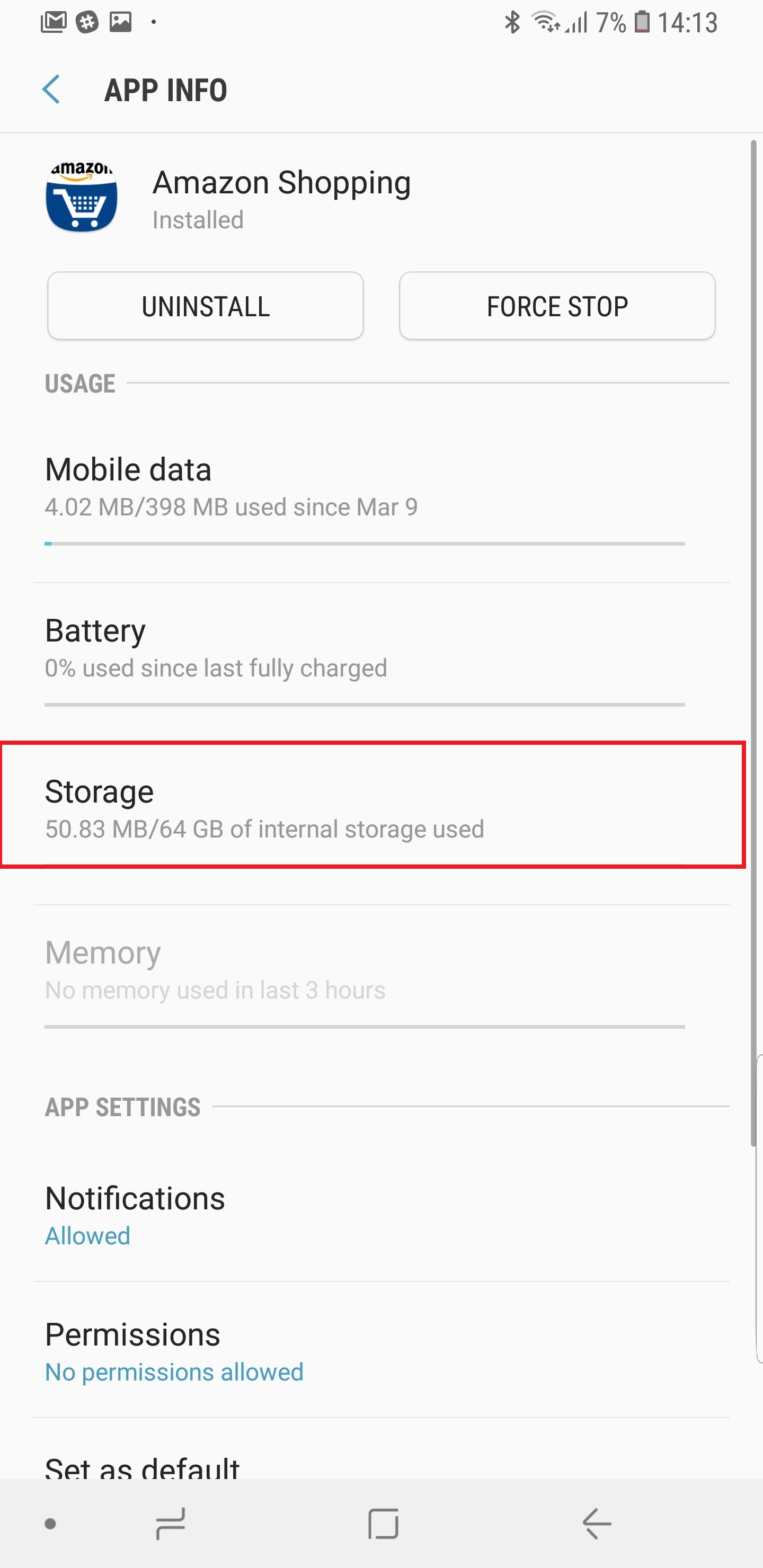
Step 1: In order to move an app, launch Settings and navigate to the Apps menu. Tap on the app you want to move to see its details

Step 2: Tap on Storage followed by Change

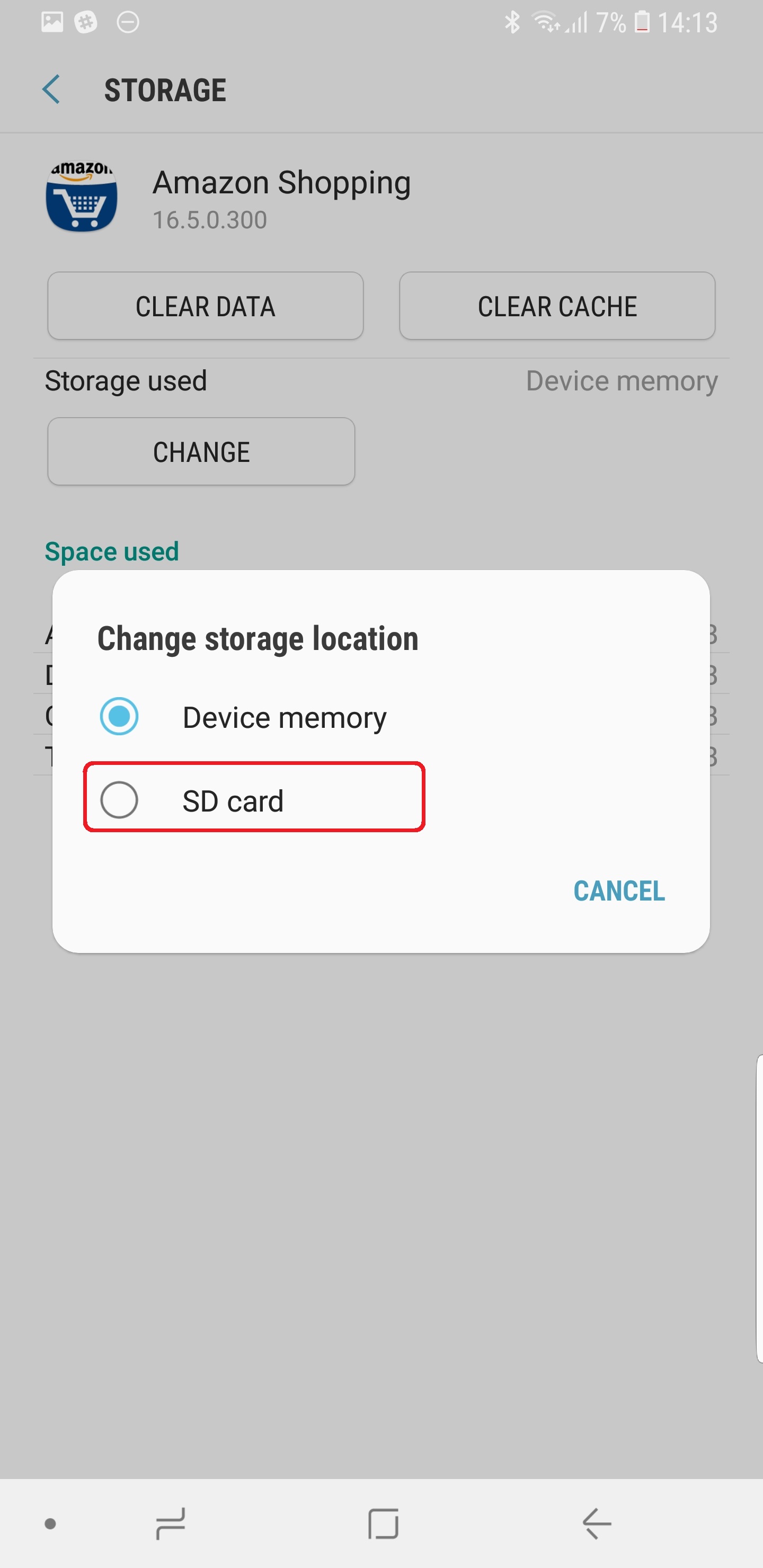
Step 3: Select SD card (select Device memory if moving app back from SD card)

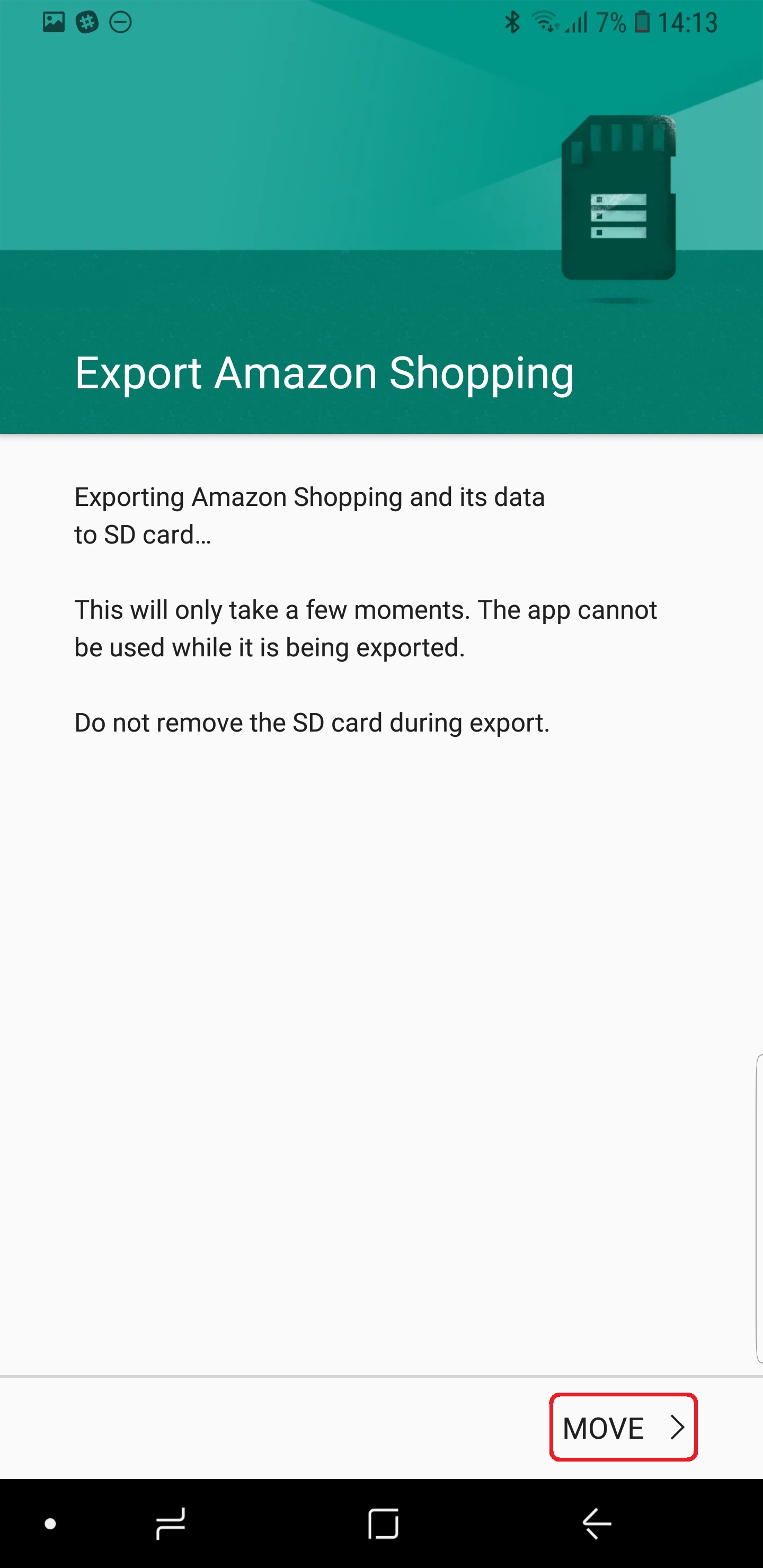
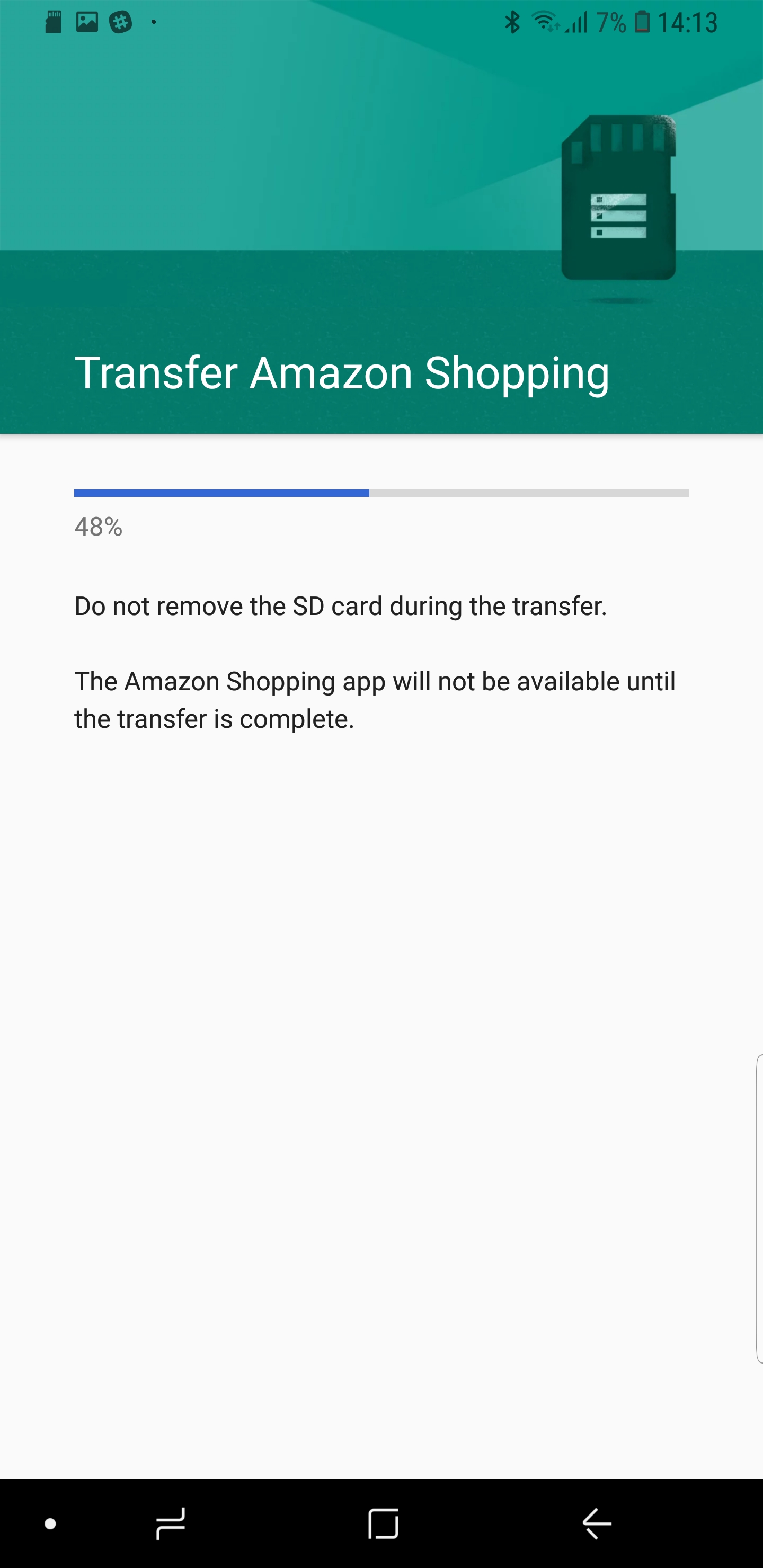
Step 4: Sit back and relax as it’s going to take a moment for the app and its data to be exported to the microSD card. The app won’t be usable while it’s being moved.

Voila. This ends the guide on how to move apps to SD card on Galaxy S9. Do keep in mind, though, the some of the exported app’s data will occupy space on the internal storage. This is just how it works on Android.

Bear in mind that exported apps might stop working if the microSD card is removed. If you’re swapping microSD cards, don’t forget to move the apps back to the internal storage.

Don’t hesitate to ask for assistance in the comments section below if you get stuck at any step. Please note that not all apps might support being moved to external memory.

The post How to move apps to SD card on Galaxy S9 and Galaxy S9+ appeared first on SamMobile.


from SamMobile http://ift.tt/2DwhqMg
via IFTTT

Best microSD cards for Galaxy S9 and Galaxy S9+

Most of you will get your new Samsung flagship today and wonder what are the best microSD cards for Galaxy S9 and Galaxy S9+. While the 64GB internal storage is going to be good enough for those who don’t use memory-intensive apps or store large amounts of content, it’s certainly not going to be enough for the vast majority of customers who pick up a Galaxy S9 or Galaxy S9+. Samsung’s new flagships have a microSD card slot so why not pick up a new card and make the most of this feature.

A class above the rest

There’s a reason why many of our readers will be interested in the best microSD cards for the Galaxy S9 and Galaxy S9+. The new flagship lets you expand the memory by up to 400GB with a microSD card instead of just 256GB as which has by far been the industry practice. With this one minor improvement, Samsung has made the Galaxy S9 futureproof as storage needs are only going to get bigger in the years to come.

Best microSD cards for Galaxy S9 and Galaxy S9+

SanDisk Ultra

SanDisk Ultra

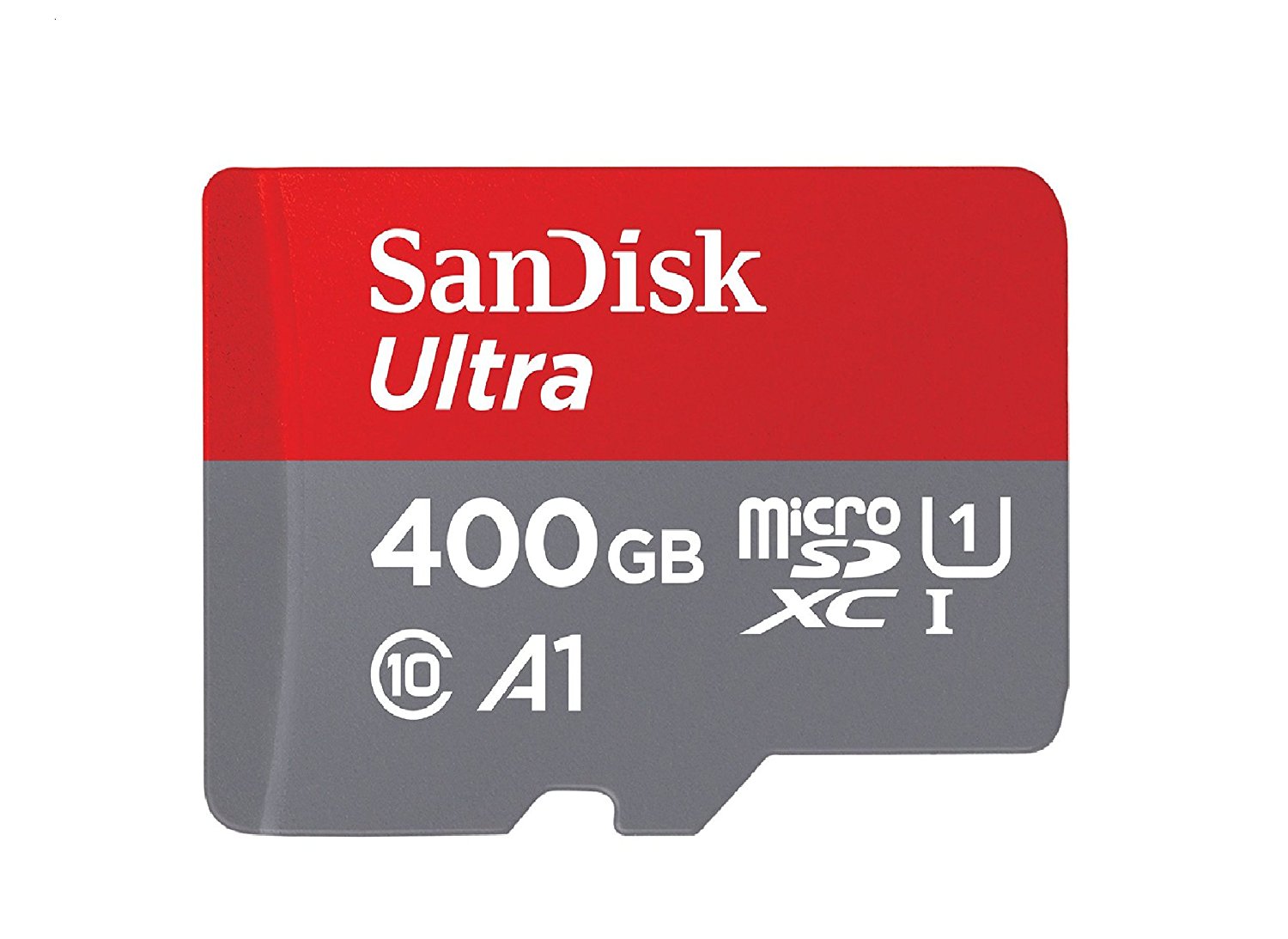
There aren’t a lot of proper 400GB microSD cards available right now but you can rest assured that the SanDisk Ultra microSDXC UHS-I card will function as advertised. It’s available in capacities of up to 400GB with transfer speeds of up to 100MB/s which the company says is good enough for moving up to 1200 photos in a minute.

The 400GB capacity is why the SanDisk Ultra takes the top spot on our list of the best microSD cards for the Galaxy S9 and the Galaxy S9+. Purchase it now on Amazon for $239.55. If you’re not willing to spend that much money on a microSD card, the SanDisk Ultra is also available in the following capacities:

SanDisk Extreme

SanDisk Extreme

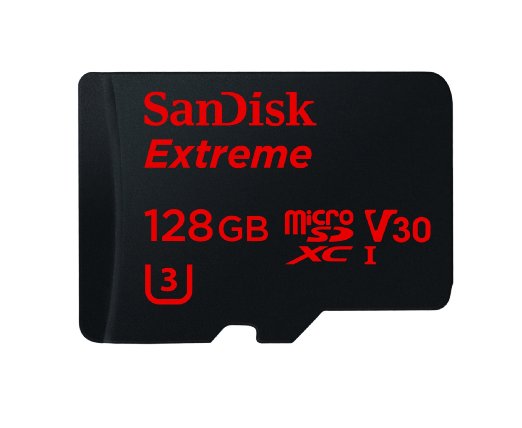
The second spot on our list of best microSD cards for Galaxy S9 and Galaxy S9+ also goes to SanDisk. The company’s SanDisk Extreme cards have been developed with 4K Ultra HD video capture in mind as they have Video Speed Class 30 and UHS Speed Class 3 ratings while ensuring extreme durability in challenging environmental conditions. You can buy it from Amazon with 128GB capacity for $64.99. Available capacities include:

Samsung EVO Select

Samsung EVO Select

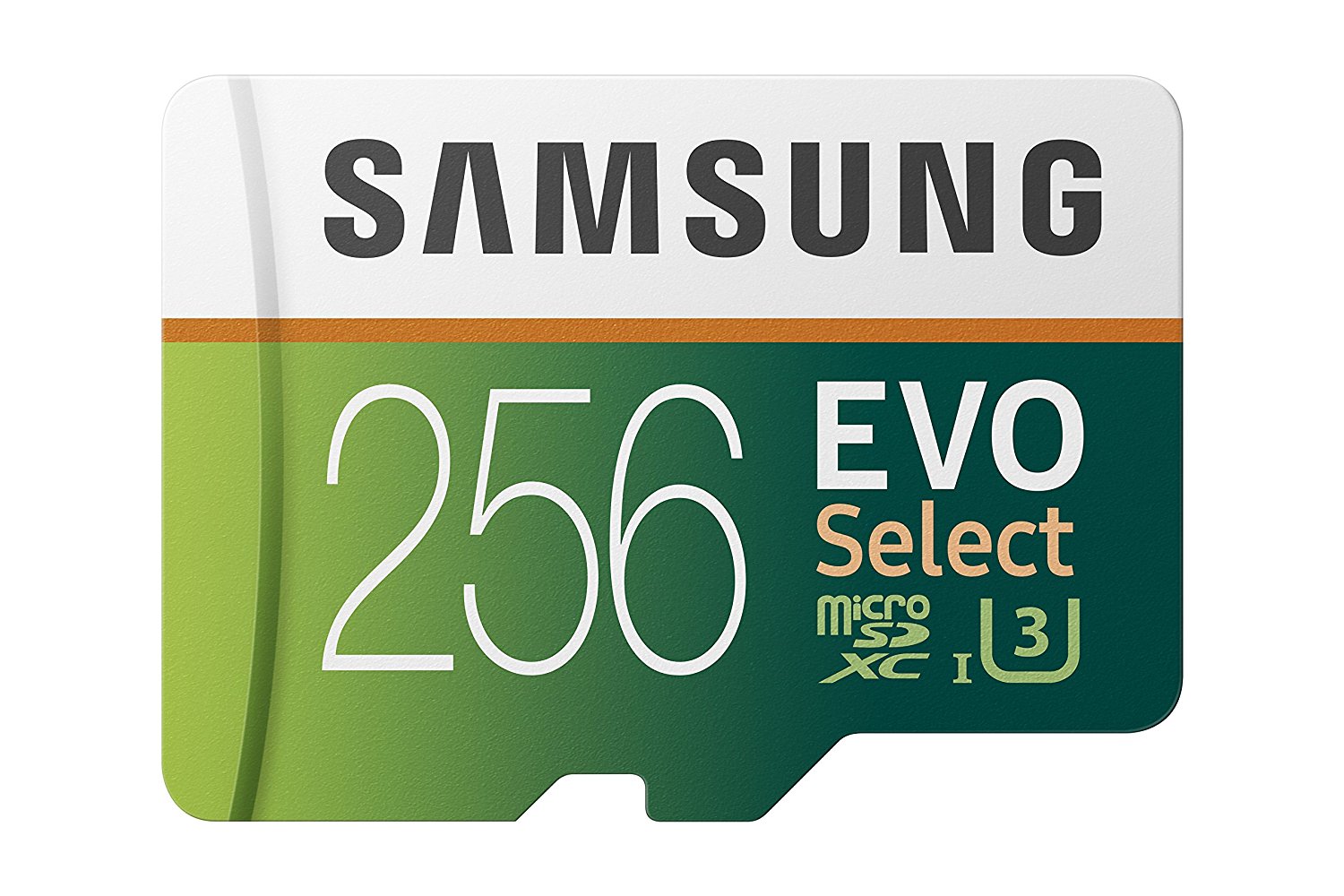
Samsung makes some great microSD cards as well which is why the EVO Select is on our list of best microSD cards for Galaxy S9 and Galaxy S9+. They promise 100MB/s and 90MB/s read and write speeds respectively with Class 10 UHS 3 rating. Samsung backs them up with “4-proof protection,” saying that the EVO Select will keep your data safe against extreme temperatures, water and other challenging conditions.

It’s not available in 400GB, though. The maximum capacity you can buy from Amazon is 256GB for $119.99. Other capacities include:


These are what we believe the best microSD cards for Galaxy S9 and Galaxy S9+ that money can buy right now. Have you picked one out yet? Let us know in the comments which one you’re going to buy and why.

The post Best microSD cards for Galaxy S9 and Galaxy S9+ appeared first on SamMobile.


from SamMobile http://ift.tt/2FYfUry
via IFTTT

Galaxy S9 release confirmed for 110 markets by end of March

March 16 was announced as the Galaxy S9 release day when the handset was officially unveiled last month and Samsung today confirmed that its new flagship smartphone is now available for purchase in dozens of markets across the globe. The company has also confirmed that the Galaxy S9 and Galaxy S9+ will be available for purchase in more than 110 markets by the end of this month.

Galaxy S9 release

Samsung and its partners have been taking pre-orders for the Galaxy S9 and Galaxy S9+ for the past couple of weeks. Those who pre-ordered their units will get them on the Galaxy S9 release day which is today. However, some lucky customers have already received their units in several markets.

The Galaxy S9 and Galaxy S9+ are available in stores today in approximately 70 countries, including all of Europe, Canada, China and the United States. Samsung says that the Galaxy S9 release will cover 110 markets by the end of March 2018.

It’s going to be a swift roll out this year, not that anybody is going to complain about that, enabling customers in non-key markets to get their hands on the new flagships from Samsung earlier.

The Galaxy S9 brings a slew of new features to the series like Super Slow-motion video recording, AKG-tuned stereo speakers, AR Emojis and deeper integration with Bixby. It’s also the only smartphone available on the market right now with a Dual Aperture lens.

Check out our full Galaxy S9/S9+ review to find out more about all of the new features that Samsung has introduced.

The post Galaxy S9 release confirmed for 110 markets by end of March appeared first on SamMobile.


from SamMobile http://ift.tt/2pg2ooY
via IFTTT

Verizon Galaxy S8 and Galaxy S8+ Oreo update now rolling out

The Galaxy S9 and Galaxy S9+ are going on sale in nearly 70 markets today, March 16th, and Verizon has chosen the eventful day to start rolling out the Android 8.0 Oreo update to the Galaxy S8 and Galaxy S8+. Does this reek of a conspiracy where you don’t get an update on the older device before the newer one goes on sale? Well, sure it does, though since this is a carrier and not Samsung we’re talking about, it’s not as infuriating. Or it is, especially for owners of the Galaxy S8 and S8+ on Verizon, but let’s not look a gift horse in the mouth, shall we?

Verizon Galaxy S8 Oreo update now rolling out

The Oreo update for the S8 and S8+ on Oreo comes with build numbers G950USQU2CRB9 and G955USQU2CRB9, which are slightly newer than what the rest of the world is running. The list of features remains the same, however, and that goes for the security patch as well, which is February 1. We’ve covered all the new features in Oreo extensively in our What’s New With Android 8.0 Oreo series of articles, although most of them are exclusive to Samsung’s version of the software. Some of the regular Android 8.0 features include picture-in-picture (PIP) multitasking support for apps, autofill for quickly entering usernames and passwords inside apps, and enhanced limits on background apps for reduced battery drain and better device performance.

If you own a Galaxy S8 or S8+ on Verizon, you should be able to download the update from the Settings » Software update menu. It may not be available for everyone at the moment, but the update’s reach should expand over the course of the next few days. Not seeing Oreo on your phone yet? Maybe use the time to prepare your phone for the update by using some of our tips.

The post Verizon Galaxy S8 and Galaxy S8+ Oreo update now rolling out appeared first on SamMobile.


from SamMobile http://ift.tt/2ItSc4V
via IFTTT

الخميس، 15 مارس 2018

Can’t use Samsung Pay on your Galaxy S9? You’re not alone

Here’s another issue that is troubling some Galaxy S9 and Galaxy S9+ owners, at least in the United States. Those who bought unlocked versions of the S9 and S9+ in the US are having problems getting Samsung Pay to work. The Play Store listing for Samsung Pay says the app is not compatible, while the preloaded version of the app says there’s an update but doesn’t actually install it when the user tries. A Samsung customer care representative has reportedly said that unlocked models “are experiencing issues with Samsung Pay” and an update will be rolled out soon.

Samsung Pay not playing nice with the Galaxy S9 in the US

While most reports say the Snapdragon version of the phone is affected, some have also reached out about the same issue on imported Exynos units, suggesting it may be a problem with Samsung Pay in the US rather than the phone. At least T-Mobile’s version of the first Galaxy S9 update didn’t bring a solution, so it does seem like buyers of the S9 and S9+ in the US will be unable to use Samsung Pay out of the box. Here’s hoping a fix is released soon, as there’s nothing worse than being able to use one of the major features on a new phone, especially a flagship like the Galaxy S9 or S9+.

Have you faced issues running Samsung Pay on your Galaxy S9 or Galaxy S9+? Let us know in the comments, and if you’ve managed to find a workaround, feel free to share it with us for the benefit of other Galaxy S9 users who may be having the same problem.

Also Read[Poll] Galaxy S9 fingerprint reader stops responding at times, needs a reboot to fix

The post Can’t use Samsung Pay on your Galaxy S9? You’re not alone appeared first on SamMobile.


from SamMobile http://ift.tt/2tQtTej
via IFTTT

Galaxy S10 3D camera reportedly being developed

Samsung is expected to pull out all the stops for next year’s flagship smartphone and the Galaxy S10 3D camera is now on the list of new components that are likely to be selected. According to a new report out of South Korea, Samsung is working with an Israeli startup called Mantis Vision on 3D camera solutions for the Galaxy S10.

Galaxy S10 3D camera

2019 will be the 10th anniversary of Samsung’s Galaxy S flagships and that’s why the company is expected to introduce major improvements with the Galaxy S10. Reports have suggested that next year’s flagship may not be called the Galaxy S10 and that Samsung might switch to a different naming scheme but that’s a whole other debate that we don’t need to get into right now.

With regards to a Galaxy S10 3D camera, the report claims that Mantis Vision is collaborating with camera module firm Namuga to integrate 3D sensing functionality into the module. Namuga has previously supplied Samsung with modules for its mid-range and low-end devices like the Galaxy A and Galaxy J series.

What good will the Galaxy S10 3D camera be for the end user? For starters, it will power an advanced facial recognition system much like Face ID on the iPhone X, so we can keep our fingers crossed for Intelligent Scan improvements. It will also improve the AR Emoji feature that Samsung promises it didn’t copy from Apple. As we mentioned in our Galaxy S9 review, AR Emoji leaves a lot to be desired so hopefully Samsung will address its issues with the Galaxy S10.

The big question here is whether Samsung will adopt a notch to house all of these components in if it decides to maximize the screen real estate on next year’s flagship. Android OS is already getting support for notches so that’s a tantalizing prospect but we’ve argued in detail why Samsung shouldn’t jump on the notch bandwagon yet. Here’s to hoping it doesn’t with the Galaxy S10.

Expect to hear more details about the device and particularly about the Galaxy S10 3D camera in the months to come even though we’re almost a year away from its launch.

The post Galaxy S10 3D camera reportedly being developed appeared first on SamMobile.


from SamMobile http://ift.tt/2tQ2b1h
via IFTTT

جميع الحقوق محفوظة لمدونة الغريب 2013