السبت، 17 مارس 2018

Chinese optical parts used in Galaxy flagship smartphones for the first time

Even though China is the manufacturing powerhouse of the world, most Chinese companies don’t enjoy a reputation for quality. Chinese firms and products are usually associated with low-cost products that may or may not last too long. However, there has been a gradual improvement in the quality of products coming out from Chinese companies.

Growing competitive edge of the Chinese suppliers

As another example of changing fortunes and perception about Chinese part suppliers, a report in ET News states that Samsung reportedly used Chinese optical parts in its flagship smartphones for the first time. Samsung apparently sourced lenses from Sunny Optical in China for the Galaxy S9 and Galaxy S9+. If true, this is an impressive achievement by a Chinese component supplier as making quality optical parts is deemed to be technically quite challenging compared to other smartphone parts.

The news report quotes an industry representative as saying the “Galaxy S9 uses Sunny Optical’s lenses for its front camera module. Although Sunny’s products have been used for low and medium-priced Smartphones, this is the first time they are used for flagship models.”

Sunny Optical, which makes lenses, camera modules, microscopes, and measuring equipment, is the biggest Chinese optical part manufacturer and already supplies to major Chinese smartphone manufacturers. So far, Samsung has been sourcing lenses from South Korean suppliers such as Kolen, Sekonix, and Samsung Electro-Mechanics for its flagship Galaxy devices. Samsung opting for a Chinese supplier for optical parts for its top-tier smartphones shows its increased confidence in the capabilities of Chinese part suppliers like Sunny Optical.

South Korean component suppliers were relying on quality to compete with the low-cost offerings from China so far. Now with the Chinese firms catching up on quality, it is bound to put more pressure on the South Korean part manufacturers.

The post Chinese optical parts used in Galaxy flagship smartphones for the first time appeared first on SamMobile.


from SamMobile http://ift.tt/2FR7cbx
via IFTTT
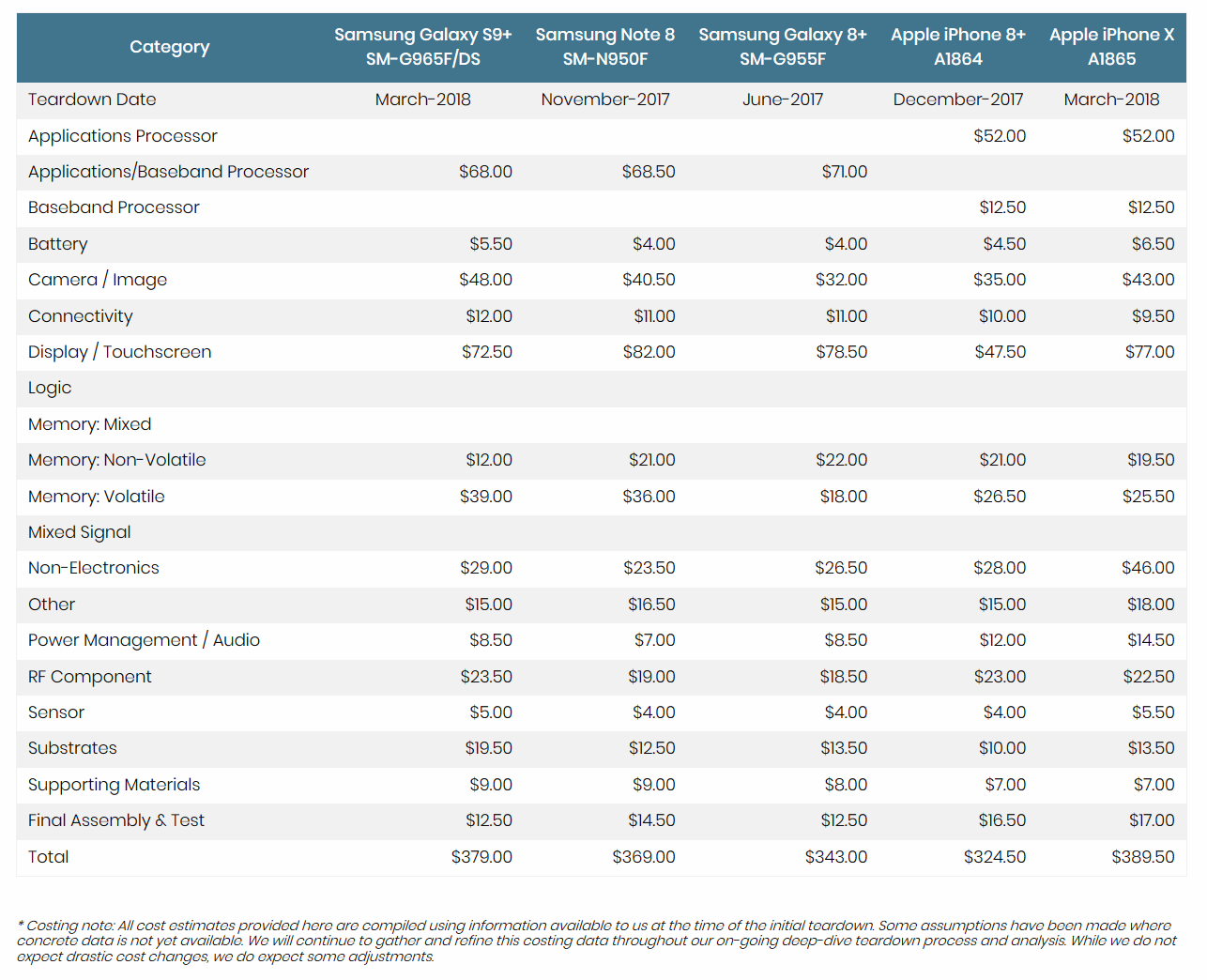
Galaxy S9+ is reportedly more expensive to make than the Galaxy Note 8

Calculating how much it costs precisely to make a smartphone is a tricky affair for third parties as companies don’t openly divulge component costs. Market analysts often rely on estimates from different sources to calculate the cost of popular smartphone models.

Techinsights has compiled a cost analysis of popular smartphone models in the market. While the cost comparison is based on estimates that may or may not be completely correct, it still represents the best guesswork we have on this topic. The analysis took into consideration various component prices to arrive at the manufacturing cost of the popular smartphones. The costs mentioned in the analysis is respective to the date of the teardown and have not been adjusted to reflect the current costs of the components.

The iPhone X tops the chart

According to the analysis, the Galaxy S9+ is more expensive to make than the Galaxy Note 8 even though the latter was priced higher than the Galaxy S9+ at launch. The report states it costs $379 to make the Galaxy S9+ compared to the Note 8’s $369. The iPhone X tops the chart at $389.5 while the iPhone 8+ costs $324.5 – the lowest among the group.

Samsung makes most of the components used in its smartphones, and so it pays some of these component costs to other divisions within the Samsung group. Apple, on the other hand, procurers many of its iPhone components from other suppliers, including Samsung.

Furthermore, the actual cost of the device to the companies is more than the sum of the price of the components as the final device cost involves other substantial costs such as R&D, marketing expenses, software development costs, distribution costs, etc.

Image Credit: Tech Insights

The post Galaxy S9+ is reportedly more expensive to make than the Galaxy Note 8 appeared first on SamMobile.


from SamMobile http://ift.tt/2Dzk1oX
via IFTTT

الجمعة، 16 مارس 2018

How to install Mickey Mouse and Minnie Mouse AR Emoji on the Galaxy S9

The Galaxy S9 and Galaxy S9+ went up for sale in more than 70 markets across the globe today, and Samsung launched two characters from Disney’s repertoire for the AR Emoji feature on the handsets. AR Emoji lets you create emojis that look like you and act like you using the front camera on the S9 and S9+ to map more than 100 points of your face, and thanks to its partnership with Disney, you can also put your expressions on Mickey Mouse and Minnie Mouse, with more Disney characters to be added to the mix throughout the year.

If you’ve received your Galaxy S9 or Galaxy S9+ in recent days, you may not be fully aware of how to download new emojis for AR Emoji. If that’s the case, just follow the instructions below to download the Mickey and Minnie Mouse characters and get going with what Samsung believes is one of the features that were the foundation as it went about creating its newest flagships.

Please note that the Mickey and Minnie Mouse emojis may not be available in your region yet, in which case you can simply try this out later on. In markets where licensing issues might have blocked Samsung from releasing these emojis, you may not be able to download them, though the company hasn’t said anything about this so we’re expecting the emojis to be available for everyone at some point in the coming days.

Now, let’s get to it.

How to install Mickey Mouse and Minnie Mouse AR Emoji on the Galaxy S9

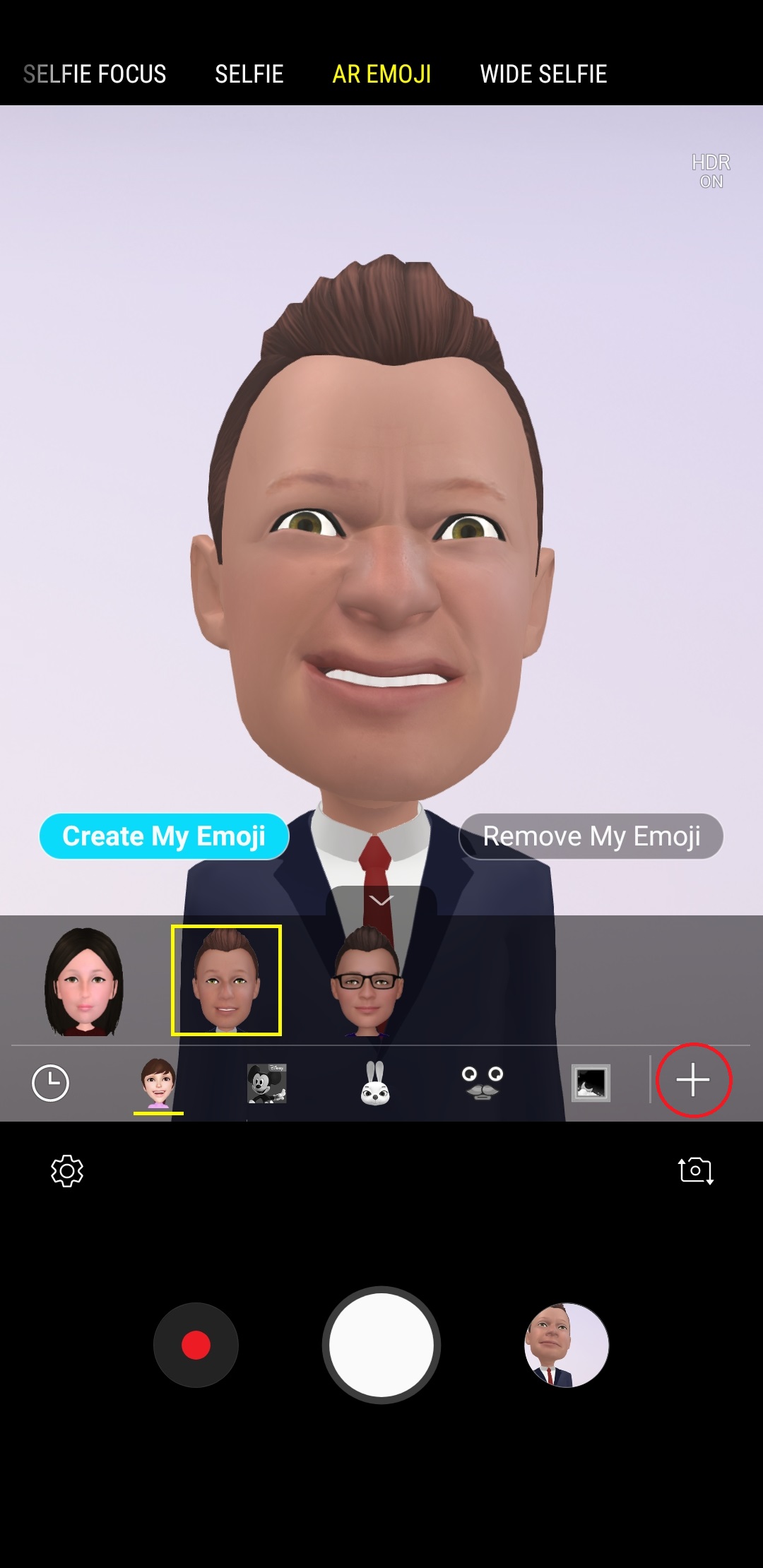
Step 1: Launch the camera app on your S9 or S9+.

Step 2: Now, hold the phone in portrait orientation (i.e. vertically, with the Samsung logo up top and the navigation keys below), then swipe up or down to switch to the front camera. If you’re already using the front camera, skip this step.

Step 3: Now, swipe left on the display a couple of times till the camera switches to the AR Emoji mode.

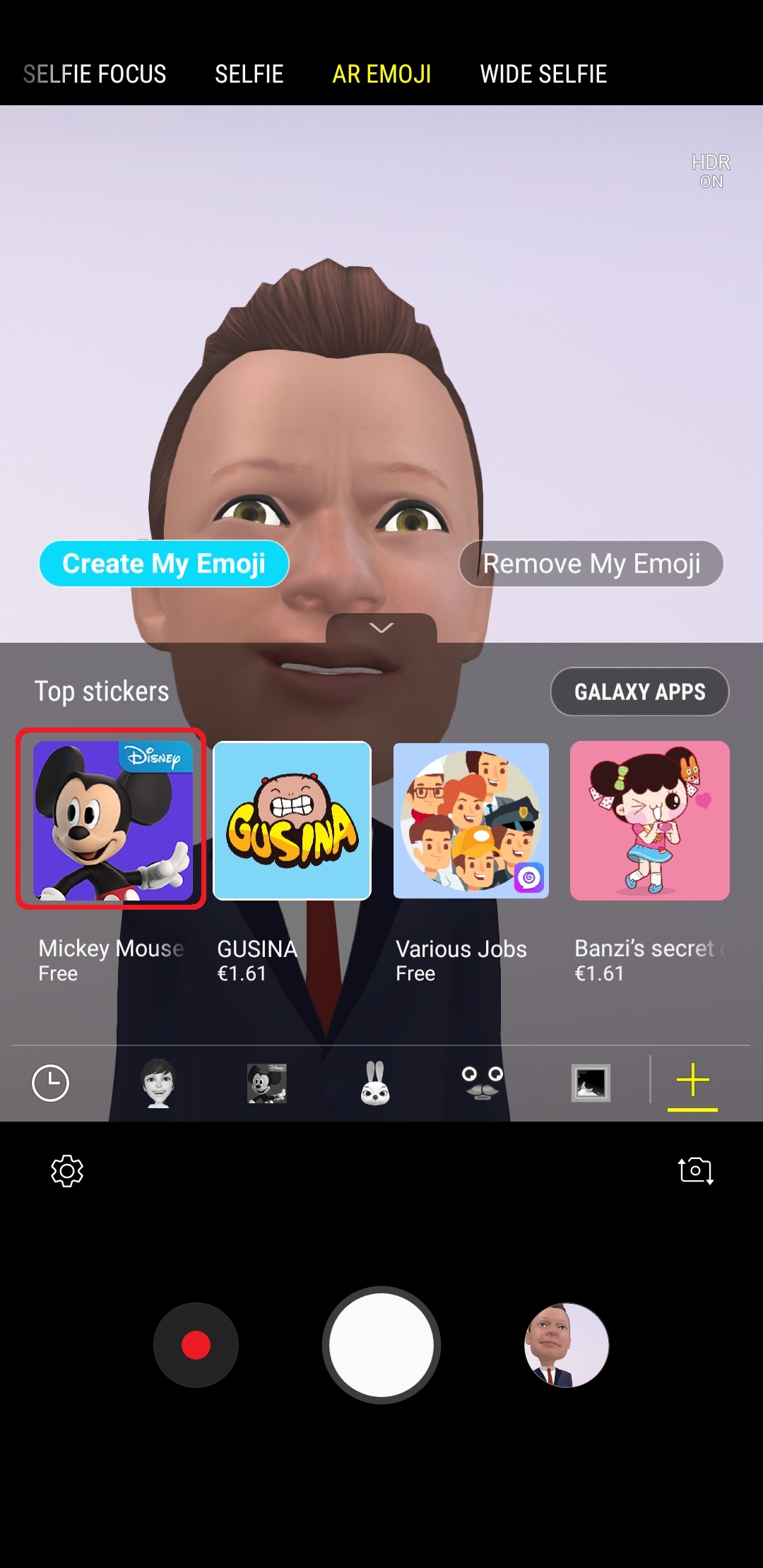
Step 4: Now, see the + icon at the bottom right of the screen? Tap that icon and you will see a list of stickers that are available for download.

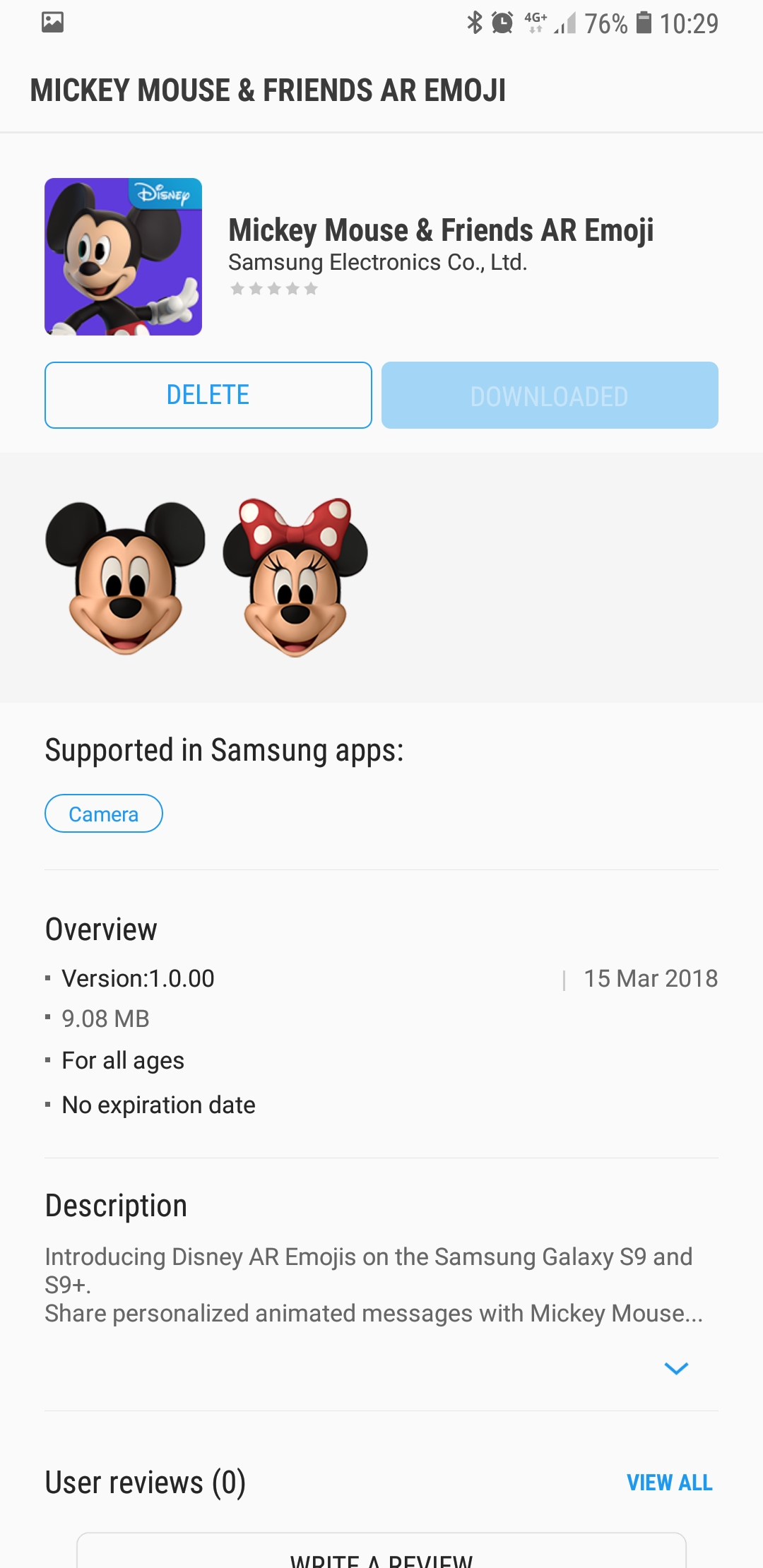
Step 5: The Mickey Mouse sticker should be first on the list. Again, if it’s not there, try this out at a later time since the emojis may not be available in your country just yet. Tap the Mickey Mouse sticker, which will take you to the Galaxy Apps store (Samsung’s official app store) and to the Mickey Mouse and Friends AR Emoji listing.

Step 6: Here, just tap the Download (or Install) button to start downloading and installing the new emojis. Once the download and install have finished, tap the back button on the phone to go back to the camera.

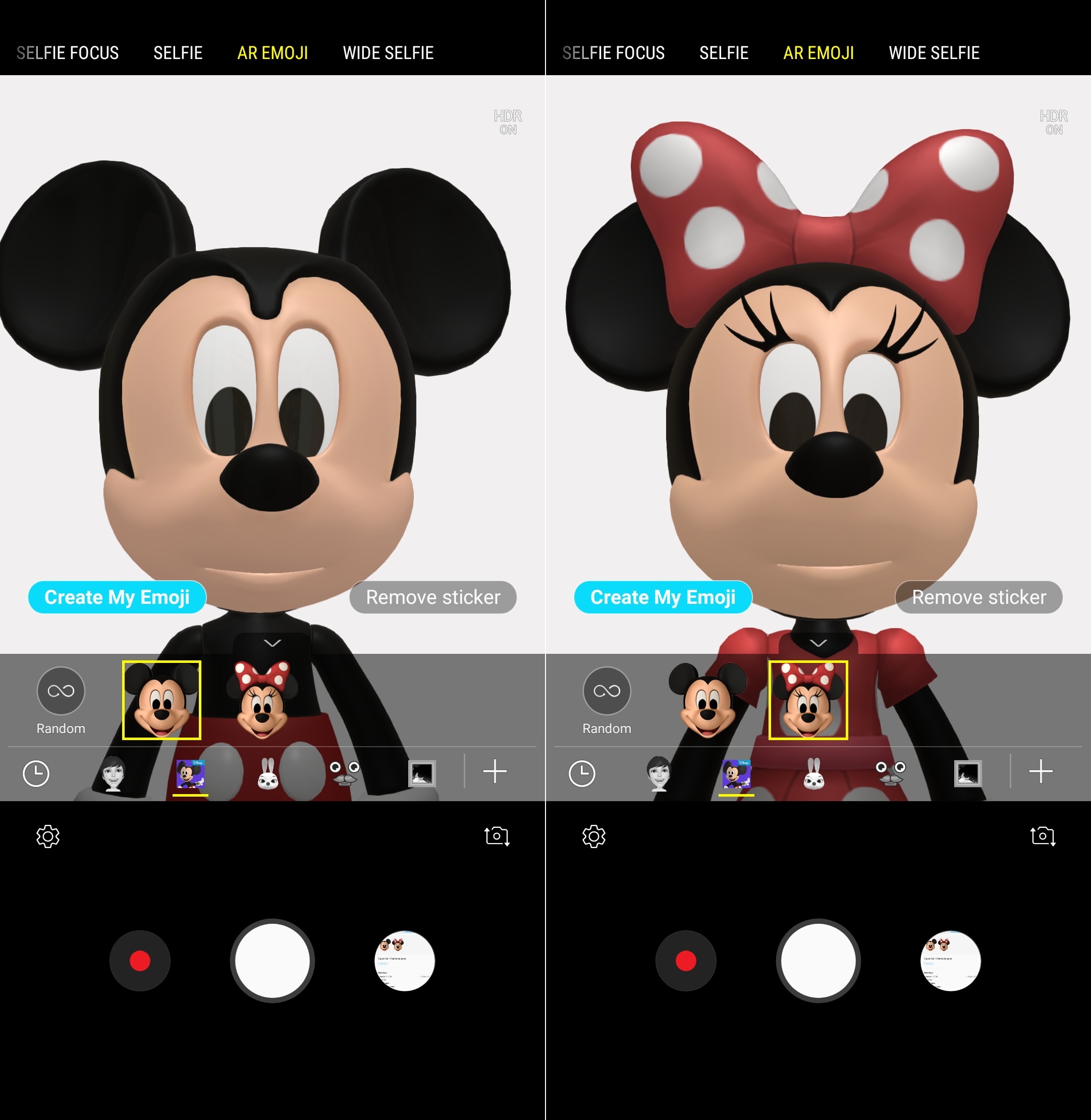
Step 7: Now, provided you’re still in AR Emoji mode (if not, just follow the second and third step to get back to AR Emoji mode), you should see the Mickey Mouse icon in the list of available emojis, a little before the + button. Tap this icon so you can start creating Mickey and Minnie Mouse emojis.


Now that you have the Mickey Mouse and Minnie Mouse emojis installed, you can play around with them to create fun animations with your very own facial expressions. For more details on how to use AR Emoji, you can read this article. Have issues following the steps above? Leave a comment to let us know, and we’ll do our best to help you out.

Check out more Galaxy S9 tips to get the most out of your shiny new phone.

The post How to install Mickey Mouse and Minnie Mouse AR Emoji on the Galaxy S9 appeared first on SamMobile.


from SamMobile http://ift.tt/2Iu3XIL
via IFTTT

Hancom Office S will be preinstalled on the Galaxy S9 and S9+ in North America

Samsung smartphones come preinstalled with many apps that users often label as bloatware. It seems Samsung is not content with the already long list of preloaded apps on its smartphones. Hancom Inc., a South Korean software company, has announced in a press release that its document-editing software, Hancom Office S, will come preinstalled on the Galaxy S9 and Galaxy S9+ sold in the North American markets.

Hancom Office is optimized for DeX

The partnership between Hancom and Samsung is not entirely new. Last year, Hancom optimized its office suite for Samsung DeX. Hancom Office app was also preloaded on the Galaxy Note 8 in select markets. It is not clear what this partnership with Hancom means in the long-term for the Microsoft Office apps preinstalled on the Galaxy devices in other markets.

Hancom Office S offers similar features as the Microsoft Office mobile apps, with the added functionality of editing PDF files. The app is famous in the Korean market for its word-processing software in the Korean language. With this new partnership with Samsung, the company expects to boost its popularity in other major markets.

Unlike budget devices where margins are thin, and companies prefer to squeeze more profits by preinstalling third-party apps, flagship devices like the S9 and S9+ are sold with healthy margins. So, it’s upsetting to see Samsung preloading its most expensive smartphones with third-party apps that users probably cannot uninstall.

Users from North America who have already received your S9 and S9 plus, do let us know in the comments section the state of bloatware on your brand-new device.

The post Hancom Office S will be preinstalled on the Galaxy S9 and S9+ in North America appeared first on SamMobile.


from SamMobile http://ift.tt/2HGnVih
via IFTTT

These Galaxy devices will be updated to Android 8.0 Oreo (updated: March 16)

Not many topics keep Android users on their toes as much as big, feature-rich updates. And with the Android 8.0 Oreo update on the horizon, we are once more bombarded with questions. Will the Galaxy S8 get that update? When can I update my Galaxy S7? How about my Galaxy S6? Here we share what we know. Be smart and bookmark, since we’ll be updating this article whenever new information surfaces.

We’ll get right to the question of which device will be updated, but we can not make any predictions regarding a timeline. So, for example, we can say a certain Galaxy will get the Android 8.0 update, but we do not yet know when. If you’re looking for all the latest news about Samsung’s Galaxy and Android Oreo, scroll down past these lists to find all headlines with related news.

These Galaxys will get Android 8.0 Oreo

These Galaxys may or may not get Android 8.0

These Galaxys will not get Android 8.0

So, you ask, how do we get to these lists? Tracking Samsung’s Android updates over a long period of time, it is clear many series and devices always get two major OS upgrades, before continuing with security updates only. However, as indicated above, this rule is not firmly established for most of the Galaxy J series, nor for several other devices.

Over time, we’ll be updating the information above when we receive new information, or when it surfaces elsewhere. We have not included devices that have already stopped receiving major OS upgrades, like the Galaxy S5 or Galaxy Note 4, even if they still receive new security patches regularly. Other devices missing from this list will be added if and when we have tangible information to report.

One last thing we have to point out, is that we are, of course, not Samsung. This list is by no means based on official information and only enumerates our predictions, not Samsung’s official update policy. Should our information be proven wrong, we will update this article, but we are not responsible for your device’s updates. If you think we missed a device from the last two years, let us know in the comments and we will try to add information about that device to our list.

Samsung Galaxy + Android 8.0 Oreo update headlines

The post These Galaxy devices will be updated to Android 8.0 Oreo (updated: March 16) appeared first on SamMobile.


from SamMobile http://ift.tt/2rXbyqN
via IFTTT

Galaxy Note 8 Oreo update seems to be rolling out at last

Galaxy Note 8 owners, the day you have been waiting for seems to finally be here. The Galaxy Note 8 Oreo update is currently rolling out in France, something we have been able confirm as not being one of those test builds that had been doing the rounds for the US variants in the last couple of months. And, once again, we can’t help but comment on the fact that the newest version of Android for one of Samsung’s flagships seems to be arriving just as the company’s 2018 Galaxy S flagships have gone on sale, a trend that’s getting more and more frustrating. In any case, it looks like Android 8.0 Oreo really is here for the Galaxy Note 8, marking the start of the anticipation that will now grip Note 8 owners as they look forward to the update arriving in their region.

Galaxy Note 8 Oreo update is here

Alright, now that we have all the dramatic expressions out of the way, let’s talk about what you can expect from the Oreo update. Right now, all we know is that the list of new features and changes remains the same on the Galaxy S8 and Galaxy Note 8. S Pen features are said to be unchanged as well, although we’ll be taking a deeper look once we have downloaded Oreo on our Note 8. The Samsung Experience 9.0 features can be seen in this official infographic, and we have detailed information on most of the user-facing features in our What’s New With Android 8.0 Oreo section. You can also check out screenshots of Oreo running on the Note 8.

The firmware version for Oreo on the Galaxy Note 8 is N950FXXU3CRC1, and it seems to include the March 2018 security patch. If you’re in France and are using an unlocked Galaxy Note 8, you should be able to download the Oreo update from the Settings » Software update menu on your device. We’ll be tracking the Note 8 Oreo update to see when it starts rolling out in other markets and let you know accordingly, so don’t forget to check back later!

Have you received the Oreo update on your Galaxy Note 8?

The post Galaxy Note 8 Oreo update seems to be rolling out at last appeared first on SamMobile.


from SamMobile http://ift.tt/2pihxpF
via IFTTT

Galaxy S9 SIM snafu acknowledged, being sorted out by Samsung

Imagine ordering a Galaxy S9 from Sprint and receiving a Verizon SIM with the brand new device. You’d be right to be confused. The Galaxy S9 SIM snafu has formally been acknowledged by the company and it’s taking steps to sort out the matter.

A stream of reports filtered in a couple of days ago that some customers who pre-ordered the Sprint-branded Galaxy S9/S9+ through Samsung’s official website received Verizon SIM cards with their device instead of Sprint. This meant that even though customers took delivery on time, this Galaxy S9 SIM snafu kept them from activating a SIM in their brand new device.

Galaxy S9 SIM snafu

Quite a lot of customers who pre-ordered Sprint Galaxy S9s from Samsung’s official store complained about receiving the wrong SIM card online. The snafu appears to be limited to these two carriers as no reports have revealed mixups for other carriers.

It didn’t help that Samsung’s online support was backed up and didn’t immediately appear to be apprised of the situation. One support rep is even said to have told a customer to “just eat the $30” cost for a new Sprint SIM card. Easier said than done, though, as Sprint has fragmented SIM cards which made it difficult for Galaxy S9 owners to get one that would work with their new phone.

Heading to a Sprint store wasn’t going to fix things as the new SIM cards aren’t readily available in stock and they take up to three business days to arrive once ordered. That’s far too long to keep someone from using a brand new flagship smartphone.

Fortunately, Samsung has now reached out to all those who have been affected by this Galaxy S9 SIM snafu and apologized for the entire situation. The company has now shipped the correct SIM card to them at no additional cost via overnight FedEx delivery.

Samsung has also issued the following statement on the matter:

We are aware of a limited number of customers who received a different SIM card with their unlocked Galaxy S9 or S9+ purchase via Samsung.com or the Shop Samsung app than the one they requested. We are in the process of correcting this issue and are providing customers with the correct SIM card that they ordered for their device. We apologize for the inconvenience and advise anyone who has experienced this error or has questions to contact us directly at 1-855-726-8721 or visit http://ift.tt/21izn8d.

The post Galaxy S9 SIM snafu acknowledged, being sorted out by Samsung appeared first on SamMobile.


from SamMobile http://ift.tt/2GzKju8
via IFTTT

جميع الحقوق محفوظة لمدونة الغريب 2013