الاثنين، 29 أبريل 2019

Samsung introduces a 43-inch ‘vertical’ TV for millennials

Samsung’s TV division has been quite innovative and experimental in recent times. From the modular Wall TV to the artsy Frame TV, the company has been pumping out new designs and form factors to stay ahead of the competition in the premium TV market. Continuing its creative streak, it has now introduced a “vertical” TV for smartphone-addicted millennials in its home market.

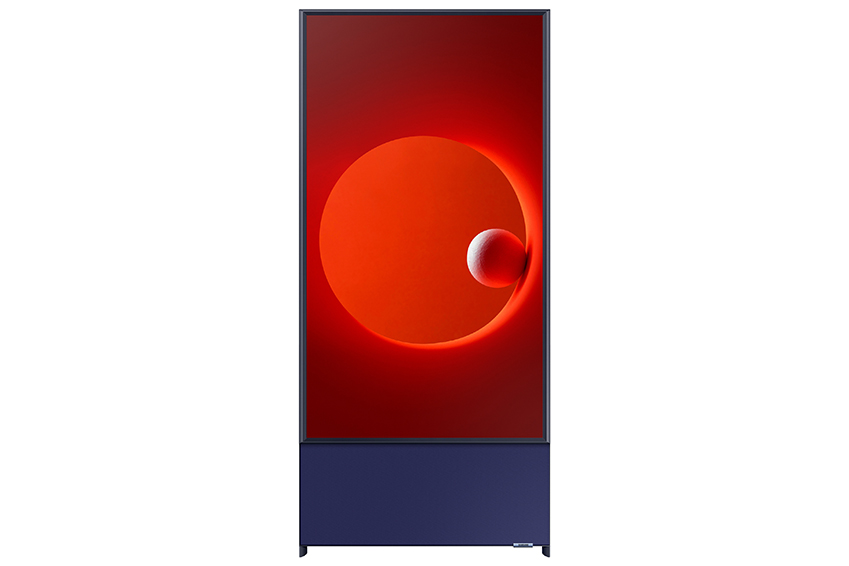
Can be used in portrait and landscape orientation

Named “The Sero,” which literally means vertical in Korean, it’s a 43-inch QLED TV with 60-watt 4.1 channel speakers and all the standard Samsung Smart TV features like Bixby and screen mirroring. The company says the vertical design is suitable for displaying content from smartphones, which may be true but doesn’t sound like a big enough reason to warrant a new design. Thankfully, the Sero TV can be turned horizontally to be used as a normal TV. Essentially, this is a TV that can be used both vertically and horizontally, so customers are not losing anything by buying this new design.
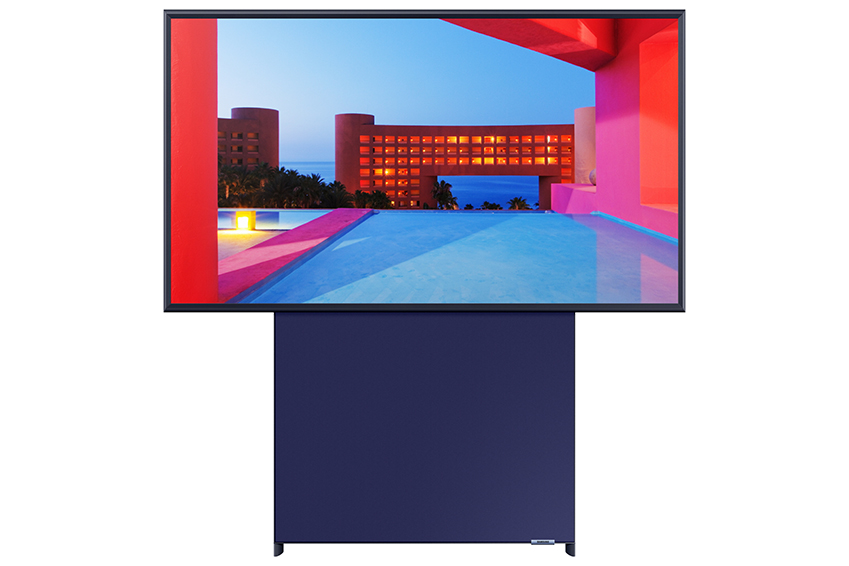
The Sero will be available in South Korea by the end of next month. It is priced at 189,000 won. Samsung has not announced if and when this will be available outside its home country. Along with the vertical TV, Samsung also introduced The Serif and Frame TVs in more sizes to target a wider customer base.

“Samsung will continue introducing screens that respect personal consumer tastes. We will think outside the box to bring different types of screens and different user experiences,” said Han Jong-hee, President of Visual Display Business at Samsung.
The post Samsung introduces a 43-inch ‘vertical’ TV for millennials appeared first on SamMobile.


from SamMobile http://bit.ly/2ZKi5Gg
via IFTTT
Our video review of the Galaxy Fold is live!

Less than a week after our written review of the Galaxy Fold went live, and after a long hiatus from the world of video, we’ve shared our video review of the handset. We intended for the video to be viewed alongside our on-site review, so it’s more of a visual aid, with many of the points we touched on in the written version being discussed in the clip — so be sure to check that out as well.

Anyway, we’d like to stress that this is our first video in a while. Our video department recently fell under new management and the team are working around the clock to improve the quality of future content. Our aim is to deliver the best Samsung coverage on YouTube, under our SamMobile TV brand. With that in mind, expect to see a new video, or two, in the not-too-distant future.

Until then, sit back, relax and enjoy our video review of the Galaxy Fold.

The post Our video review of the Galaxy Fold is live! appeared first on SamMobile.


from SamMobile http://bit.ly/2PA1DUB
via IFTTT

Galaxy A50 April update brings Bixby Routines and new camera features

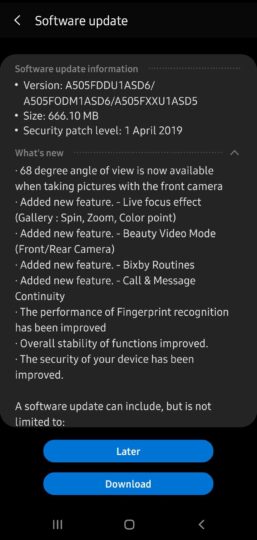
Samsung has started rolling out a new update to the Galaxy A50 in India. The update introduces a number of new features to the device, and also bundles the April 2019 security patch. Samsung also promises improved fingerprint recognition on the Galaxy A50 with the latest update.

The update is available over the air and can be expected to reach all Galaxy A50 units over the next few days. It carriers software version A505FDDU1ASD6 and weighs just over 666 MB.

Bixby Routines comes to the Galaxy A50

Samsung launched Bixby Routines, a feature that works on the If This Then That (IFTTT) principle, with the Galaxy S10 series earlier this year. The feature is also available in Samsung’s newer devices, such as the Galaxy A80. And with the latest software update, Bixby Routines has arrived on the Galaxy A50 as well.

The update also brings a number of new features to the Galaxy A50’s camera. The device gets a “Beauty Video Mode” for both front and rear cameras and supports more background effects for Live Focus images. The new update also adds a narrower 68-degree field of view for the front camera. Earlier, the front camera only offered a wider field of view.

Lastly, the Galaxy A50 now supports call and message continuity. You can make and answer calls and text messages from other compatible devices signed into your Samsung account.

As always, Samsung is rolling out the update in stages. To check if it’s available for your Galaxy A50, head into Settings, navigate to Software update, then select Download and install. Drop a comment below and let us know if you’ve received the update.

The post Galaxy A50 April update brings Bixby Routines and new camera features appeared first on SamMobile.


from SamMobile http://bit.ly/2V6uyFF
via IFTTT

You won’t believe this image of Saturn was taken on a Galaxy S8

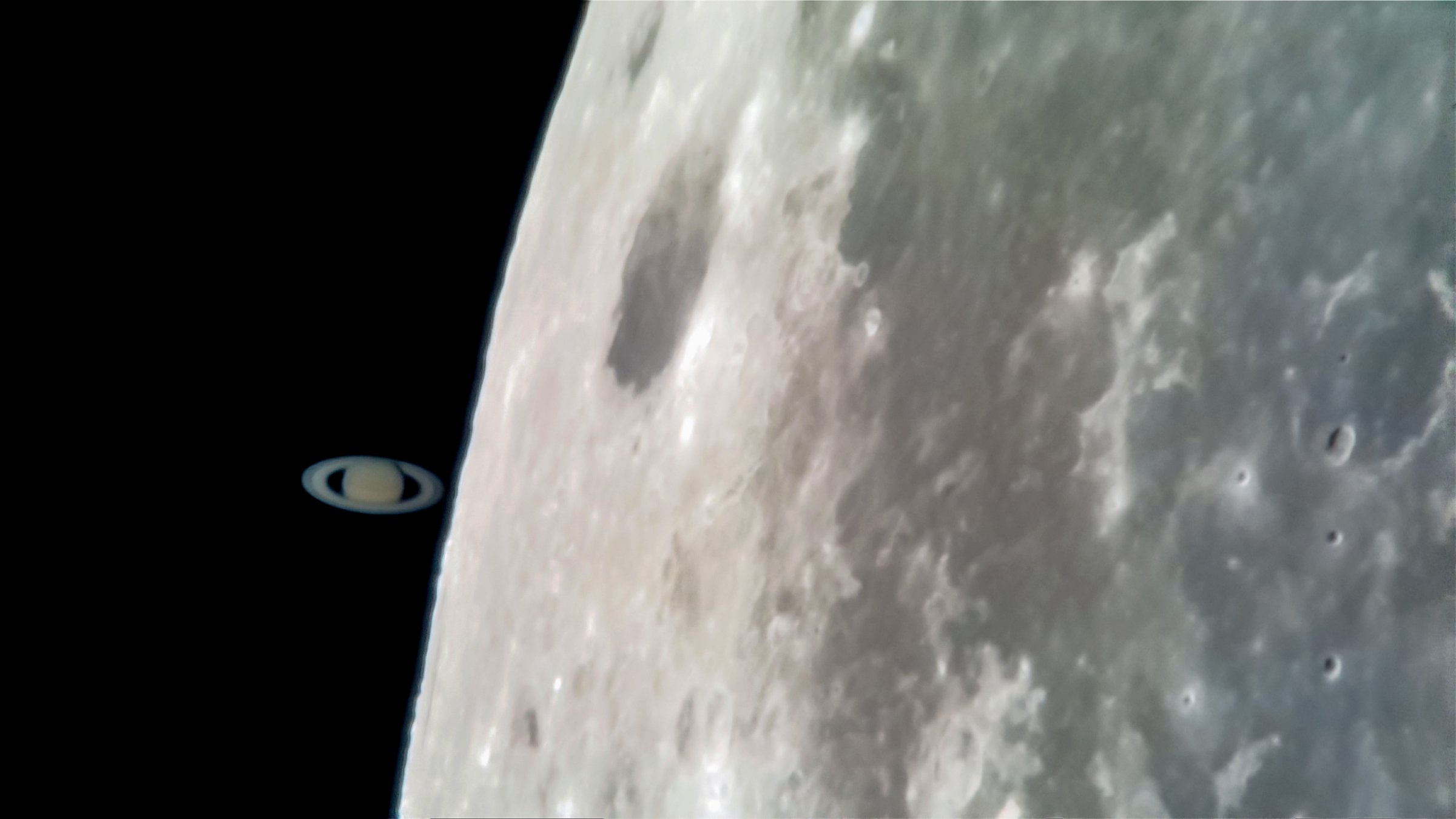
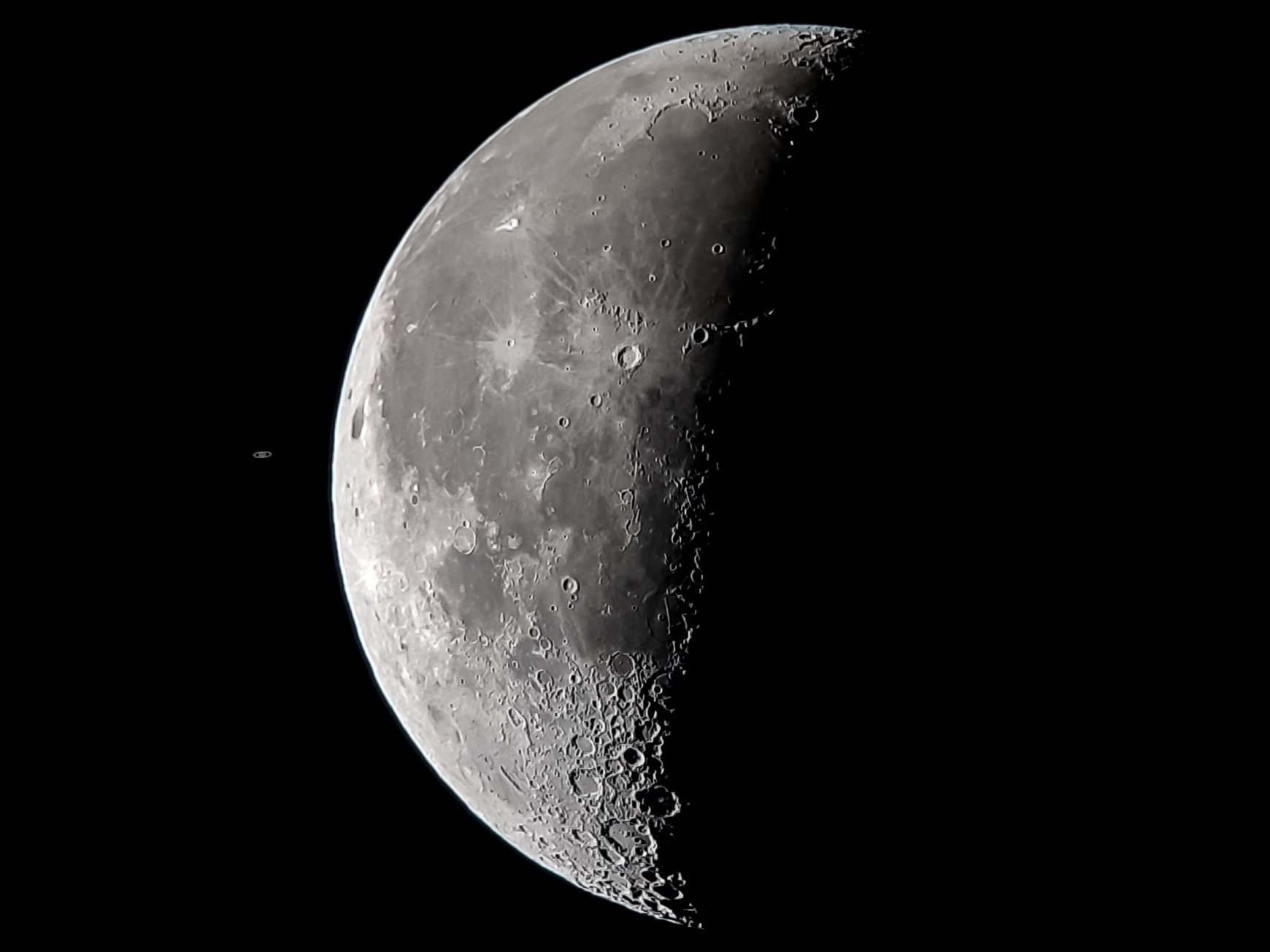
South African astrophotographer Grant Petersen snapped a picture of the most recent occulation of Saturn and the moon using nothing more than a Galaxy S8 and a basic 8-inch Dobsonian telescope from his home base in Johannesburg — and the result is fascinating to say the least, with the image showcasing the second-largest in the Solar System just before it slipped behind Luna at dawn.

To capture the image, Petersen recorded a 60-frame-per-second video of the occulation. He then processed the clip using stacking, which let him merge several of the video frames into a brighter, clearer picture. It’s the same basic construct the boffins at NASA use to photograph both major and minor astronomic events, like an asteroid or even the International Space Station zipping by.

Saturn is an astonishing 1.4 billion kilometres from Earth

What’s more impressive is the photo Petersen took accurately highlights how small Saturn is when viewed from Earth, when in actuality it’s the second-largest planet in the Solar System, sitting behind Jupiter. It looks smaller because it’s further away, and significantly further at that, with the moon measuring in at a total distance of 384,400 kilometres from Earth and Saturn at 1.4 billion kilometres.

The post You won’t believe this image of Saturn was taken on a Galaxy S8 appeared first on SamMobile.


from SamMobile http://bit.ly/2DELUib
via IFTTT

الأحد، 28 أبريل 2019

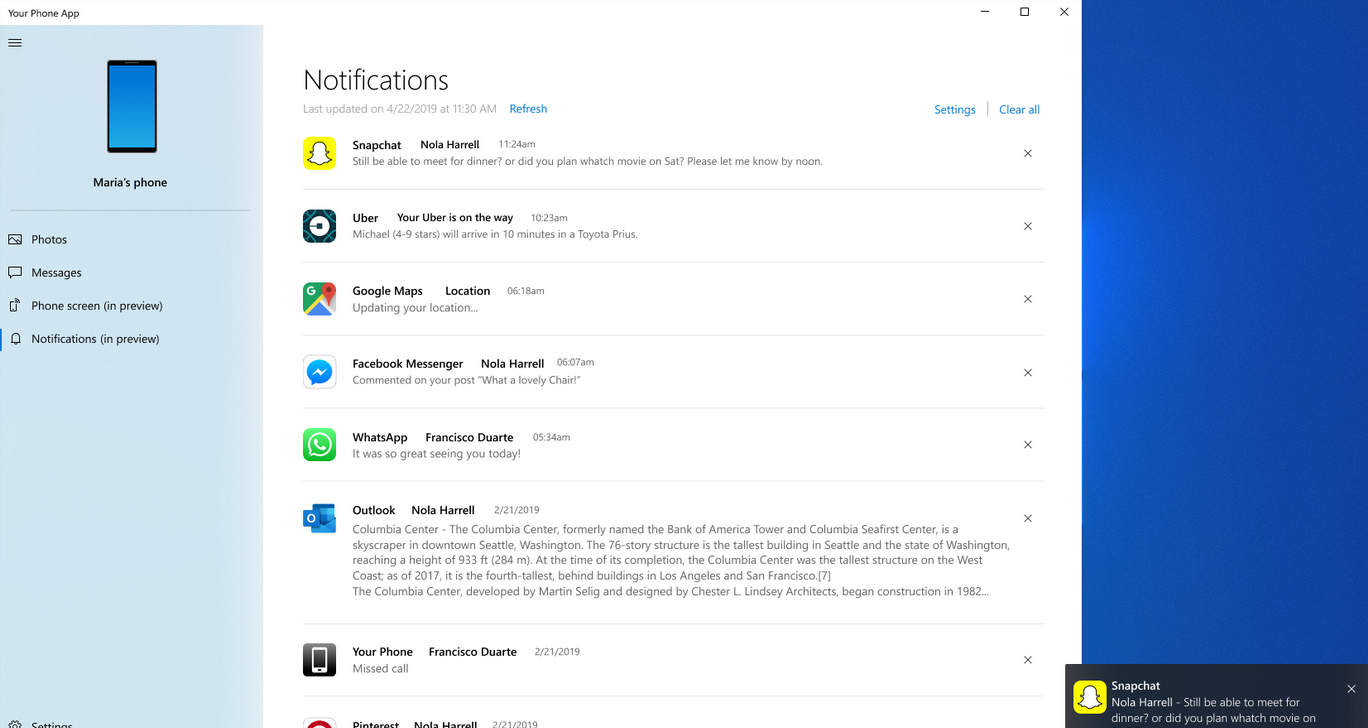
Galaxy S10 can now mirror notifications to your Windows PC

Last month, Microsoft started testing a new feature that allows Samsung Galaxy S8 and Galaxy S9 owners to view their handset’s notifications on their Windows PC — and now the firm has added support for the Galaxy Note 8, Galaxy Note 9 and Galaxy S10. At least, that’s the official statement. We tried setting it up on our Galaxy A70, which isn’t on the list, and it worked just fine.

In order to take advantage of notification mirroring, you’ll need a PC running build 1803 (RS4) of Windows 10 or newer with Your Phone installed, as well as a supported smartphone running Android 7.0 Nougat or higher. You’ll also need to have the latest version of Microsoft’s Your Phone Companion application installed on your handset, which can be downloaded through the Google Play Store.

Phone Companion is far from a one-trick pony

Your Phone Companion bundles a slew of other features, including the facility to access media stored on your device. You won’t have to connect to your PC using a wire, either; Your Phone companion links to the Your Phone App on your computer using Bluetooth and Wi-Fi, and uses a remote connection to retrieve files and mirror notifications in a timely manner — without a wire in sight.

The post Galaxy S10 can now mirror notifications to your Windows PC appeared first on SamMobile.


from SamMobile http://bit.ly/2J2xZGn
via IFTTT

Galaxy Note 10 Pro will have a 4500mAh battery

The standard 4G model of the Samsung Galaxy Note 10 Pro will feature an adequately-sized 4500mAh battery, which is a 500mAh hike on that of the Galaxy Note 9 and on par with that of the Galaxy S10 5G, according to esteemed tipster Ice Universe — corroborating a recent leak.

The cell was certified for use by the Korea Institute of Industrial Technology on Saturday, with the accompanying documentation revealing that the component was assigned the model number EB-BN975ABU, which matches up to the 4G variant (SM-N975) of the Galaxy Note 10 Pro.

What is the Galaxy Note 10 Pro?

Samsung is said to be working on four variants of the Galaxy Note 10 — two with 4G and two with 5G. That makes sense seeing as the firm is rumored to launch the handset with the choice of two screen sizes: 6.28-inches and 6.75-inches, with the latter being branded the Galaxy Note 10 Pro.

As for what the duo will bring to the table, the main tidbit we’ve heard to date comes courtesy of  Korea’s ETNews, which has reason to believe that neither the Galaxy Note 10 or Galaxy Note 10 Pro have a single physical button on board — though we’ve seen no evidence supporting that claim.

Samsung is expected to announce the Galaxy Note 10 and Galaxy Note 10 Pro in August.

The post Galaxy Note 10 Pro will have a 4500mAh battery appeared first on SamMobile.


from SamMobile http://bit.ly/2WaSft3
via IFTTT

السبت، 27 أبريل 2019

Android Pie update rolling out to the Galaxy J4+ and Galaxy J6+

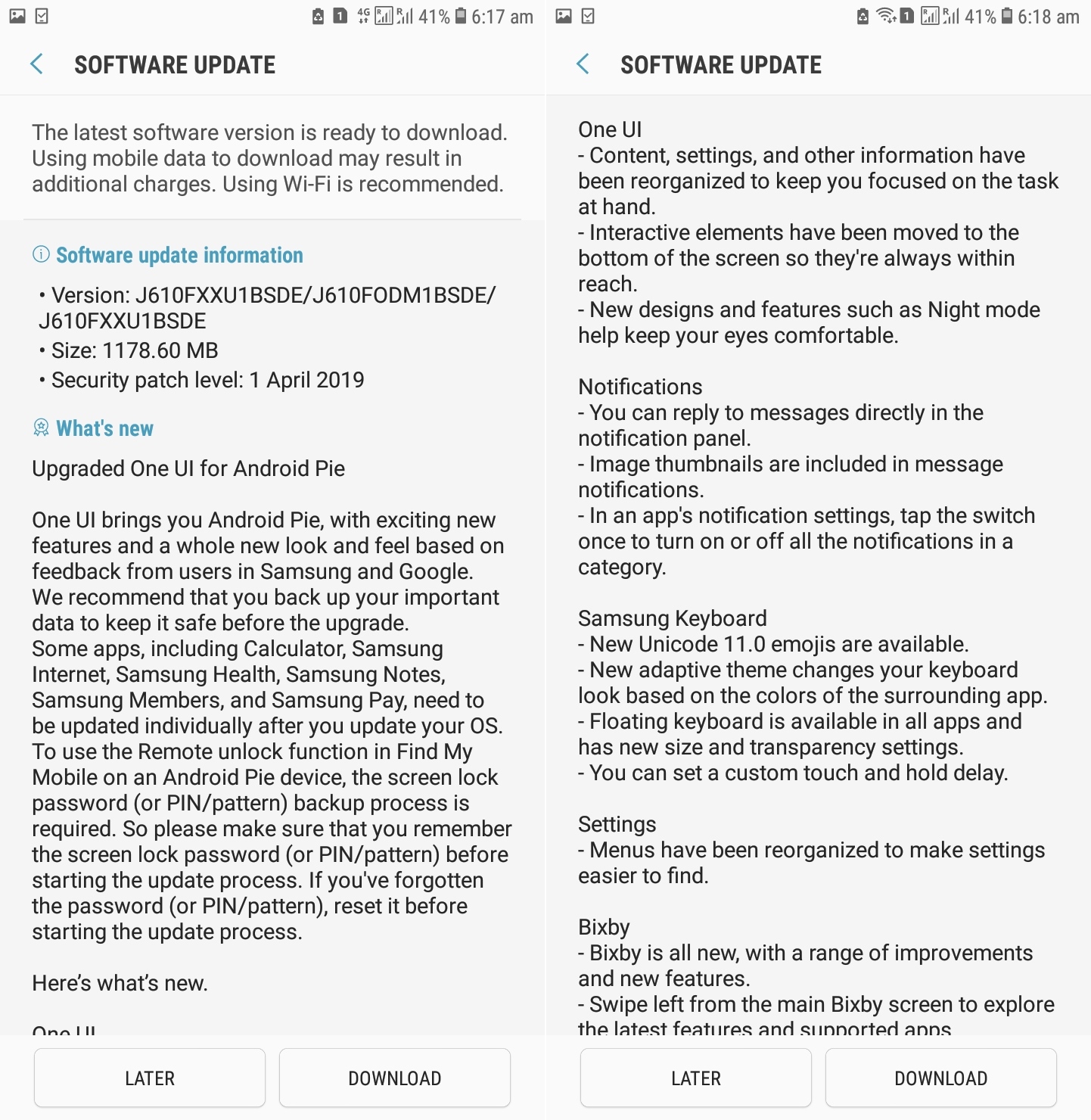
Samsung is racing to the finish line with the Android Pie update. The company has added two more budget phones, the Galaxy J4+ and Galaxy J6+, to the list of Galaxy devices that have been updated to Pie. The Galaxy J4+ is receiving the update in Vietnam, Thailand and Ukraine, while the Galaxy J6+ is being updated in Germany, Iraq, and India.

Android Pie for Galaxy smartphones brings a new look and feel for Galaxy phones thanks to Samsung’s new One UI interface, which puts important information front and center and makes it easier to access with one hand. There’s also plenty of new functionality and minor improvements included in One UI, many of which we have covered in detail in our One UI (Android Pie) feature focus series. The April 2019 security patch is included in the updates for both devices as well.

Something to be noted here is that it’s not often that Samsung pushes a major update for a smartphone to multiple markets in the initial release. Perhaps this is a one-time thing, but it’d be great if it becomes a norm. And going by the improvements Samsung has been making to its software update game, we wouldn’t be surprised if this starts happening more often in the coming months.

Download Android Pie over the air or use our firmware database

Galaxy J4+ and J6+ owners in the countries mentioned above should open the phone’s settings, navigate to Software update, then tap the Download updates manually option to grab the Android Pie update over the air. Updates are rolled out in stages, so don’t worry if it doesn’t immediately show up and simply try again after some time. For the impatient folks, we have the full Android Pie firmware available in our firmware database so they can upgrade right away.

Thanks for the tip Anbk!

  • Model: SM-J415F
  • Dimensions: 161.4 x 76.9 x 7.9mm
  • Display: 6.0" (152.4mm) TFT
  • CPU: Qualcomm Snapdragon 425
  • Camera: 13 MP, CMOS F1.9
  • Model: SM-J610F
  • Dimensions: 161.4 x 76.9 x 7.9mm
  • Display: 6.0" (152.4mm) TFT
  • CPU: Qualcomm Sanpdragon 425
  • Camera: 13 MP, CMOS F1.9 + 5MP, CMOS F2.2

The post Android Pie update rolling out to the Galaxy J4+ and Galaxy J6+ appeared first on SamMobile.


from SamMobile http://bit.ly/2Px3NnP
via IFTTT

جميع الحقوق محفوظة لمدونة الغريب 2013