الجمعة، 27 سبتمبر 2019

How to get the Samsung Fortnite Glow skin for free

Samsung has been offering custom Fortnite skins for a while now and now there’s a new one up for grabs. It was confirmed earlier this week that the Fortnite Glow skin and Levitate emote will be available starting September 27. The skin is available as a free download for all Fortnite players with an eligible Galaxy device.

The company says that this skin has been inspired by the Aura Glow color that it introduced with the Galaxy Note 10. Aura Glow has certainly become the color option of choice for most Galaxy Note 10 owners.

To get the Samsung Fortnite Glow skin, you will need to follow a changed procedure. Samsung has changed it so that it’s difficult for people to steal the skin off of retail units. That’s what happened quite frequently when the first custom skin was launched last year.

How to get the Samsung Fortnite Glow skin

You’ll first need to have Fornite installed on your Samsung device. You can get the game from the Galaxy Store or the Galaxy Game Launcher. Then either sign in to your Epic Games account or sign up for a new account.

Head over to the Store and you’ll see the Fortnite Glow skin in the Store under Limited Time Offers. Ensure that the store is set to Samsung in Settings > Account > Content > Android Store Selection. You will then see a screen which asks you to register a credit card if you haven’t done so already. Go ahead and register a credit card, don’t worry, it won’t be charged.

Tap on the Fortnite Glow skin again and then either choose to redeem the outfit and the emote for yourself or gift it to a friend. Be sure to do this before December 31, 2019. If you choose to redeem it for yourself, the Samsung Fortnite Glow skin is going to be available in your Locker.

Eligible Samsung devices include the Galaxy Note 10 and Galaxy Note 10+/10+ 5G, Galaxy Note 9 and Note 8, Galaxy S10e, S10, S10+ and S10 5G, Galaxy S8/S8+ and S8 Active, Galaxy S7, S7 edge and S7 Active, Galaxy A9, Galaxy A70, A80 and A90. The Galaxy Tab S6, Tab S4 and S3 are eligible as well.

The post How to get the Samsung Fortnite Glow skin for free appeared first on SamMobile.


from SamMobile https://ift.tt/2n7UMrg
via IFTTT

الخميس، 26 سبتمبر 2019

Galaxy Note 10’s screen recording feature isn’t part of new Galaxy S10 update

The latest Galaxy S10 update is an important one, as it levels the playing field between Samsung’s two flagship lines as far as software features are concerned. The update brought a slew of Galaxy Note 10 features to the Galaxy S10e, Galaxy S10, and Galaxy S10+, including pretty much every camera feature and support for Samsung DeX on PC. However, one Note 10 feature that hasn’t arrived with the update is the ability to record the screen.

When we first wrote about the update in question, one of our screenshots from an updated Galaxy S10 showed a quick toggle called Screen recorder, leading some of our readers to wonder why they didn’t see the toggle on their S10e/S10/S10+. Rest assured that Samsung isn’t playing favorites here (not that we would mind if they did). That particular shortcut in the quick toggles comes from a third-party app, and the confusion was created by the fact that Samsung’s inbuilt screen recording functionality on the Galaxy Note 10/10+ has the same name.

It’s unfortunate that Samsung hasn’t brought over the Galaxy Note 10’s excellent screen recording feature to the Galaxy S10 lineup with the recent update, but that doesn’t mean the company won’t do so in the future. Samsung is probably saving it for the Android 10 and One UI 2.0 update and could bring the feature to more than just the Galaxy S10 devices, although only time will tell if that will actually be the case.

For now, if you’re looking for a way to record the screen on your Galaxy S10 or another Galaxy smartphone, you can use this neat little hack inside Samsung’s Game Tools feature. You can also download the same app that we use from Google Play – it’s an excellent free app that has no ads and is packed to the brim with customization options.

  • Model: SM-G970F
  • Dimensions: 69.9 x 142.2 x 7.9mm
  • Display: 5.8” (146.5mm) Super AMOLED
  • CPU: Exynos 9820 Octa
  • Camera: 12 MP, CMOS F1.5/F2.4 (77°) & 16MP, CMOS F2.2 (123°)Ultra Wide

  • Model: SM-G973F
  • Dimensions: 70.4 x 149.9 x 7.8mm
  • Display: 6.1"(157.5mm) Super AMOLED
  • CPU: Exynos 9820 Octa
  • Camera: 12 MP.CMOS F2.4 45° Telephoto & 12MP F1.5 77° & 16MP F2.2 123° Ultra-wide

  • Model: SM-G975F
  • Dimensions: 74.1 x 157.6 x 7.8mm
  • Display: 6.4"(162.5mm) Super AMOLED
  • CPU: Exynos 9820 Octa
  • Camera: 12 MP.CMOS F2.4 45° Telephoto & 12MP F1.5/F2.4 77° & 16MP F2.2 123° Ultra-wide

The post Galaxy Note 10’s screen recording feature isn’t part of new Galaxy S10 update appeared first on SamMobile.


from SamMobile https://ift.tt/2nA7rDv
via IFTTT

The revamped Galaxy Fold has suffered its first display defect

Display defect hasn’t become quite as synonymous with the Galaxy Fold as battery fire became with the Galaxy Note 7, but there’s no denying the foldable smartphone’s rocky start. Samsung recalled all of the review units it sent out earlier this year and delayed the April launch due to some obvious issues. It has since launched a revamped Galaxy Fold with improved durability.

This device is already out in South Korea and markets across Europe. South Koreans have particularly taken a liking to it because it sold out very quickly there. No such reports have come in from those markets as yet. It’s hitting shelves in the United States tomorrow and we now have our first report of a Galaxy Fold display defect.

This might just be a manufacturing defect

Brian Heater over at TechCrunch is sporting a Galaxy Fold unit these days like he did when Samsung originally sent out units to reviewers in April. Even though many reviewers had issues with their units back then, his unit, much like ours, was working perfectly fine until the day Samsung took it back.

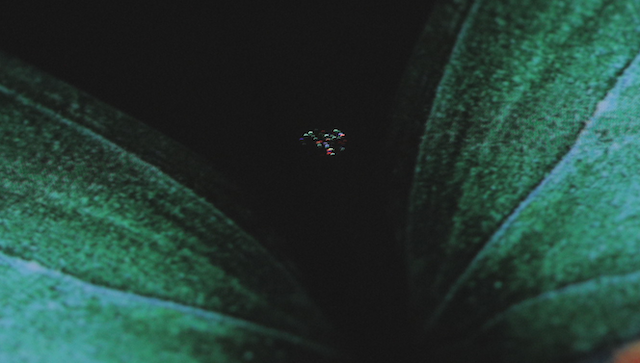
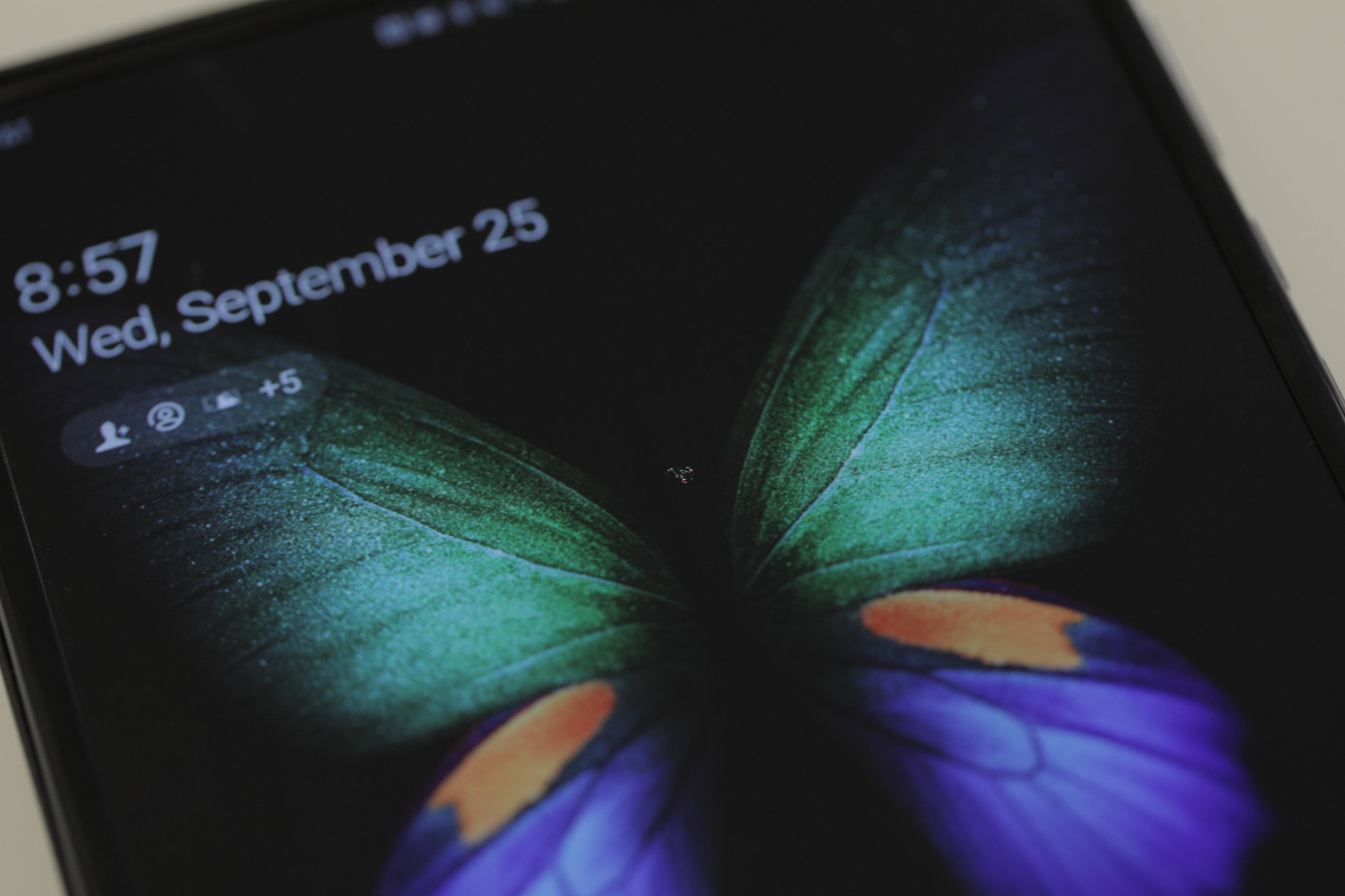
It seems he hasn’t been that lucky this time around. A brightly colored spot has appeared in the center of the display within barely a day’s use. It’s not huge but it’s not something that won’t catch your eye. The defect isn’t as drastic as the ones we saw earlier this year when entire panels were blacked out but it is slightly concerning now that actual customers will be paying for this device. It’s not clear what has caused this but Heater thinks this may have been due to pressing the display to fold the device. You do have to press in with your thumb slightly to close the Galaxy Fold.

Samsung has a long list of precautions to take when using the device. It even put up an entire video for this which cautions users they shouldn’t apply excessive pressure to the display, place objects on it before folding, expose it to water or add a screen protector. He didn’t do any of those things. Ideally, for a regular customer, such a defect would be covered under warranty which would result in a free replacement. For other cases, Samsung offers a one-time discounted screen repair for $149 within one year of the date of purchase.

Samsung has picked up this unit and will be taking it apart to ascertain what happened. This may have just been a manufacturing defect which isn’t uncommon. Tens of thousands of Galaxy Fold units have been sold already and people are using them without any problems. Our very own unit is currently in Egypt on holiday with our founder and is holding up well against the conditions there. Nevertheless, it will be interesting to find out what caused this defect.

The Galaxy Fold goes on sale in the United States tomorrow. It’s due to be launched in India on October 1. What are your thoughts on this? Do share them in the comments below.

The post The revamped Galaxy Fold has suffered its first display defect appeared first on SamMobile.


from SamMobile https://ift.tt/2nAKv7d
via IFTTT

How to set up and use Secure Folder on the Galaxy Note 10

Samsung’s Secure Folder is a great security feature based on the Knox platform, available on various Galaxy phones including the latest Galaxy Note 10 series. Secure Folder offers a private, encrypted space on your smartphone, allowing you to safely store private files and apps.

Secure Folder is virtually a sandboxed environment. It not only allows you to secure files and apps behind a biometric authentication or lock screen but in addition to that, app data stored inside the Secure Folder will be isolated from the rest of the system and can only be accessed through the Secure Folder. For example, the screenshots below were captured on the Galaxy Note 10, and those that were made inside the Secure Folder are accessible only from the Gallery app inside the Secure Folder.

How to set up and use Secure Folder on the Galaxy Note 10

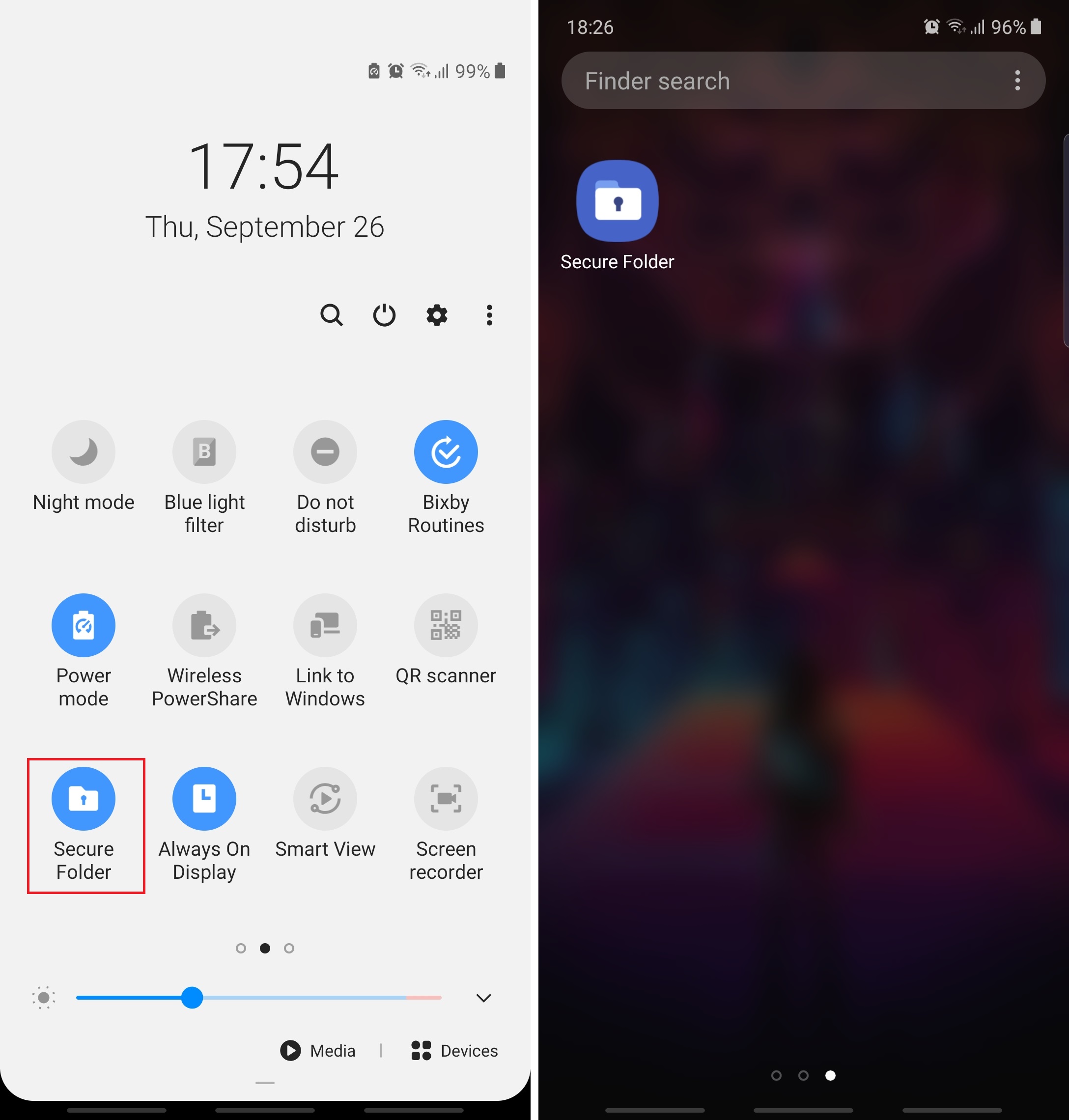
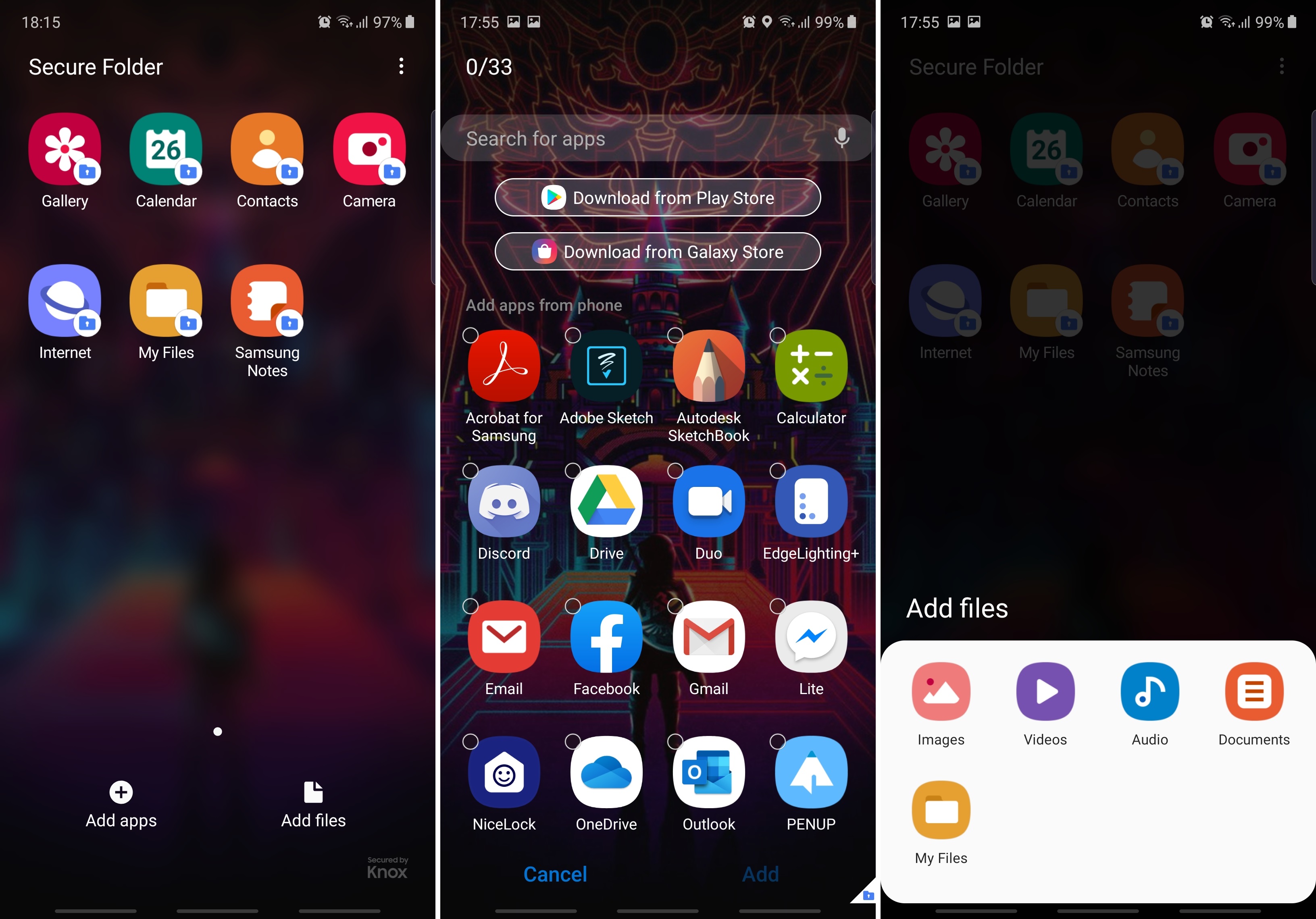
Step 1: Open the apps drawer and launch Secure Folder. If the shortcut is missing from the apps drawer, drag the status bar down and tap the Secure Folder quick toggle from the notification shade. Tapping this toggle can hide or show the Secure Folder shortcut inside the apps drawer.

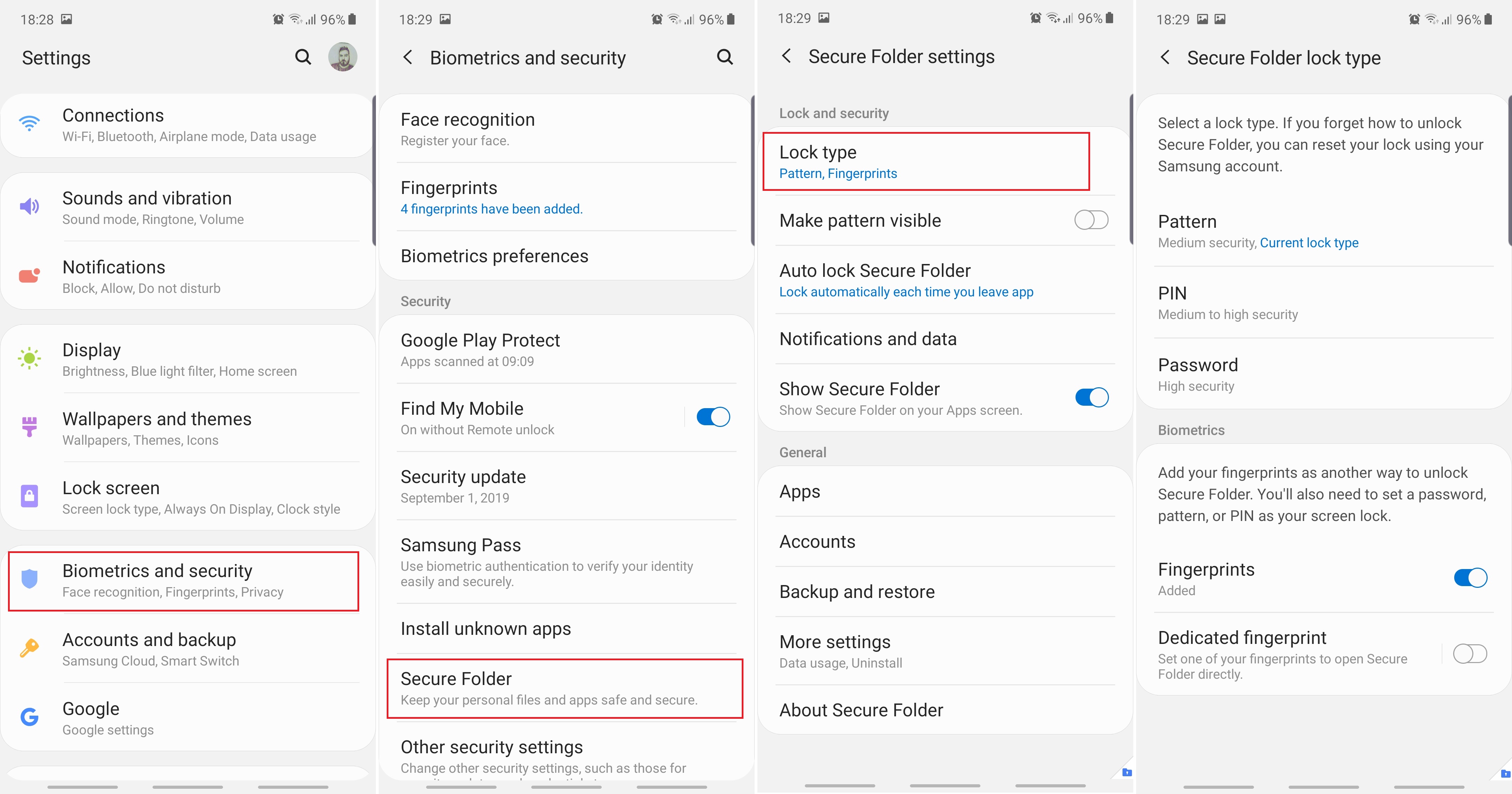
Step 2: If this is the first time you’ve launched Secure Folder on the Galaxy Note 10, the phone will present a series of splash screens detailing the feature. You will then be required to sign in with your Samsung account and set the desired lock type for Secure Folder. You can also change the lock type later by opening Settings, accessing Biometrics and security, then tapping Secure Folder and the desired Lock type.

Step 3: Once you’ve set up Secure Folder, launch the app from the apps drawer and unlock it. Then you can tap Add apps or Add files in the main Secure Folder screen and select the items you want to be secured.

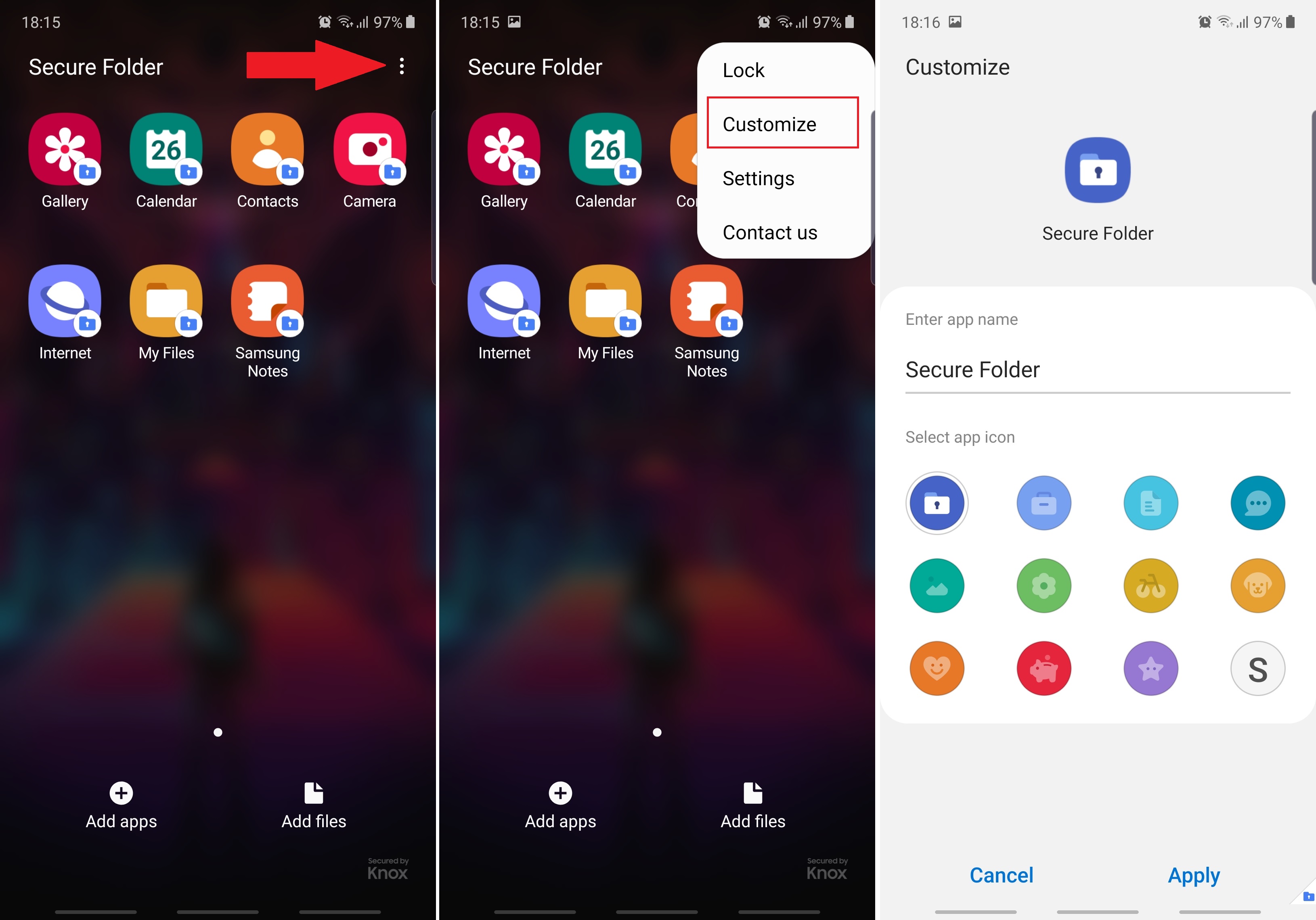
Step 4 (optional): You can customize Secure Folder and make its presence less conspicuous. Inside Secure Folder, tap the context menu button in the top-right corner then select Customize. Here you can choose a different app icon for Secure Folder, and you can even rename the shortcut to make it blend inside the apps drawer.

Tip: When you’re done using Secure Folder, you can always hide it from the apps drawer by tapping the Secure Folder quick toggle.


Do you find yourself using Secure Folder often or is this your first time using it? Let us know in the comment section and don’t forget to check our other Galaxy Note 10 tips.

  • Model: SM-N970F
  • Dimensions: 151.0 x71.8x7.9mm
  • Display: 6.3"(160.02mm) Super AMOLED
  • CPU: Exynos 9825
  • Camera: 12 MP, CMOS F2.2 Telephoto & 12MP F1.5/F2.4 77° & 16MP F2.2 123° Ultra-wide

  • Model: SM-N975F
  • Dimensions: 162.3 x 77,2 x 7.9mm
  • Display: 6.8"(172.7mm) Super AMOLED
  • CPU: Exynos 9825
  • Camera: 12 Ultra Wide: 16MP F2.2 (123°) & Wide-angle: 12MP 2PD AF F1.5/F2.4 OIS (77°) & Telephoto: 12MP F2.1 OIS (45°) & DepthVision Camera: VGA

The post How to set up and use Secure Folder on the Galaxy Note 10 appeared first on SamMobile.


from SamMobile https://ift.tt/2m2EKPe
via IFTTT

That ‘Galaxy A5’ you’re hearing about is likely not a commercial device

A series of reports emerged online today citing 91mobiles and claiming that Samsung is working on a new entry-level Galaxy A smartphone identified by the model number SM-A015F. This is not to be confused with the SM-A105F model number which belongs to the Galaxy A10.

The report goes on to mention that the mysterious device will be cheaper than the Galaxy A10 and hit the shelves under the name of “Galaxy A5.” This wouldn’t make much sense considering how Samsung switched this year’s Galaxy A (2019) series to a double-digit naming scheme.

Don’t get too excited, this might not be a real device

According to the report that cites “a trusted source,” the SM-A015F will be equipped with a 5.7-inch Infinity-V or Infinity-U display and sport only 16GB of internal storage. The device would be a true budget entry designed to compete with the most affordable phones on the market.

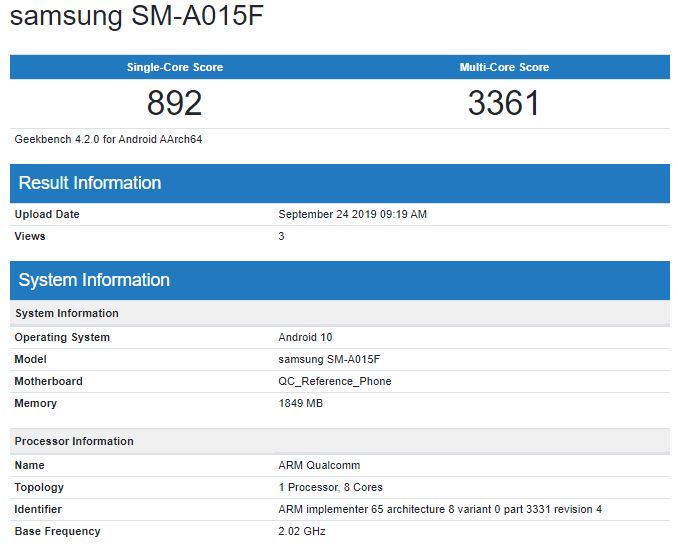
With all said and done, it’s time for a reality check so the big question now is whether the SM-A015F is real. Well, it seems like it is, but it might not be a device meant for the consumer market. We’ve spotted the SM-A015F in Geekbench where it’s been labeled as a Qualcomm reference phone running on an 8-core processor clocked at 2.02GHz, 2GB of RAM, and Android 10.

This technically means the SM-A015F is a prototype/pre-production device used by Qualcomm to test its hardware. It’s not meant as a consumer device but, instead, it’s being used by the chipmaker as a testing platform. At the most, the SM-A015F’s entry in Geekbench suggests Qualcomm might be working on a new entry-level/mid-range Snapdragon chipset which could be employed by some of Samsung’s upcoming Galaxy A (2020) smartphones.

Don’t hold your breath about the SM-A015F becoming Samsung’s next budget phone. Right now, all evidence indicates this might be just a testing platform for Qualcomm, but things can change so we’ll keep an ear to the ground. We’ll keep you up to speed as soon as we find out more.

The post That ‘Galaxy A5’ you’re hearing about is likely not a commercial device appeared first on SamMobile.


from SamMobile https://ift.tt/2nqHwhr
via IFTTT

Daily Deal: 28% off TP-Link AC1750 Smart WiFi Router

A good router is essential for hassle-free internet use at home or at the office and this particular one fits the bill. It makes sure your connection is secure and fast. On top of that, it will allow you to control a lot of settings, enabling you to customize your network, for instance, if you want to set up a Wi-Fi network for guests with limited bandwidth. In addition, this router also comes with parental control features to keep the littles ones using a tablet or laptop safe. At 28% off, this is the perfect moment to get this TP-Link router with Dual Band Gigabit speed and upgrade your internet experience.

Hit the Buy Now button below to order one today before the price changes again. This router ships internationally as well in case you’re located outside of the US.

The post Daily Deal: 28% off TP-Link AC1750 Smart WiFi Router appeared first on SamMobile.


from SamMobile https://ift.tt/2lYGSY7
via IFTTT

Samsung set to launch the Galaxy Fold in India on October 1

As reported previously, the Galaxy Fold is set to launch in India on October 1. The Korean company has sent invites to the local media outlets confirming the launch of the much-awaited device in the country next week. This makes India one of the first wave of markets to get Samsung’s foldable smartphone.

Budget and mid-range devices account for the bulk of the smartphone sales in India, but the sheer size of the market offers enough room for premium models as well. The previous report pegged Galaxy Fold’s Indian price between Rs. 1.5 lakh (~$2120) and 1.75 lakh (~$2470), which, if true, makes it costlier than its price in other markets. We can expect Samsung to officially announce the Indian price and availability details at the event.

Unlike China, Samsung is still a dominant force in the Indian smartphone market, and the company has been working hard to keep it that way. The quick launch of the Galaxy Fold in the subcontinent can be seen as part of the strategy.

To recap, the Galaxy Fold was scheduled to go on sale in April this year, but Samsung was forced to delay its plans indefinitely due to durability issues. The company finally started selling the Galaxy Fold earlier this month after making minor but important changes to its design. The foldable device first went on sale in Korea, followed by a handful of European markets. It is also scheduled to go on sale in the all-important US market on September 27.

The post Samsung set to launch the Galaxy Fold in India on October 1 appeared first on SamMobile.


from SamMobile https://ift.tt/2lhbN1x
via IFTTT

جميع الحقوق محفوظة لمدونة الغريب 2013