الثلاثاء، 1 أكتوبر 2019

Verizon releases Android Pie update for the Galaxy Tab S3

Samsung started rolling out the Android 9 Pie update for the Galaxy Tab S3 last month. Firmware updates tend to arrive a bit later on carrier-branded models. So it’s no surprise that Verizon has just now released the Android Pie update for the Galaxy Tab S3.

Owners of this tablet will be aware that it launched with Android Nougat onboard. This makes the Android 9 Pie update its final major firmware update. The Galaxy Tab S3 isn’t included in the list of Samsung devices that will receive Android 10.

Verizon releases Android Pie for the Galaxy Tab S3

Verizon is rolling out firmware version T827VVRU3CSH4 for the Galaxy Tab S3 on its network. The update brings all of the improvements that are part and parcel of Android 9. You can check out our One UI Feature Focus series to find out all that’s new with this update.

Some of the new features include Adaptive Battery which learns how you use your tablet with artificial intelligence and allows you to extract more life out of the battery by optimizing apps and services. Adaptive Brightness does something similar with the display brightness level to deliver additional power savings. Digital Wellbeing and the system-wide Night mode are included as well.

This update also includes the latest security patch for the month of September 2019. Verizon is currently rolling out the update over-the-air. Users should expect to receive a notification on their device shortly.

The post Verizon releases Android Pie update for the Galaxy Tab S3 appeared first on SamMobile.


from SamMobile https://ift.tt/2oU5y5n
via IFTTT

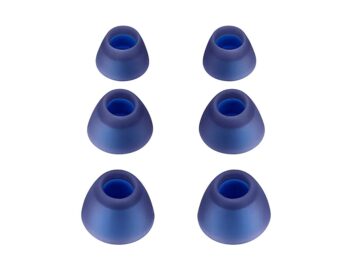
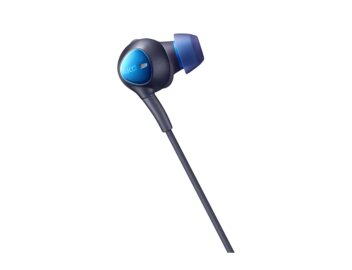
Noise cancelling AKG Type-C earphones for Note 10/Tab S6 listed online

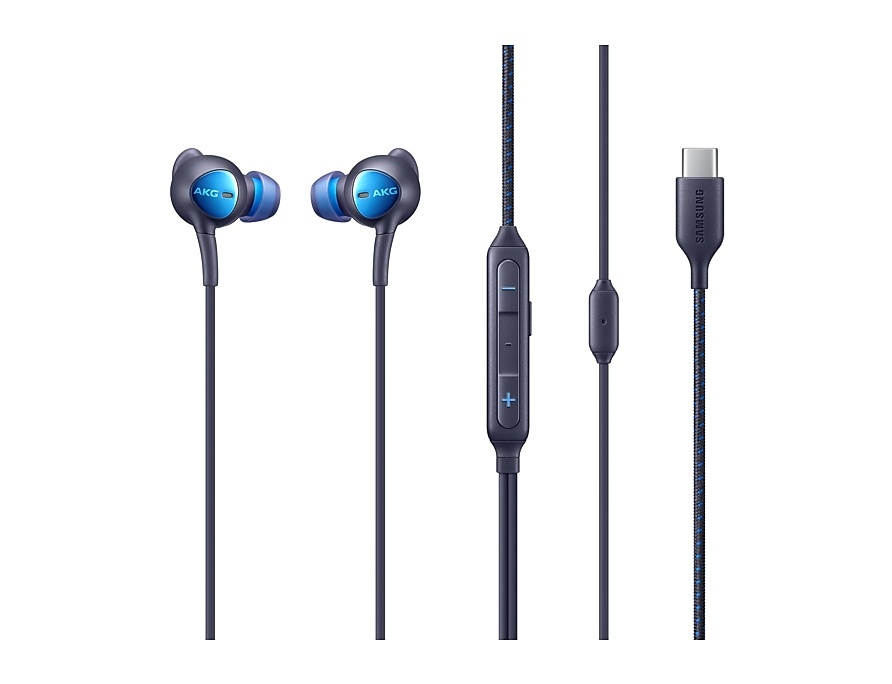
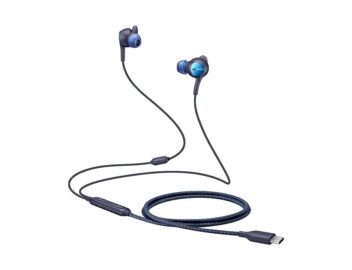
Samsung finally seems to have launched the active noise cancelling USB Type-C AKG earphones that the company had said it would release alongside the Galaxy Note 10 and Galaxy Note 10+. Samsung Korea and Samsung UAE have the earphones listed simply as ‘ANC Earphone (Type C)’, and the product page on Samsung’s Korea website says the earphones are compatible with “the Galaxy Note 10, Note 10+, Tab S6, Fold 5G, S10e, S10, S10 + and S10 5G and all Samsung smartphones and tablets without 3.5 mm terminal.”

Basically, these earphones should be compatible with most Galaxy phones that have a USB Type-C port, although it’s unclear if the active noise cancellation will also work on all devices that can output audio to these earphones. It technically should, and Samsung is touting noise cancellation by up to 99.15%, along with better stereo separation thanks to the USB Type-C plug. However, we will have to do a real-world test to see how the overall audio quality differs from the AKG earphones you get in the box with the Galaxy Note 10 and Note 10+.

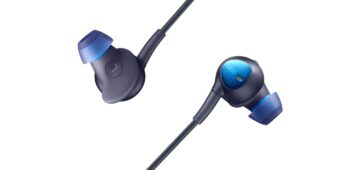
The ANC earphones come in black with blue highlights and are priced at 77,000 won in South Korea, which translates to around $65 USD. Unfortunately, it doesn’t look like Samsung is selling these earphones in any other market at the moment – even Samsung UAE isn’t selling them online and is only providing a list of retailers where the product can be purchased in person. Fingers crossed widespread availability will not take long to happen.

Would you be interested in purchasing the ANC Type-C AKG earphones for your Galaxy Note 10 or other Galaxy device? Are the earphones listed on Samsung’s official website in your country? Let us know in the comments!

The post Noise cancelling AKG Type-C earphones for Note 10/Tab S6 listed online appeared first on SamMobile.


from SamMobile https://ift.tt/2naRLac
via IFTTT

الاثنين، 30 سبتمبر 2019

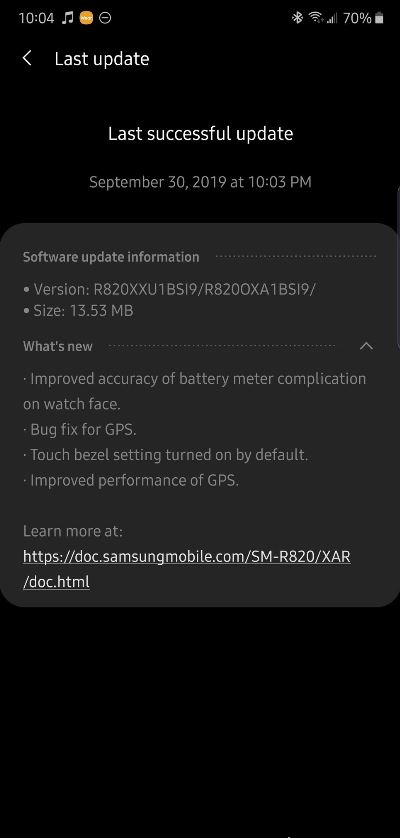
Galaxy Watch Active 2 update sets touch bezel setting on by default

A software update has been released for the Galaxy Watch Active 2 in the US today, and it makes an important change: After the update is installed, the touch bezel on the watch will be turned on by default. As we had reported, one of the Galaxy Watch Active 2’s key features, the virtual touch bezel, comes disabled out of the box and requires the user to take a trip into the Galaxy Wearable app on their connected smartphone to manually enable it. Anyone who hasn’t enabled it on their watch yet will find that the touch bezel will be activated on its own once they install the update that’s rolling out for Samsung’s latest smartwatch.

It’s rather unclear how or why Samsung shipped the Galaxy Watch Active 2 out to customers with the touch bezel setting set to be disabled by default, but the company is now making the necessary correction. The update — sporting build number R820XXU1BSI9 for the 44mm Wi-Fi version of the watch — also improves GPS performance and the accuracy of the battery level indicator on watch faces. A similar update is likely to roll out for the 40mm and cellular variants – the update should also be making its way to markets outside the US in the near future, and we will be sure to let you know once that happens.

To check if the update is available for your watch, open the Galaxy Wearable app on your connected phone, select About Watch, followed by Update watch software, and then tap the Update now button. The update will also show up on its own via a notification on your phone if you don’t manually check for it, although that can take a few days.

Thanks for the tip, Jake McCabe!

The post Galaxy Watch Active 2 update sets touch bezel setting on by default appeared first on SamMobile.


from SamMobile https://ift.tt/2oQKQTW
via IFTTT

Galaxy S10 September update out for Canada, no new features included

Galaxy S10 owners in Canada can now download an update with the September 2019 security patch. However, they will be disappointed to find that the update does not bring any of the Galaxy Note 10 features that the Exynos-powered Galaxy S10 devices received with the September update in other markets. Only the new security patch is included in the update, which bumps the software version up to G97*WVLS2ASI6.

The September update is available on all carriers in Canada and is rolling out over the air. You should be able to download it on your S10e, S10, or S10+ from the Software update menu of the Settings app, though it may not be immediately available for all users as these updates are released in stages. Firmware for the latest software version are available in our firmware archive for those who would like to upgrade their device manually instead of waiting for the OTA update.

When can Canadian users — and those in the US — expect to get the update with those Galaxy Note 10 features? Well, it’s hard to say at this time, as even Exynos Galaxy S10 devices are yet to receive it in every market. Samsung is taking things slower than usual, perhaps because of the sheer number of new features that are included in the latest update, so there may be a long wait in store for Galaxy S10 owners in the US and Canada.

The post Galaxy S10 September update out for Canada, no new features included appeared first on SamMobile.


from SamMobile https://ift.tt/2o29Ebe
via IFTTT

First Galaxy Fold 5G firmware update adds Link to Windows

Samsung has started rolling out the first firmware update for the Galaxy Fold 5G. It’s a minor update that doesn’t bring much in the way of new features. It’s certainly not like the significant update released for the Galaxy S10 recently which brought over many of the new features introduced with the Galaxy Note 10.

What this update does bring is the Link to Windows feature that debuted on the Galaxy Note 10 as well. No additional features have been ported over to Samsung’s foldable smartphone as yet but many would hope that Samsung does that soon.

Samsung rolls out firmware Galaxy Fold 5G firmware update

Samsung recently brought over camera features like AR Doodle and Night mode for the front camera to the Galaxy S10 from the Galaxy Note 10. A new Live focus effect has been ported over as well. This update does none of that for the Galaxy Fold 5G.

What the first Galaxy Fold 5G firmware update does bring is the Link to Windows feature. As we’ve explained before, this is nothing more than a glorified shortcut for Microsoft’s Your Phone app. You can already use this feature even on older devices.

Samsung is rolling out firmware version F907BXXU1ASHA for the Galaxy Fold 5G. We do have it readily available for download from our firmware section. It will gradually make its way to markets where the 5G version is being sold. There are only a handful of them outside of South Korea. You may recall that Samsung isn’t selling the 5G variant of its foldable smartphone in the United States.

The post First Galaxy Fold 5G firmware update adds Link to Windows appeared first on SamMobile.


from SamMobile https://ift.tt/2mkZOAB
via IFTTT

How to set up and customize Galaxy Note 10 Air Actions

Air Actions is the latest addition to the Galaxy Note family. The feature was introduced along with the new S Pen version paired with the Galaxy Note 10. For the first time in the series, the latest S Pen features an internal gyroscope. The hardware is being put to practical use through what Samsung calls Air Actions; or to be more specific, a sub-section of Air Actions which covers gestures.

Galaxy Note 10 Air Actions allows users to remotely-control certain apps through the S Pen physical button and internal gyroscope. Supported apps allow you to control various aspects by pressing or double-pressing the S Pen button, or through so-called ‘air gestures’ by holding the button pressed and swiping the S Pen left, right, up, and down in the air. (If you’re having trouble with gesture recognition, this story might help).

This guide will explain all you need to know about setting up Air Actions.

How to set up Air Actions

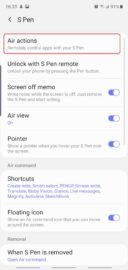
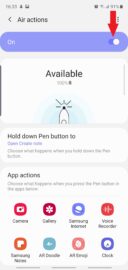
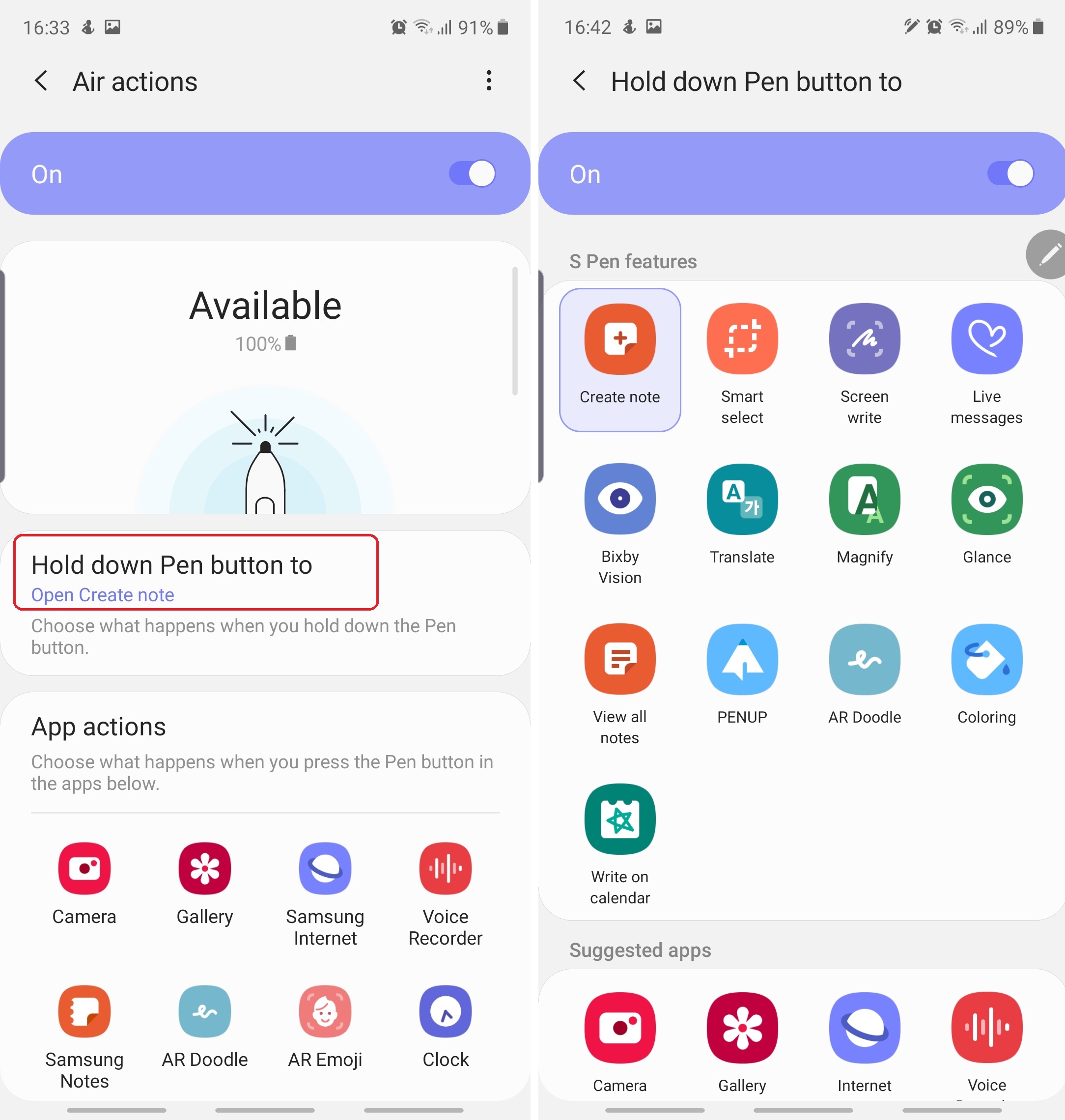
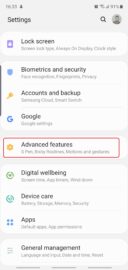
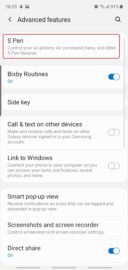
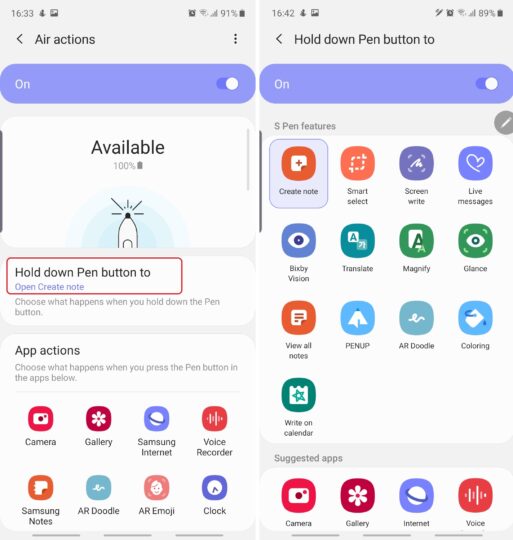
Step 1 – Accessing the Air Actions Menu: Open Settings and access Advanced features. Select S Pen and go to Air actions. Make sure the feature is enabled. If necessary, tap the On/Off toggle.
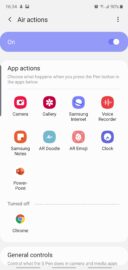
Step 2 – App actions: This is technically Air Actions implemented at its best. The App actions list contains all the apps that fully support Air Actions and, as you can probably tell, the range is fairly limited. However, supported apps offer a wide range of options for remote-controlling. Samsung will open up the Air Actions SDK to developers so expect third-party apps to support this down the line.

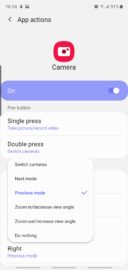
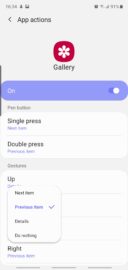
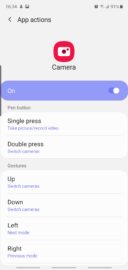
Users can select an app and determine the behavior of all the gestures, including single and double button presses, as well as air gestures. Each app offers its own set of commands for each gesture (but not always for all of them), so there’s a bit of customization to be had here.
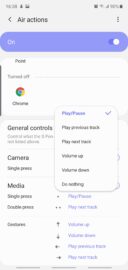
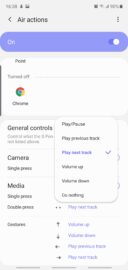
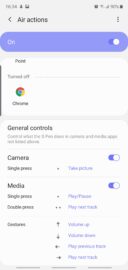
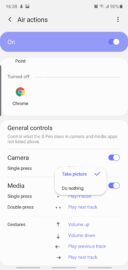
Step 3 – General controls: These are similar to App actions but work for unsupported apps; therefore the controls/gestures are generalized instead of having a separate profile for each app. You can change the behavior of all the gestures by tapping the blue text. You can also disable the Single and Double-press gestures, or disable the remote shutter functionality for the Camera app.
Step 4: Holding down the S Pen button has its own practical use that is independent of App actions and General controls. You can assign this command to launch an app or summon an Air command tool even when you’re actively using another app in the foreground. We recommend assigning this command to an app or feature that works well with the S Pen, such as Create note.

Do you use Air Actions, and if so, how often? What are the use cases in which Air Actions has been the most useful to you? And if you haven’t tried Air Actions yet, are you looking forward to it? Join us in the comment section below and feel free to check out our other Galaxy Note 10 tips covering additional S Pen details, battery life guides, and more.

  • Model: SM-N970F
  • Dimensions: 151.0 x71.8x7.9mm
  • Display: 6.3"(160.02mm) Super AMOLED
  • CPU: Exynos 9825
  • Camera: 12 MP, CMOS F2.2 Telephoto & 12MP F1.5/F2.4 77° & 16MP F2.2 123° Ultra-wide

  • Model: SM-N975F
  • Dimensions: 162.3 x 77,2 x 7.9mm
  • Display: 6.8"(172.7mm) Super AMOLED
  • CPU: Exynos 9825
  • Camera: 12 Ultra Wide: 16MP F2.2 (123°) & Wide-angle: 12MP 2PD AF F1.5/F2.4 OIS (77°) & Telephoto: 12MP F2.1 OIS (45°) & DepthVision Camera: VGA

The post How to set up and customize Galaxy Note 10 Air Actions appeared first on SamMobile.


from SamMobile https://ift.tt/2oDG8Zv
via IFTTT

Daily Deal: 60% off Samsung Active InEar Headphones

In-ear headphones are versatile. They’re perfect to use during your commute, in the office or while working out. The design makes sure they stay in your ear so you can move freely. They also have a built-in microphone (compatible with Samsung smartphones) so you can take calls with them too. At 60% off, this is a great opportunity to get a couple of headphones in so you’ll never have to go without them.

Hit the Buy Now button below and order them before they’re out of stock!

The post Daily Deal: 60% off Samsung Active InEar Headphones appeared first on SamMobile.


from SamMobile https://ift.tt/2n42qDm
via IFTTT

جميع الحقوق محفوظة لمدونة الغريب 2013