الخميس، 3 أكتوبر 2019

Daily Deal: 20% off the Xbox One X 1TB

Just like yesterday, we’ve found a good deal for all you gamers out there. The Xbox One X is a popular console and definitely a worthy upgrade if you have an older Xbox. This console supports 4K gaming as well so you can play the latest games in the highest quality possible. It also packs a massive 1TB of storage capacity meaning there’s plenty of room to store all of your games. At 20% off, this is the perfect time to upgrade your console!

Hit the Buy Now button below and order before the price goes up again.

The post Daily Deal: 20% off the Xbox One X 1TB appeared first on SamMobile.


from SamMobile https://ift.tt/2nYwxg8
via IFTTT

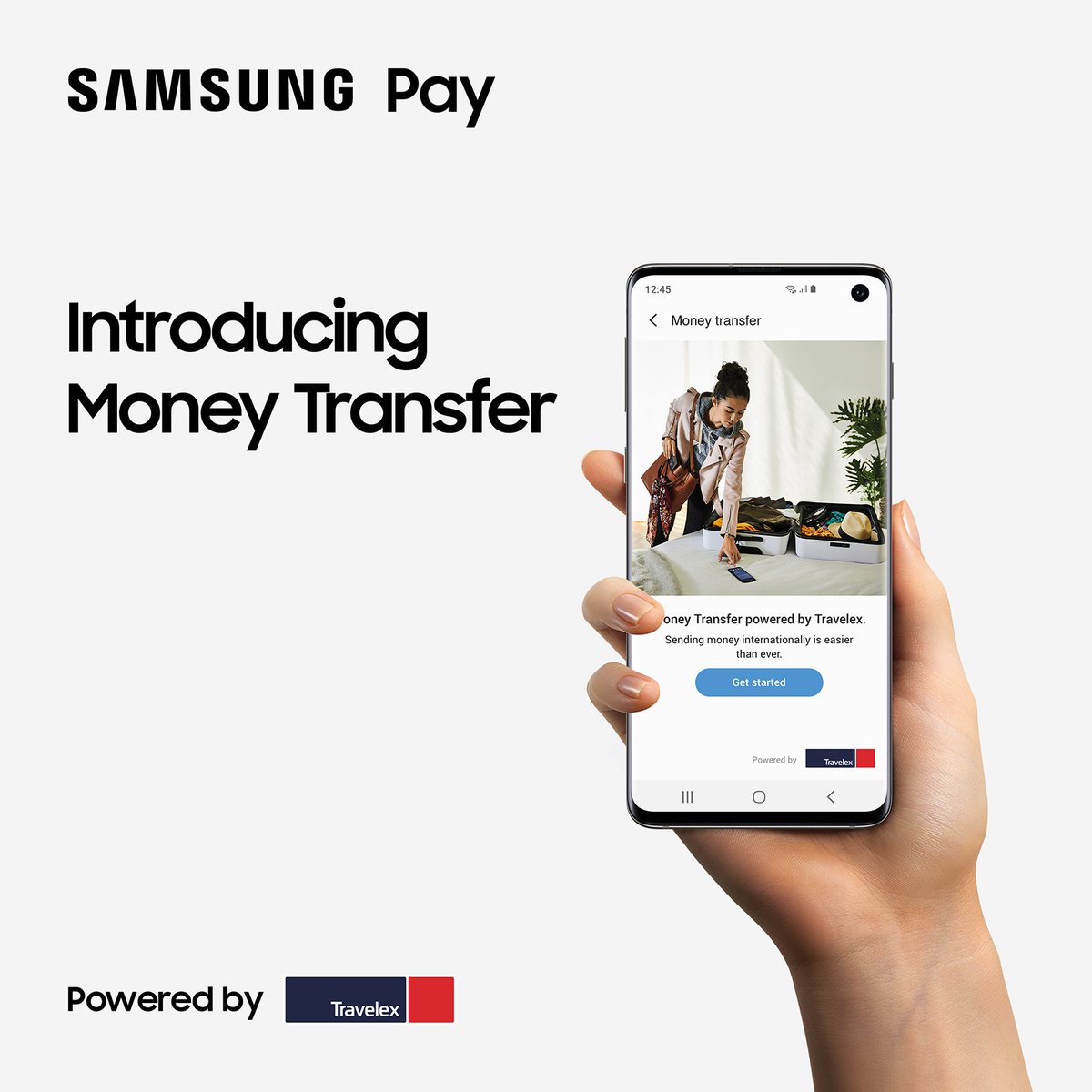
Samsung Pay Money Transfer service now available in the US

Samsung Pay just got a lot more useful in the United States. Users in the country will now be able to use the Samsung Pay Money Transfer service to send money to people in 47 countries across the globe.

The company has teamed up with fintech expert Finablr on this service which will be providing the network to support cross-border payments through Samsung Pay. The international money transfer service is available from within the existing Samsung Pay app. It will be possible to make seamless and secure cross-border transfers with different payout methods.

Use Samsung Pay Money Transfer to send money to 47 countries

Users can use their existing debit or credit cards for the Samsung Pay Money Transfer service within the app. They will be able to send money in most major currencies to either the recipient’s bank account or to a local cash pickup point.

Money transfers can be made to 47 countries initially, powered by Finablr subsidiary Travelex. Supported countries include Mexico, Canada, China, South Korea, the UK and India. The full list is available on Travelex’s website. Users will be shown the exchange rate and transfer fee upfront before they execute the transfer.

What’s interesting is that Samsung Pay is the first native mobile wallet in the United States to offer an international money transfer service. Rivals like Google Pay only allow users to transfer funds inside the US, for example. With this partnership, Samsung is getting a foothold in the highly lucrative remittance market.

The Samsung Pay Money Transfer service is currently available for users in the United States only. This service is going to be expanded to other markets next year.

The post Samsung Pay Money Transfer service now available in the US appeared first on SamMobile.


from SamMobile https://ift.tt/2oIBAkO
via IFTTT

Add a floating shutter button in your Galaxy Note 10’s Camera app!

Did you know you can add an additional shutter button in the camera app on your Galaxy Note 10 or Note 10+? Floating Shutter button is a feature Samsung added to its phones back in 2017, and it’s a feature the company doesn’t talk about anymore, which is a shame because it’s actually very useful. As the name suggests, the floating shutter button can be moved around and placed anywhere on the screen to make taking photos more convenient, freeing you from having to awkwardly twist your thumb to reach the standard shutter button at the bottom/right side of the screen, especially when you’re capturing a selfie.

Where is the Floating Shutter button feature located on the Galaxy Note 10/10+? It’s inside the camera settings, and you can follow the steps below to find out how you can enable it.

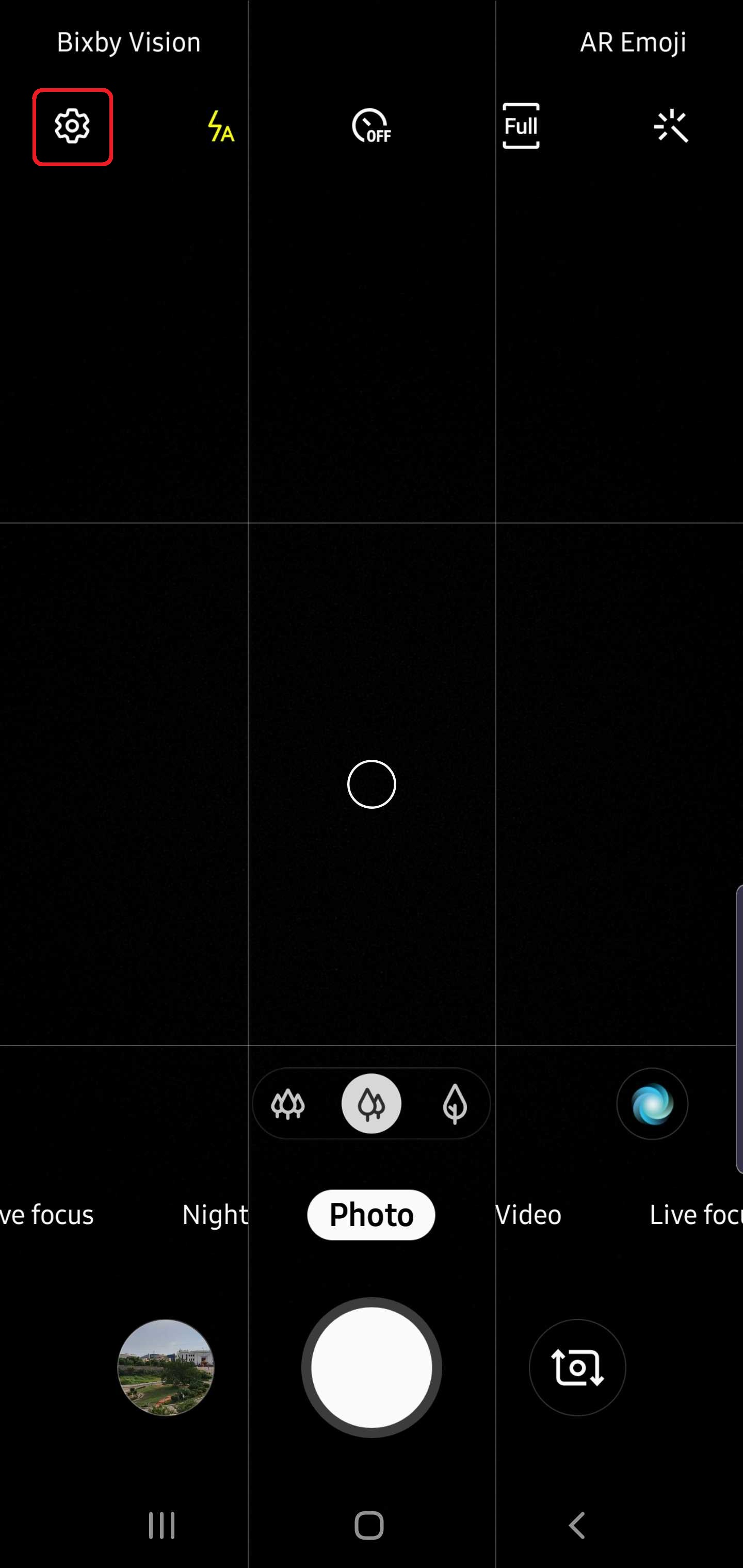
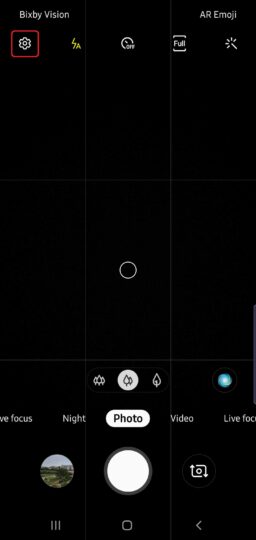
Step 1: Open the Camera app on your Galaxy Note 10 or Note 10+, then hit the gear-shaped icon in the top-left corner to go into the camera settings.
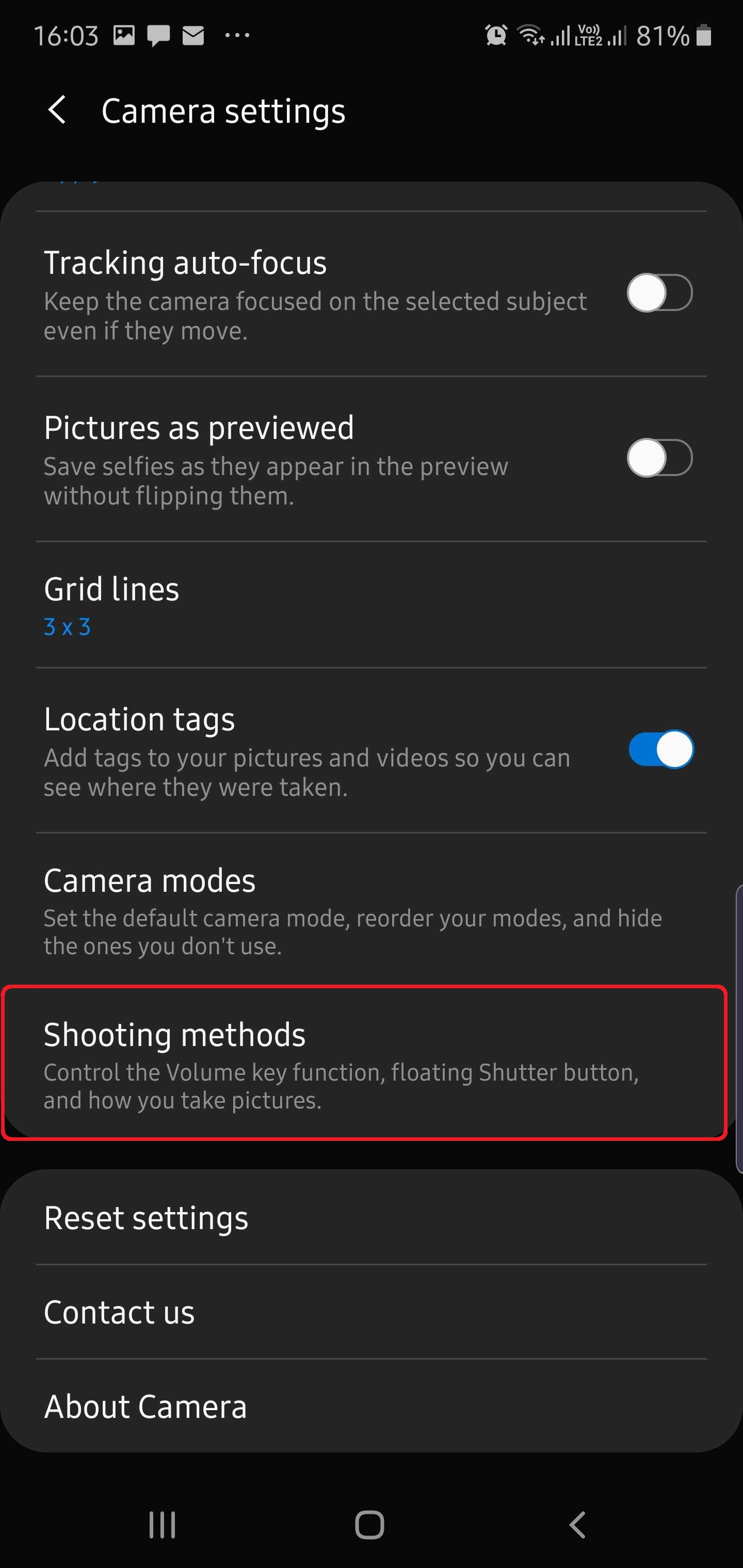
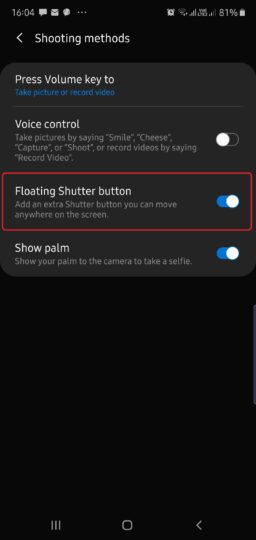
Step 2: Scroll down and tap Shooting methods.

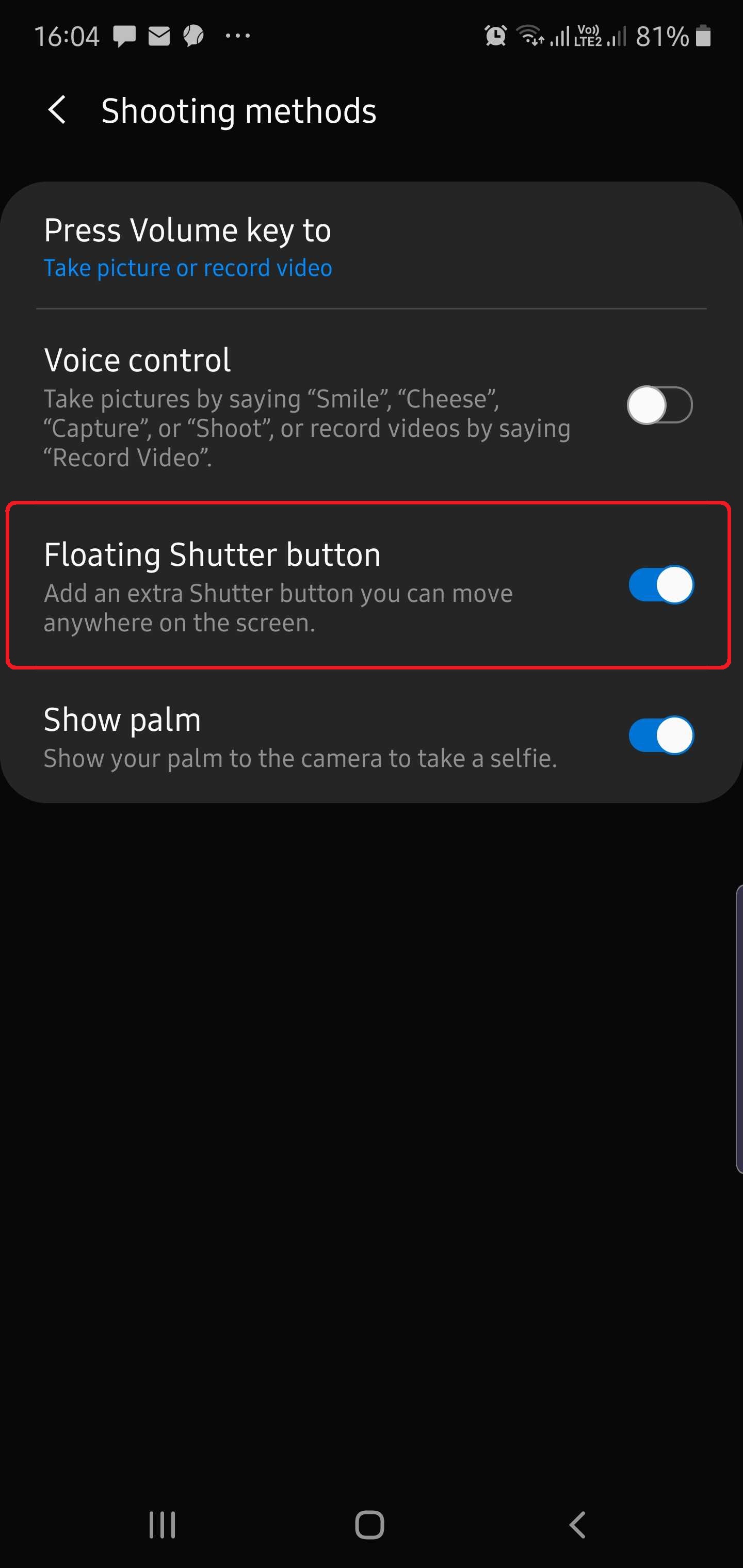
Step 3: Here, turn the switch next to the Floating Shutter button option ON.

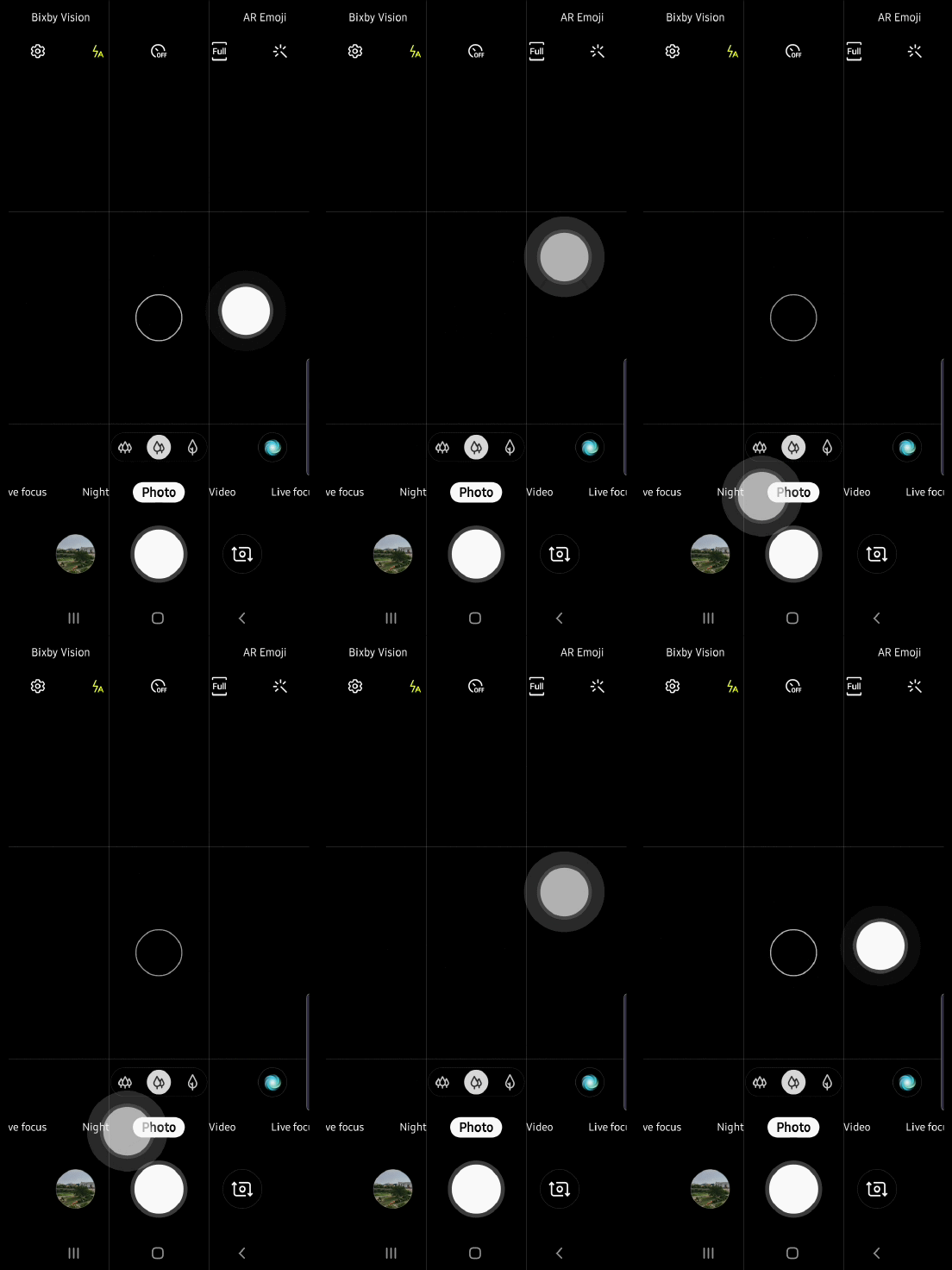
Now, when you head back to the camera viewfinder, you will find a separate shutter button waiting to be moved around and placed wherever you wish. And here’s a tip: If you don’t like that extra shutter button, you don’t need to go all the way into the camera settings again to disable it. Just drag the floating shutter button and drop it over the regular shutter button and the two will merge into one. This way, the floating button will be there when you need it (just move it again by dragging it out from the regular shutter button) while staying out of the way when you don’t.

Check out more Galaxy Note 10 tips to get the most out of your phone, and let us know if you will be using the floating shutter button now that you know how to add it to the camera on your Note 10/10+!
  • Model: SM-N970F
  • Dimensions: 151.0 x71.8x7.9mm
  • Display: 6.3"(160.02mm) Super AMOLED
  • CPU: Exynos 9825
  • Camera: 12 MP, CMOS F2.2 Telephoto & 12MP F1.5/F2.4 77° & 16MP F2.2 123° Ultra-wide

  • Model: SM-N975F
  • Dimensions: 162.3 x 77,2 x 7.9mm
  • Display: 6.8"(172.7mm) Super AMOLED
  • CPU: Exynos 9825
  • Camera: 12 Ultra Wide: 16MP F2.2 (123°) & Wide-angle: 12MP 2PD AF F1.5/F2.4 OIS (77°) & Telephoto: 12MP F2.1 OIS (45°) & DepthVision Camera: VGA

The post Add a floating shutter button in your Galaxy Note 10’s Camera app! appeared first on SamMobile.


from SamMobile https://ift.tt/2pAd4CB
via IFTTT

Samsung’s Exynos processors may never be the same again

Samsung has used its own Exynos processors for flagship smartphones in addition to Qualcomm chips since as far as you may remember. Qualcomm-based variants are sold in limited markets like the United States and China whereas the Exynos variants are distributed across the globe.

The Exynos chips have featured Samsung’s custom Mongoose cores for a few years now and while the gap has been narrowed in subsequent generations, the Snapdragon counterpart is generally better at thermal management and battery efficiency. Samsung has reportedly made a major decision that would fundamentally change Exynos processors from here on out.

Future Exynos processors may not have Samsung’s custom cores

Multiple reports suggest that Samsung has laid off the entire CPU dev team at its R&D Center in Austin. Founded in 2010, the R&D Center in Texas develops CPUs and system IP. Development for its custom CPU core is believed to have been done there as well.

Samsung has been building its own custom CPU cores based on its version of the ARMv8 architecture. It went this way instead of simply licensing cores from ARM. The Galaxy Note 10’s Exynos 9825 features the fourth-generation Mongoose M4 core, which is on the same 7nm node as the Snapdragon’s Kryo 485 semi-custom core. The latter outperforms Samsung’s solution in multi-core usage scenarios.

Even after four generations, the Mongoose cores haven’t been able to match and let alone exceed what Qualcomm was able to achieve with its semi-custom design. So the decision may finally have been made to let this go and focus the efforts and resources elsewhere.

This obviously doesn’t mean that Samsung will stop making Exynos processors. The reports mention that Samsung has not laid off the GPU and SoC development teams. It will go the Qualcomm route and simply license standard cores from ARM. Future Exynos SoCs may thus feature off-the-shelf ARM cores with Samsung’s custom modem and AI solutions.

Samsung is yet to comment on these reports. We’ll update you as and when new information comes in.

The post Samsung’s Exynos processors may never be the same again appeared first on SamMobile.


from SamMobile https://ift.tt/2oFN5JD
via IFTTT

Galaxy Fold reportedly headed to Russia in late October for 159990 rubles

The Galaxy Fold could make its way to Russia in late October, according to Eldar Murtazin of Mobile-Review.com. Murtazin took to Twitter to say that the Galaxy Fold will be available for purchase/pre-order in the country from October 25 with a price tag of 1,59,990 rubles. That translates to around $2460, and while prices for Galaxy devices in Russia are generally higher by $150 to $200 than pricing in the US and European markets, the Fold would have an additional markup if the suggested pricing is accurate.

However, that price might be for the 5G-enabled variant. We’re told that Russia will get both the LTE and 5G variants of the Galaxy Fold, but Murtazin doesn’t say which variant he’s talking about in his tweet. Even if it’s the LTE variant that costs 1,59,990 rubles, not a lot of folks are likely to mind the higher pricing. If one is okay with spending $2000 on a smartphone — one that’s unique and of the never-before-seen kind — then having to pay a couple hundred bucks more probably won’t deter most prospective customers.

The redesigned Galaxy Fold’s availability will expand to many markets around the globe this month. The pre-order period will commence in India on October 4, followed by some Middle Eastern countries. It should arrive in Poland on October 18th, along with markets such as Mexico, Spain, Thailand, South Africa, Malaysia and Australia. We’re working on our review of the device and will have it up sometime in the next few days, but in the meantime, you can check out how our Galaxy Fold survived a trip to Egypt.

The post Galaxy Fold reportedly headed to Russia in late October for 159990 rubles appeared first on SamMobile.


from SamMobile https://ift.tt/2oHxQju
via IFTTT

[Poll] What is your favorite Galaxy Note 10 camera feature?

The Galaxy Note 10 and Galaxy Note 10+ are packed to the brim with new camera features that we hadn’t seen on any Galaxy flagship before. Well, some of them, like the ability to shoot bokeh videos with the Live focus video mode and make 3D scans of real-world objects, were possible on the Galaxy S10 5G thanks to its fourth rear camera, but they didn’t go mainstream until the Galaxy Note 10 duo came along. Other features, like AR Doodle or a Night mode for selfies and the telephoto rear camera, debuted on the Note 10/10+ before ultimately making their way to the Galaxy S10 lineup via a software update.

The Galaxy Note 10/10+ also have this unique feature called Zoom-in Mic, which uses a mic hidden beneath the camera sensors to focus on sound coming from whatever it is the camera is zoomed into. Of course, if you’ve been rocking a Galaxy Note 10/10+, you would have noticed that not all of those camera features are truly useful in day-to-day life. But then again, having some functionality just for fun – a category that AR Doodle fits in perfectly – never hurt anybody, right? Having a boatload of features also means there’s something for everybody, and in our latest poll, our question to Galaxy Note 10 and Note 10+ owners is this: What’s your favorite camera feature?

Vote in the poll below, then tell us in the comments section why you love a particular feature the most!

What's your favorite Galaxy Note 10 camera feature?
  • Model: SM-N970F
  • Dimensions: 151.0 x71.8x7.9mm
  • Display: 6.3"(160.02mm) Super AMOLED
  • CPU: Exynos 9825
  • Camera: 12 MP, CMOS F2.2 Telephoto & 12MP F1.5/F2.4 77° & 16MP F2.2 123° Ultra-wide

  • Model: SM-N975F
  • Dimensions: 162.3 x 77,2 x 7.9mm
  • Display: 6.8"(172.7mm) Super AMOLED
  • CPU: Exynos 9825
  • Camera: 12 Ultra Wide: 16MP F2.2 (123°) & Wide-angle: 12MP 2PD AF F1.5/F2.4 OIS (77°) & Telephoto: 12MP F2.1 OIS (45°) & DepthVision Camera: VGA

The post [Poll] What is your favorite Galaxy Note 10 camera feature? appeared first on SamMobile.


from SamMobile https://ift.tt/2ptKyCC
via IFTTT

Galaxy A20e getting updated with October 2019 security patch

Samsung is now pushing out the October 2019 security patch to the Galaxy A20e in Germany. The company first released the October security update for the Galaxy A50 before the month had even started, then followed it up with the October update for the Galaxy A30, Galaxy J2 Core, and Galaxy S10 5G. Neither Google nor Samsung have detailed the October security patch yet, but that isn’t stopping the latter from releasing the October patch for yet another smartphone.

The Galaxy A20e is one of Samsung’s most affordable 2019 A series phones and, like every other non-flagship Galaxy phone launched this year, is scheduled to get a security update every three months. The device is making a jump to the October patch from the July patch as a result, and for now, we don’t have information on what else is included in the update as it doesn’t seem to be rolling out over the air just yet. It’s only available via Samsung’s Smart Switch program for Windows and macOS; it can also be downloaded from our firmware archive.

Once the update goes live over the air, you will be able to download it by tapping the Download and install option in the Software update menu of your Galaxy A20e’s Settings app. Do let us know if you’ve received the update and whether it brings any new features or improvements other than enhanced security by leaving a comment below!

The post Galaxy A20e getting updated with October 2019 security patch appeared first on SamMobile.


from SamMobile https://ift.tt/2o4IxMP
via IFTTT

جميع الحقوق محفوظة لمدونة الغريب 2013