The Galaxy Fold has been released in a lot more markets over the past month. Samsung has been offering the device in limited quantities and it has been selling out almost everywhere. The company has managed the roll out well and may now be planning to make more units than it had originally thought.
According to a report out of South Korea, Samsung Display is ramping up the production of foldable display panels since the Galaxy Fold has been selling really well. If the company feels that it can end up selling more units than first planned, it would obviously make sense to do that.
Galaxy Fold has been selling out fairly quickly
The report mentions that Samsung Display had planned to produce 67,000 foldable display panels last month after making 40,000 in August. However, the company made 92,000 panels, a 40 percent increase over the original target.
As the Galaxy Fold continues to sell out, Samsung would want to maintain the momentum by fully operating the manufacturing lines for foldable displays. It’s now expected to produce 102,000 panels in October and 99,000 in November. It can reportedly make 3,300 foldable panels every single day and if these targets are to be hit, Samsung Display will have to keep the manufacturing lines running at full speed for the next few months.
Demand for the Galaxy Fold will taper off eventually. The controlled manner in which Samsung is releasing the device has helped increase sales. Rarity is always a good tactic to employ and Samsung had done that very well.
For most of us, the television is the center of the living room, and we spend an average of nearly four hours every day in front of our TV. When you spend that much time sitting opposite your TV, you want the best possible picture quality as well as smart features so that you don’t need additional hardware, like a Chromecast, to watch Netflix. Right now, you can get all that with the Samsung’s 43″ UHD 7 Series TV at 24% off its regular price. It’s a 4K TV that can upscale standard definition content to 4K, has HDR for brighter picture with higher dynamic range, and has plenty of smart features to get you a solid all-round experience.
It’s a great deal if you’re looking to upgrade your current setup, so hit the Buy Now button below to get the TV while it’s still discounted.
Samsung’s newest YouTube video telling everyone why they should buy the company’s QLED doesn’t seem like an advertisement at first glance. Titled TV burn-in checker, it comes off as an educational video that starts off showing the words “What is burn-in” being typed in to a Google search field, with the autocomplete options showing “OLED TV burn-in” as the first result. The video then shows multiple red images with dark patches, telling the viewer that burn-in is those dark patches they see on the screen, and finally ends with suggesting they contact customer care or “get a burn-in free QLED.”
It’s a clever marketing technique, but it’s not the first time that Samsung has targeted the burn-in problems associated with OLED TVs (and OLED displays in general) to show why consumers should opt for its QLED televisions. Many believe this is part of a campaign to call out LG without explicitly naming its local competitor. While Samsung has been the biggest proponent of AMOLED displays on smartphones and has single-handedly helped make them the de facto standard, it missed the OLED boat when it comes to televisions and has instead put all its resources into QLED technology.
LG has focused on OLED tech for its TVs, and that has also brought the burn-in issue to the fore, with many tests showing LG’s OLED TVs don’t stand up to the company’s claims about how long the TVs can be used without burn-in becoming a problem. Samsung has used it to take multiple indirect digs at LG with videos such as the one you see below, and it’s something the company will no doubt continue to do in the future.
Do you own a Samsung QLED TV, or do you have an OLED TV from LG or another manufacturer?
A customer representative has revealed in the Samsung online community in Germany that Smart Switch cannot currently help Galaxy S10 users running the Android 10 beta revert back to Android Pie without voiding the phone’s warranty. Smart Switch will reportedly be updated in the next week or so to allow users to go back to Android Pie without issues, but for now, you’re stuck on Android 10 if you have participated in the beta program and have installed the beta update that Samsung released earlier this week.
For those unaware, Samsung phones come with a hardware fuse that is tripped anytime the device detects that unofficial software has been installed, and that instantly voids the device’s warranty. This was a precaution the Korean giant implemented on its phones a few years ago when it started taking device security seriously to make inroads into the enterprise world and enable features like Secure folder and was mostly supposed to stop users from installing custom ROMs.
And, right now, the hardware fuse will also be tripped if Smart Switch is used to revert from Android 10 to Android Pie. It’s not clear why Samsung isn’t communicating this issue via the notices section of the Samsung Members app where it would be more visible. But, if you were thinking of going back to Android Pie using Smart Switch, you should refrain from doing so and wait for further information.
How do I check if my warranty is void?
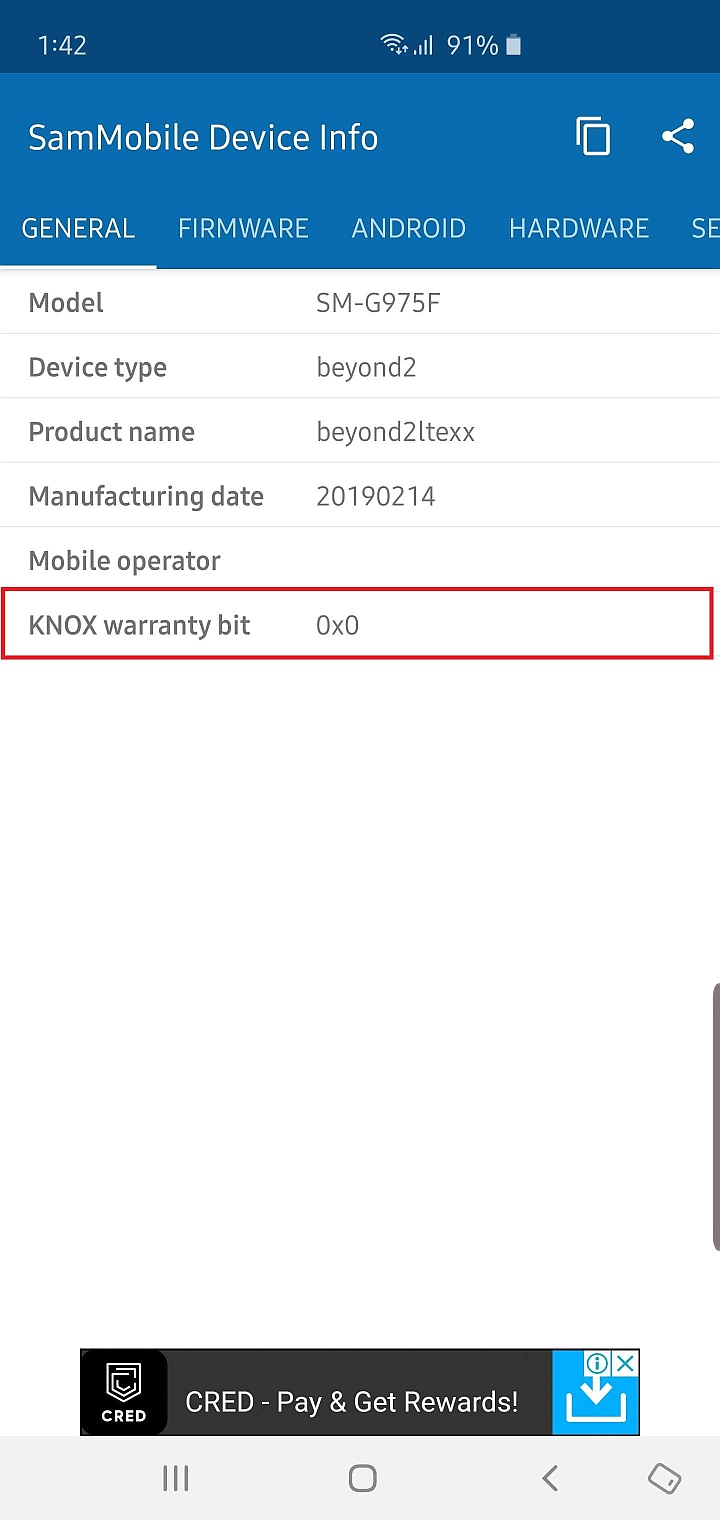
If you have already downgraded to Pie using Smart Switch and want to know if your device’s warranty fuse has been tripped, you can download our SamMobile Device Info app from the Play Store and check what it says in front of the KNOX warranty bit field in the General section (see screenshot below). Your warranty is fine if it says 0x0, but if it’s 0x1, then your warranty has been void.
Unfortunately, there’s no way to reset warranty if the fuse has been tripped. So, if Smart Switch currently is messing up the warranty for Galaxy S10 beta owners trying to get back to Android Pie, we hope the company comes out with a clearer stance on the issue instead of making a post about it in its forums that not everyone may come across.
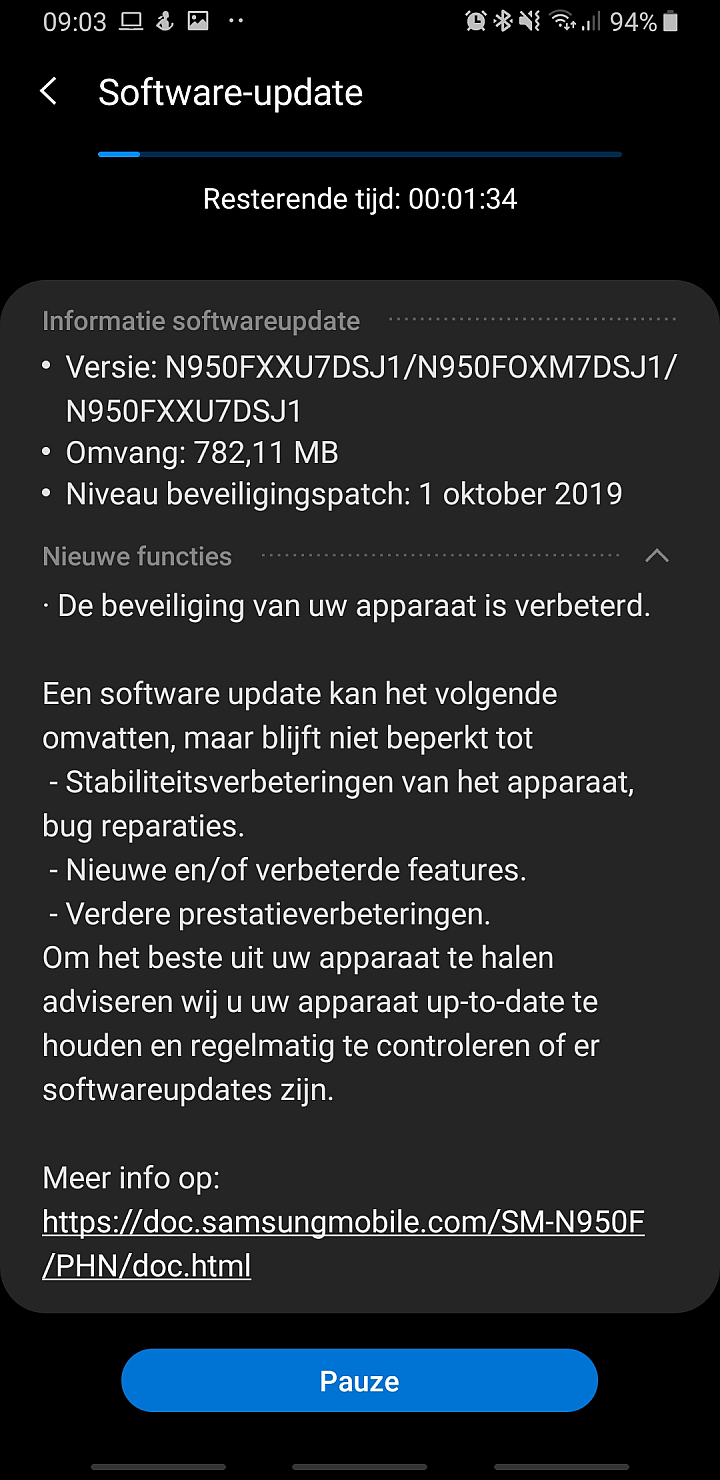
The Galaxy Note 8 may not be eligible for the Android 10 and One UI 2.0 update, but it’s still getting regular security patches, and Samsung has now released the October 2019 security patch for the device. An update with software version N950FXXU7DSJ1 is rolling out in the Netherlands, Bulgaria, and the Baltic states, and like all recent updates for the Note 8, this one doesn’t bring any new features or improvements other than enhanced security.
The October 2019 security patch includes a fix for a serious vulnerability that was discovered to have been exploited by the NSO, an Israeli cyber intelligence firm. However, it’s not clear if Samsung is including the fix in the security patch it is rolling out to Galaxy devices, as the fix was released by Google separately instead of being included in the regular October patch release. It’s also unclear if the fix is even needed for devices that weren’t singled out by Google analysts when the vulnerability was first discovered – the only Galaxy phones mentioned were the Galaxy S7, Galaxy S8, and Galaxy S9.
The latest Galaxy Note 8 update is available over the air and can be downloaded on the phone from the Settings » Software update menu. You can also update via Samsung Smart Switch or by downloading the latest firmware from our database and flashing it manually on your Note 8 using a Windows PC.
For long-time users of Galaxy smartphones, the Galaxy Note 10 brings two substantial hardware changes. One is the lack of a 3.5 mm headphone jack, and the other is the position of the power button. The Galaxy Note 10’s power button is on the left side of the device, right below the volume buttons, and that requires one to forego an old habit if they have been using Galaxy devices for a few years.
The Galaxy Note 10/10+ isn’t the first smartphone on which Samsung has changed the position of the power or volume buttons. The company has been putting both the volume and power buttons on the right side of its budget and mid-range devices launched in the last year or so. The Galaxy Note 10 and Note 10+ are just the first devices in Samsung’s repertoire to have all the buttons placed on the left frame.
Basically, the layout is new no matter if you have used flagship, mid-range, or budget Galaxy phones in the past. It’s also an issue for those who have used a phone with a dedicated Bixby key. The power button on the Galaxy Note 10 is exactly where the Bixby key would be if Samsung hadn’t ditched it altogether. And anyone who, on a previous device, had the Bixby key assigned to launch an app other than Bixby with a single press has no doubt pressed the power button out of force of habit on their Note 10/10+ every now and then.
In short, there’s a learning curve involved in adjusting to the power button placement for long-time Galaxy smartphone users, and this learning curve can be small or big depending on an individual. And here’s what we want to know in this poll: Does it bother you that the power button is on the left side of your Note 10 or Note 10+? Have you gotten used to it, and if yes, did it take you long to stop reaching for the right frame of the phone to access the power button?
Vote in the poll below, then take to the comments section to discuss your thoughts in detail with other readers!
Results: A change in the position of a button on a phone may not be as simple as some think, as 25 percent of voters said they still haven’t gotten used to the new power button placement on the Galaxy Note 10/10+. 29 percent were able to get used to it on day one, while 31 percent got used to it in a few days. 7 percent of voters found themselves taking a long time to adjust, while the remaining 7 percent voters love the new placement as they’re left-handed.
Does it bother you that the Galaxy Note 10 power button is on the left?
It did initially, but I got used to it in a few days 31%, 327 votes
327 votes31%
327 votes - 31% of all votes
Got used to it on day one 29%, 307 votes
307 votes29%
307 votes - 29% of all votes
Still haven't gotten used to it 25%, 262 votes
262 votes25%
262 votes - 25% of all votes
Took me considerable time, but I got over it eventually 7%, 75 votes
75 votes7%
75 votes - 7% of all votes
I'm left-handed, so it's perfect for me 7%, 72 votes
The Galaxy S10 One UI 2.0 beta program is now live in the US. Owners of the Galaxy S10e, Galaxy S10, and Galaxy S10+ on AT&T and T-Mobile and those owning unlocked units can participate in the program to try out Android 10 and One UI 2.0 by registering through the Samsung Members app.
It’s not clear whether Samsung has already released the first beta update in the US over the air to participating users, but that’s likely to happen in the next few hours. Once the update goes live, you will have to grab it the same way you get regular software updates – by going into the Software update section in the Settings app and tapping the download option. The size of the update varies from 1800 MB to 1900 MB for the S10e, S10, and S10+ in Germany, and the download size for North American users should be similar.
One UI 2.0 brings a slew of new features and changes to the Galaxy S10, some of which — such as yet another camera UI upgrade — you may not like. You can see some of those features in action in the video below and also get more details in this article. Check them out, and let us know down in the comments if you’ve managed to register for the beta program!