الأحد، 17 نوفمبر 2019

New Galaxy Note 10 Android 10 beta update rolling out now

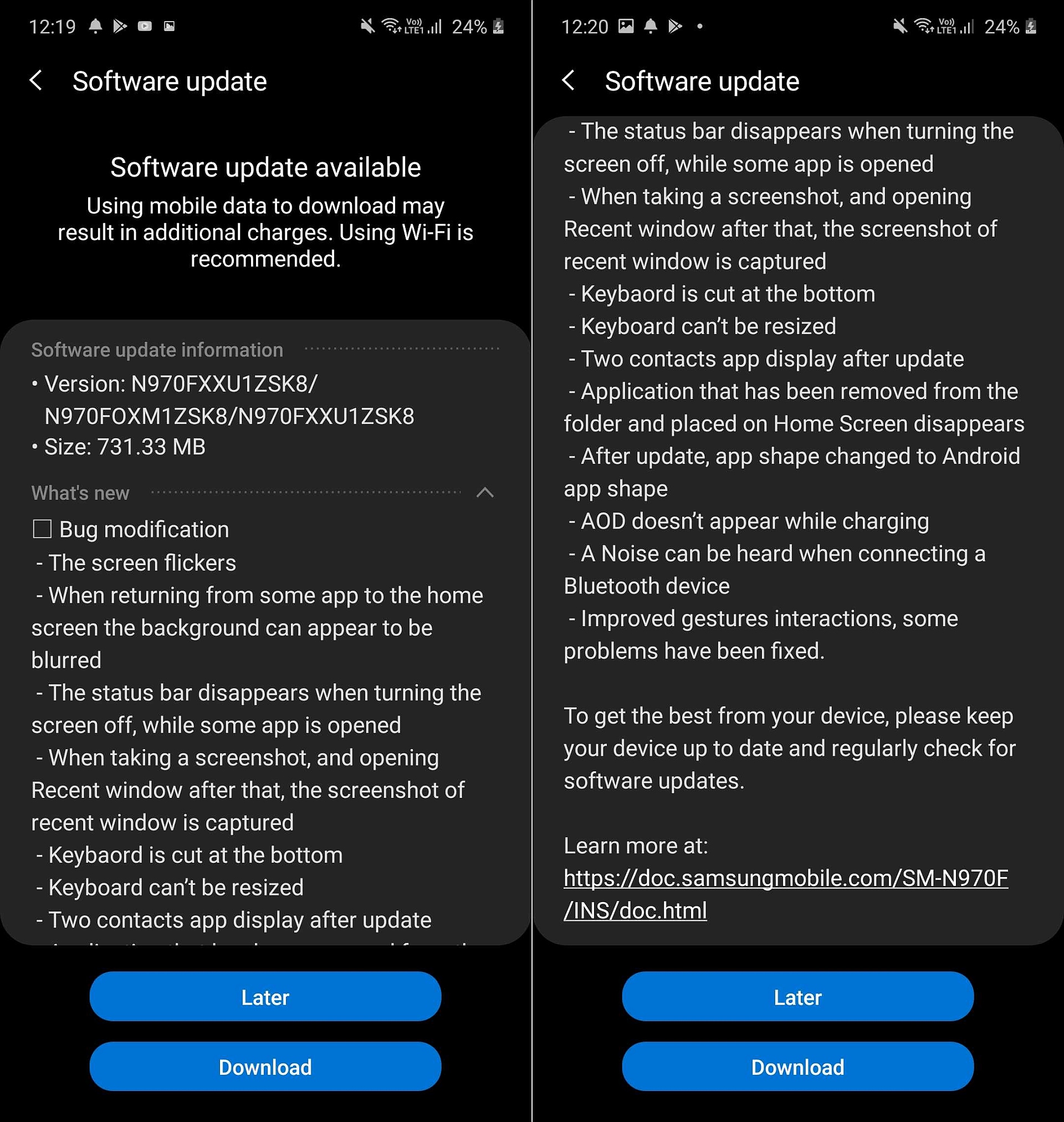
The Galaxy Note 10 One UI 2.0 beta program is moving ahead today with the release of the second beta update. We can confirm that a new Android 10 beta update is rolling out to the Note 10 and Note 10+ in India, carrying software version N97*FXXU1ZSK8. It’s likely to be made available in Germany, South Korea, and the US as well, although we cannot confirm that at this time (feel free to let us know in the comments if you’re getting the update in any of those countries).

The changelog for the second Android 10 beta for the Galaxy Note 10 is exactly the same as the changelog for the latest Galaxy S10 beta that was released last week. That could either be a case of Samsung being lazy and taking the copy paste route or a result of the fact that the software is pretty similar on the Galaxy S10 and Note 10. We’d prefer it to be the latter as that would mean Samsung could release the stable Android 10 update for both lineups at the same time.

To download the new beta update on your Galaxy Note 10 or Note 10+, open the Settings app on your phone, select Software update, then select Download and install. As always, we would recommend backing up your data before you install the latest beta.

galaxy note 10 second android 10 beta

Thanks for the tip, Samkit!

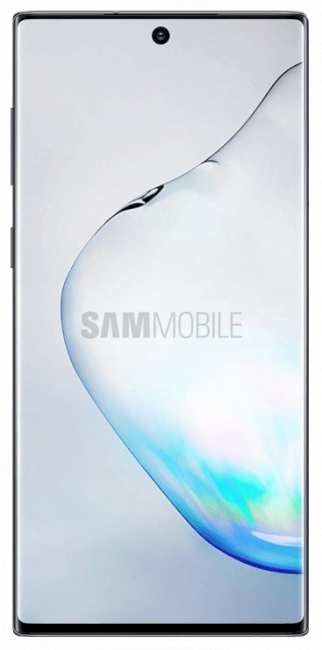
  • Model: SM-N970F
  • Dimensions: 151.0 x71.8x7.9mm
  • Display: 6.3"(160.02mm) Super AMOLED
  • CPU: Exynos 9825
  • Camera: 12 MP, CMOS F2.2 Telephoto & 12MP F1.5/F2.4 77° & 16MP F2.2 123° Ultra-wide

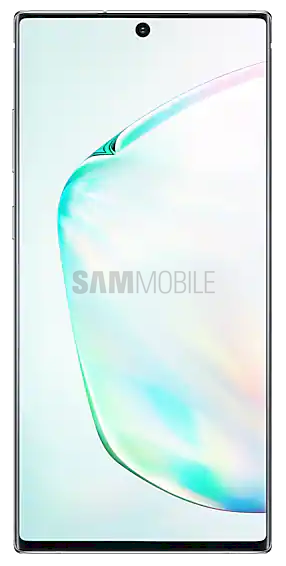
  • Model: SM-N975F
  • Dimensions: 162.3 x 77,2 x 7.9mm
  • Display: 6.8"(172.7mm) Super AMOLED
  • CPU: Exynos 9825
  • Camera: 12 Ultra Wide: 16MP F2.2 (123°) & Wide-angle: 12MP 2PD AF F1.5/F2.4 OIS (77°) & Telephoto: 12MP F2.1 OIS (45°) & DepthVision Camera: VGA

The post New Galaxy Note 10 Android 10 beta update rolling out now appeared first on SamMobile.


from SamMobile https://ift.tt/2NVTri3
via IFTTT

Samsung to release third-party made Galaxy phones in other markets

Samsung launched its first ODM smartphone, the Galaxy A6s, in China last year. The ODM classification means that this device was not manufactured by Samsung in its own factories. It outsourced the production to a contractor. The company made this decision as it switched up its strategy to better compete in the lucrative Chinese market.

Reports so far have suggested that Samsung will release more ODM devices in China. However, it appears that in a bid to become more competitive in key markets, Samsung will now start shipping third-party made Galaxy phones in markets outside China as well.

Samsung’s ODM Galaxy phones will be sold outside China in 2020

Samsung had significantly ramped down its own production in China over the years as its market share fell below 1 percent. The company shut its last factory in the country just last month. It became evident that Samsung was going to meet local demand through a mix of ODM-produced and imported units from its factories outside the country.

Echoing earlier reports, sources told Reuters that out of the 300 million devices that it expects to ship next year, Samsung will outsource a fifth of that production to ODMs in China, around 60 million units. It has been making arrangements to shit production of some Galaxy A models to third-party manufacturers like Wingtech.

The company and other ODM manufacturers make devices for the likes of Huawei and Xiaomi. They thus have massive economies of scale which allow them to produce new budget devices quickly. There is some concern that this shift in strategy will lead to Samsung losing control on quality for these devices. Moreover, substantial orders from Samsung may enable these manufacturers to lower their costs even further which would end up helping Samsung’s rivals.

Since margins are very slim in the low-end segment, Samsung is left with no choice but to use the same strategy as its Chinese rivals to counter them in the market. Shifting production of some mass-market models will enable it to further cut costs and offer then for lower prices. One source claimed that Wingtech is able to secure some components for up to 30 percent less than what Samsung would pay for them in Vietnam where a bulk of its devices are made.

Wingtech is said to get a voice in both the design and production of its lower and mid-range Galaxy A handsets. The units will then be sold in China and markets across Southeast Asia and South America. However, in a bid to allay concerns about quality control, Samsung told the scribe that it will maintain oversight of the design and development of its ODM smartphones. Sources also claim that in order to reduce the possibility of any quality issues, Samsung has been pairing Korean component suppliers with Chinese contractors. The company itself says that its ODM devices will have the same quality checks and standards as any of its other devices.

This changes nothing for premium mid-range and flagship devices. Samsung will maintain sole control over the entire process from conception to mass production. It will manufacture those devices at its factories in Vietnam and India. This shift in strategy is merely meant to counter the rising tide of competition from Chinese smartphone manufacturers. Samsung is trying to beat them at their own game. Let’s see how that works out.

The post Samsung to release third-party made Galaxy phones in other markets appeared first on SamMobile.


from SamMobile https://ift.tt/2KtpILe
via IFTTT

Galaxy S11 may put these powerful camera features in your hands

It appears that Samsung is working on several new camera features that it could possibly announce with the Galaxy S11. That wouldn’t surprise anyone. Samsung has made a habit of introducing new camera features with its flagship smartphones. That’s actually what many customers actively look forward to.

The fourth One UI 2.0 beta firmware that started rolling out earlier this week has dropped some hints about these new features. It also highlights the possibility that Samsung may eventually bring the ability to record 8K video.

Samsung to add powerful new camera features to the Galaxy S11

An APK teardown of the Samsung Camera app included in the latest firmware version has revealed that several new camera features are in development. Director’s View is one such feature. It will allow you to lock on a subject in the frame and change who’s in the close up. This feature may also allow you to record from multiple camera lenses simultaneously, something that the Filmic Pro app makes possible on the iPhone 11 Pro.

Single Take Photo is also expected to be another new addition. As per the references found in the code, this feature will let you capture the scene in a “series of pictures and short videos.” You’ll capture one by panning your phone around in a slow and steady motion for 15 seconds. Hyperlapse has been around for a while now but it seems that Samsung is now working on a version of this feature that’s primarily meant for low-light conditions. The Night Hyperlapse feature may simply be a combination of the existing hyperlapse and night modes. The reference to Vertical Panoramas suggests that Samsung is now getting ready to support the ability to take vertical panoramas. You can kind of force your phone do to this already but it’s good to see that Samsung is going to make this official.

There are references to 8K video recording as well. It’s possible that this feature would debut with the Galaxy S11. The next flagship’s Exynos 990 processor does have the capability to record 8K video at 30 frames-per-second. This would also require Samsung to upgrade the primary camera sensor on its next flagship. Rumor has it that Samsung may use its 108MP sensor for the primary camera on the Galaxy S11.

Nothing is set in stone just yet as far as the Galaxy S11 is concerned. One thing is for sure, we’re going to be hearing a lot more rumors about the device in the days to come. What do you think about these camera features, would they do a good job of setting the Galaxy S11 apart from the pack? Let us know in the comments below.

The post Galaxy S11 may put these powerful camera features in your hands appeared first on SamMobile.


from SamMobile https://ift.tt/2rSt7Ns
via IFTTT

الجمعة، 15 نوفمبر 2019

Here are 7 examples of how to use Bixby Routines on a Samsung phone

The Bixby Routines feature was introduced earlier this year along with the Galaxy S10 series and the feature is, of course, included in the Galaxy Note 10 lineup as well. It’s one of the more unique features that differentiate Samsung’s smartphones from the competition. It’s a deceptively simple tool that packs quite a punch and allows users to create a variety of automated tasks based on the IFTTT (If This Then That) principle.

With Bixby Routines, you can determine what actions your smartphone should perform when certain conditions are met. A condition can be a time of day, a location, a certain action on your phone, your battery level or battery charging status, and much more. As a simple example, you can set Bixby Routines so that your phone automatically starts playing music once it’s been connected to your car. Or you can tell your device to show you a different set of Lock Screen shortcuts at certain hours of the day.

Bixby Routines offers tons of possibilities and you can experiment with different conditions and actions to automate tasks based on your unique user experience. The system is quite customizable. It’s not limited to just one condition or action per Routine, so you can set a variety of parameters.

How to access and create Bixby Routines

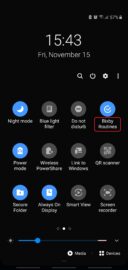
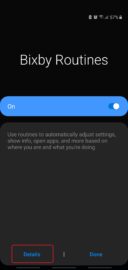
There are a couple of ways to access Bixby Routines. One is to open Settings and go to Advanced Features. The other is to swipe the status bar down and tap the Bixby Routines quick toggle (the text, not the toggle itself) and then tap Details.
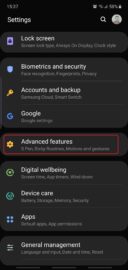
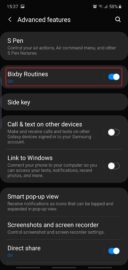
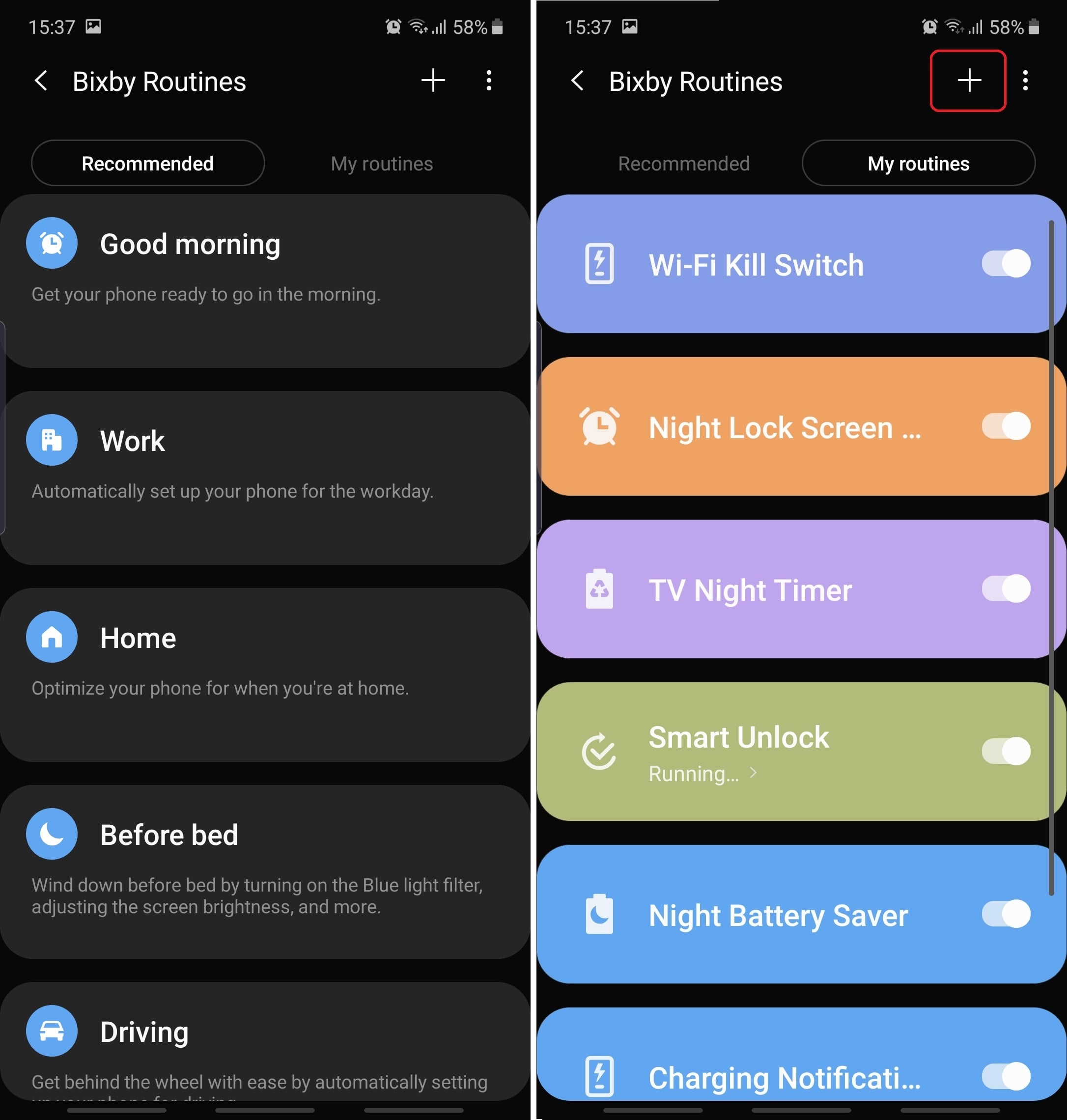
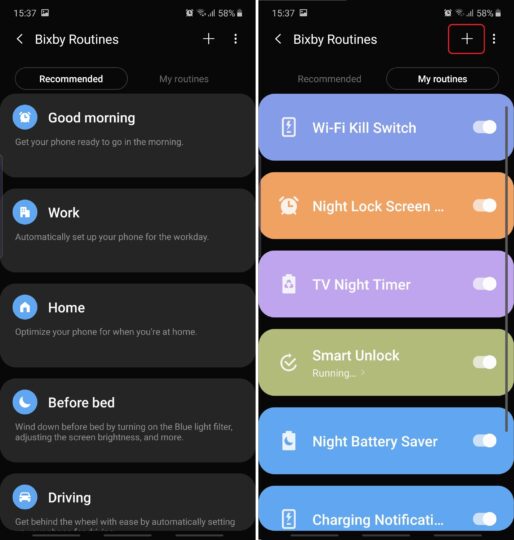
Once inside Bixby Routines, you can either choose one of the existing presets from the Recommended section and fill out the empty fields, or you can begin creating your own Bixby Routine from scratch by tapping ‘+’ in the upper right corner of My Routines.
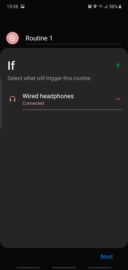
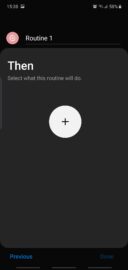
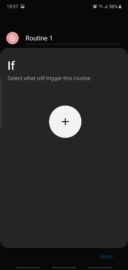
When creating a custom Routine, tap the large ‘+’ button on the If screen and add a condition – or more – then tap Next. Determine your Then parameters and tap Done.
Moving forward we will explore the custom option and list a few examples of what can be achieved when creating your own Bixby Routines.

Examples of some useful Bixby Routines

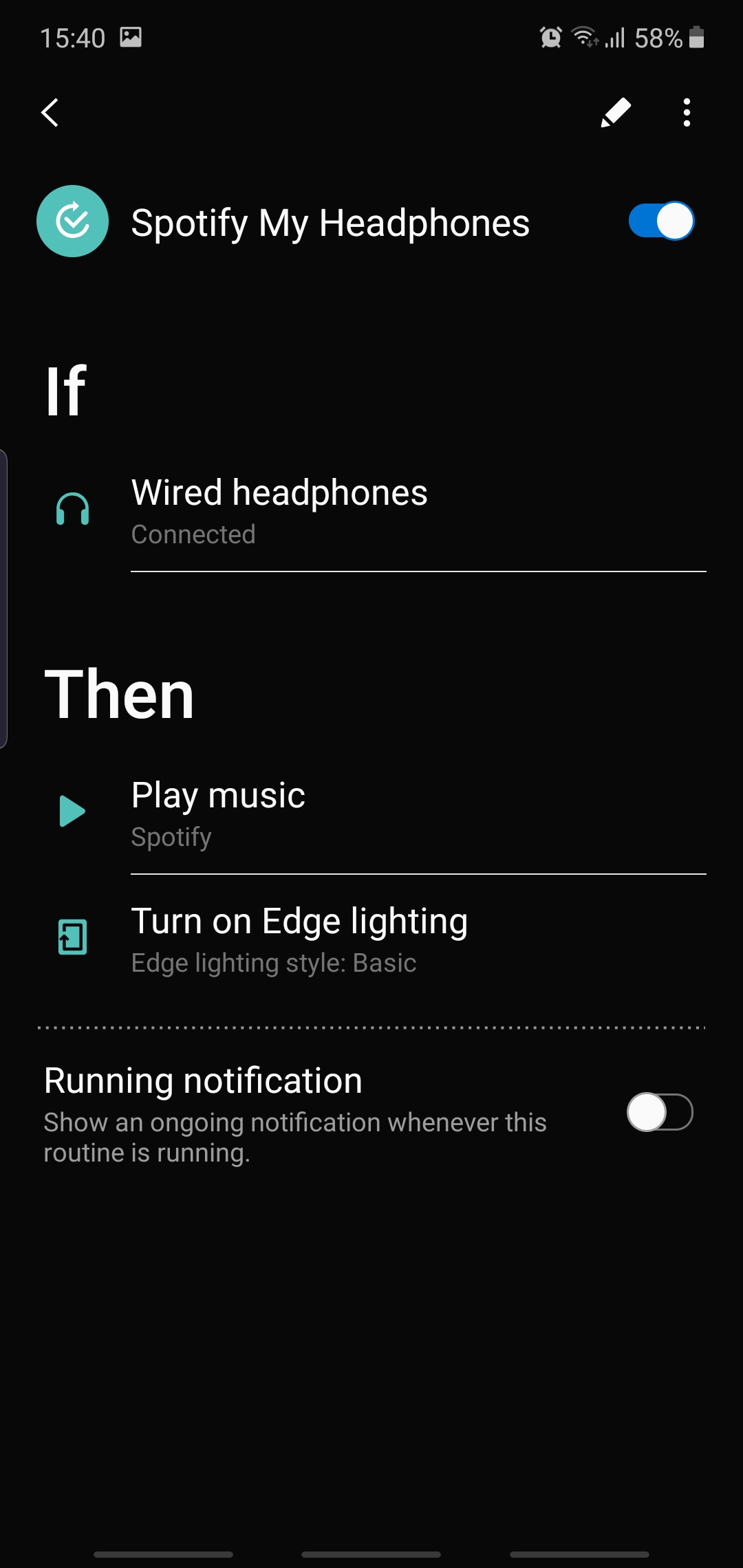
Have you ever wished that your phone would automatically start playing music whenever you plugged in your headphones? If so then you might get some inspiration from this following Routine.
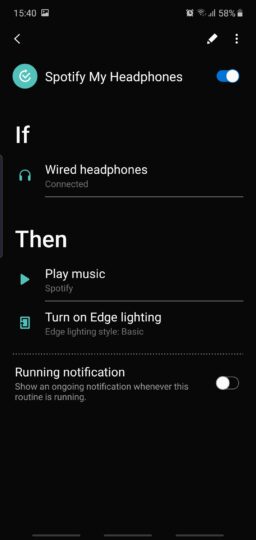
It automatically starts playing Spotify when your headphones are connected and also creates an Edge lighting effect as an added bonus. Once again, this is a very customizable system so you could just create a Routine that only enables an Edge lighting effect when your headphones are detected, without playing any music. Or you could drop the Edge lighting effect altogether and focus solely on the music playback aspect of the Routine, whether it be through Spotify or another music player/service.

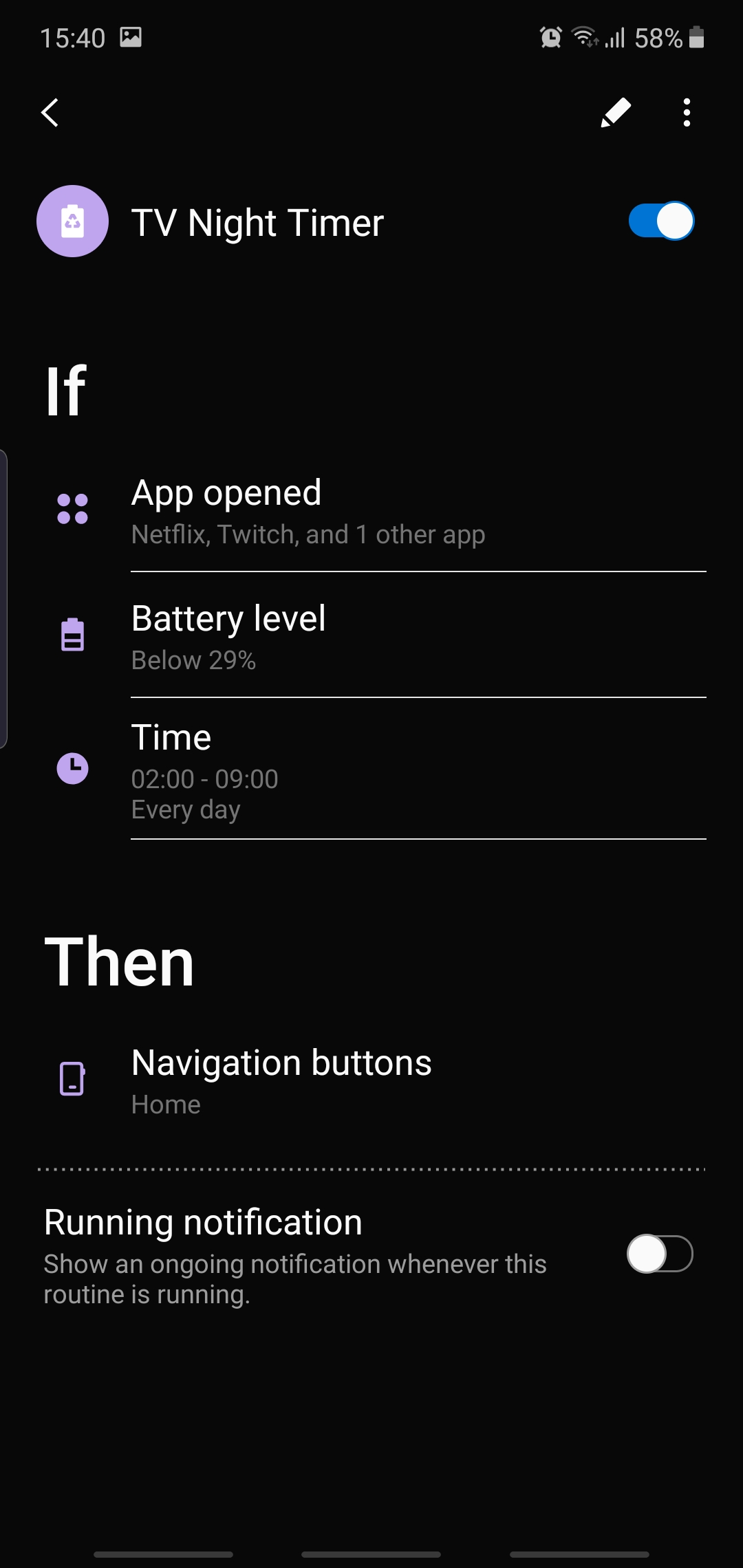
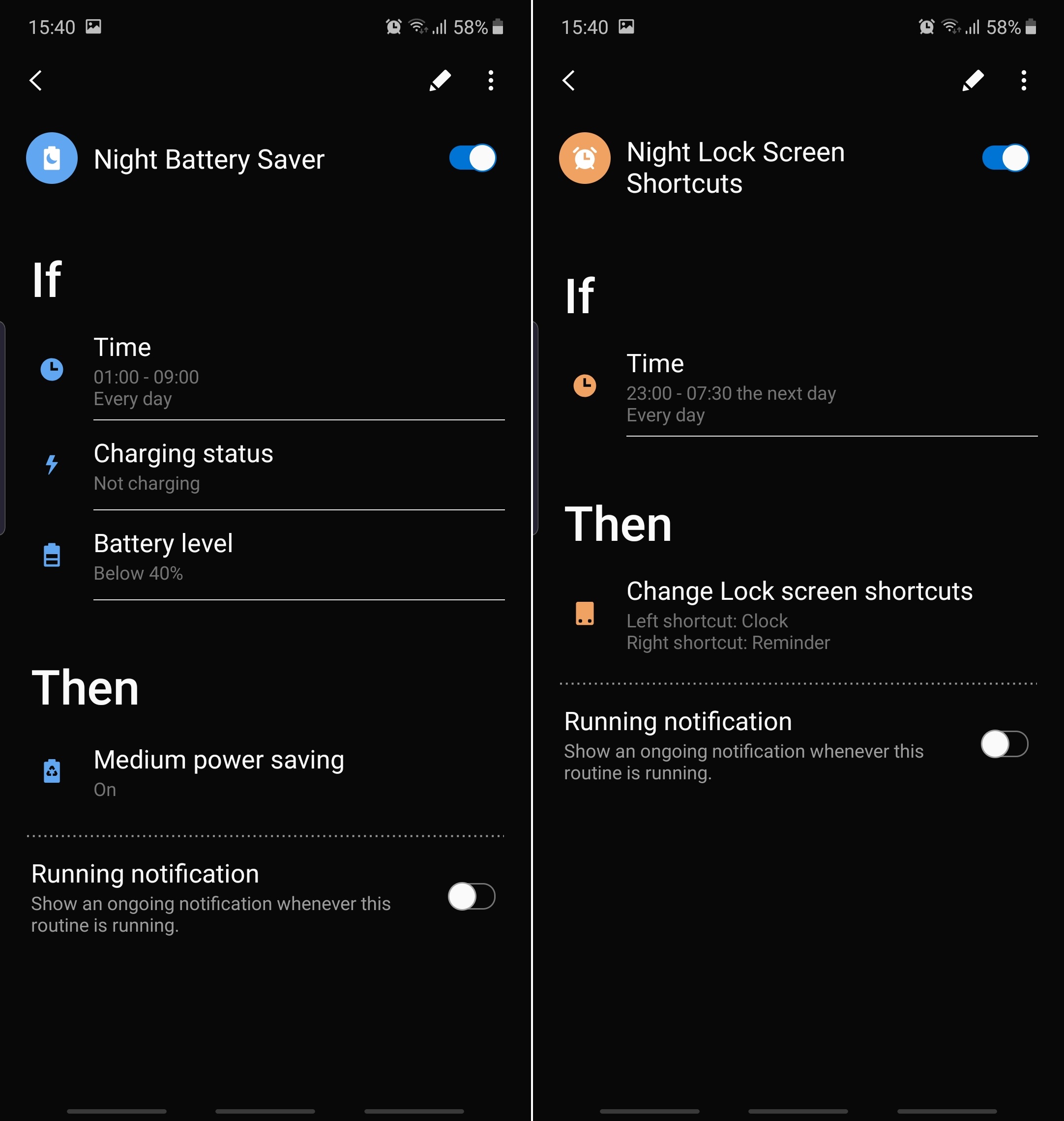
Another Routine that I find useful lets you save battery life in case you fall asleep while watching Netflix, YouTube, or other video streaming services. Nobody wants to wake up to a fully discharged phone and miss that morning alarm. With this Bixby Routine, you can set your phone to minimize apps like Netflix and YouTube if they’re open during predefined night hours and your phone’s battery level is at a dangerously low level.
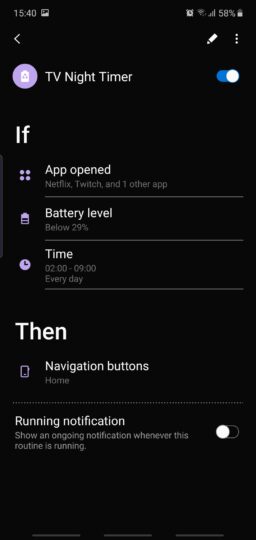
Once again, you can change things around and replace Netflix and YouTube with your video streaming platforms of choice. You can base the Routine solely on time of day (night) or even add a location-based If clause.

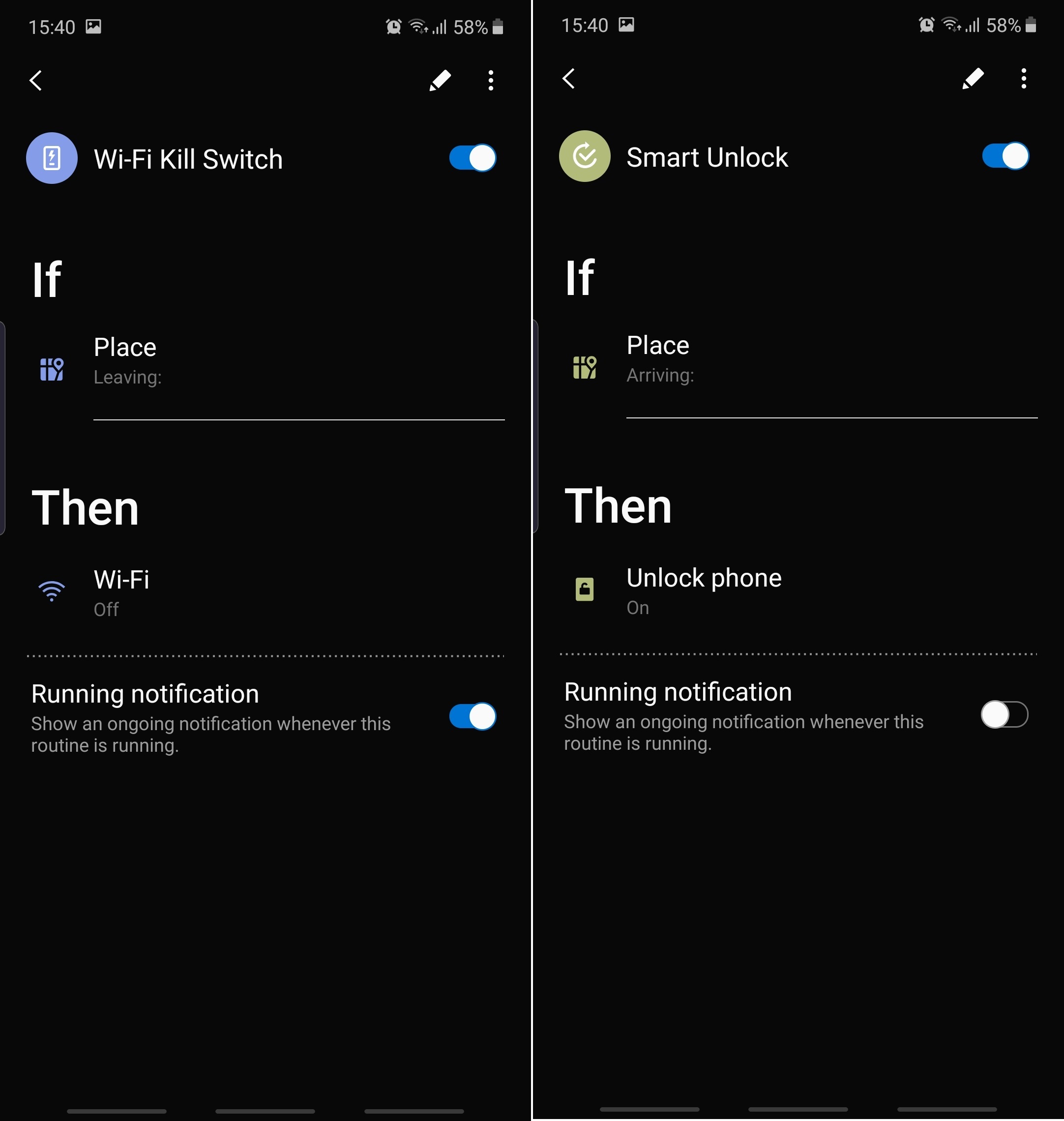
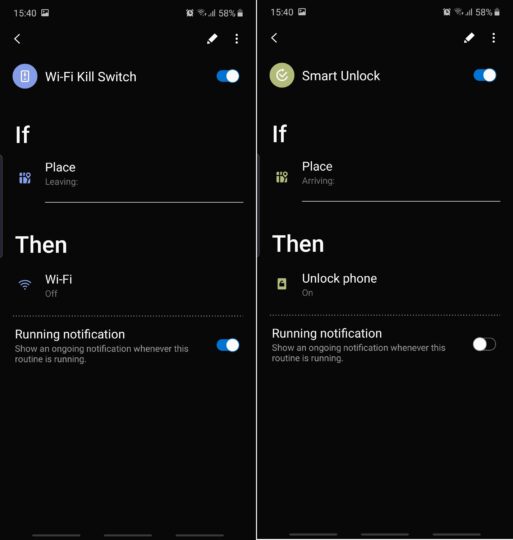
Speaking of location-based Routines, you can create a Wi-Fi kill switch designed to turn off Wi-Fi whenever you leave a predefined location. Or you can create a Routine as an alternative to Google’s Smart Lock and Trusted Places, whereby your phone remains unlocked while you’re at home.
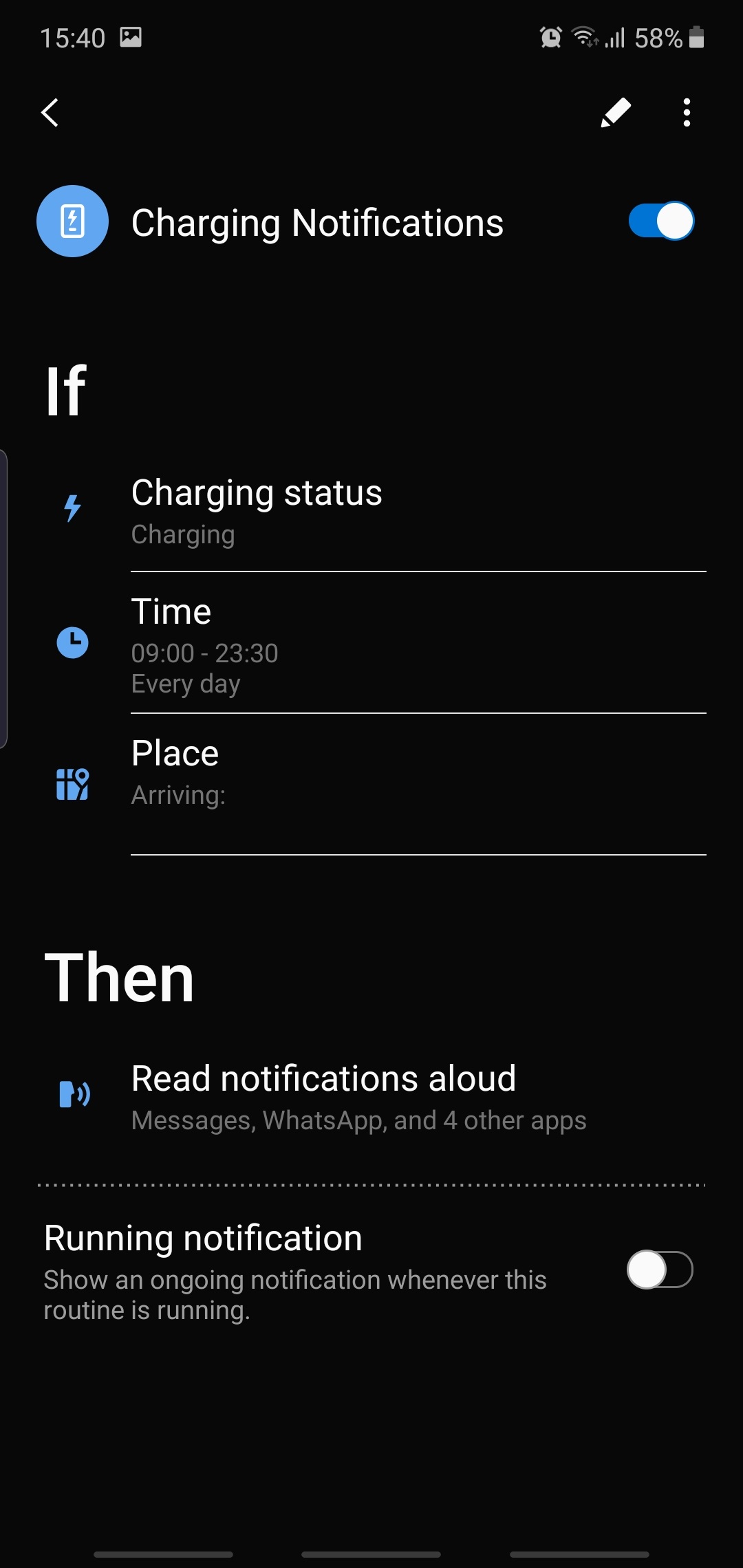
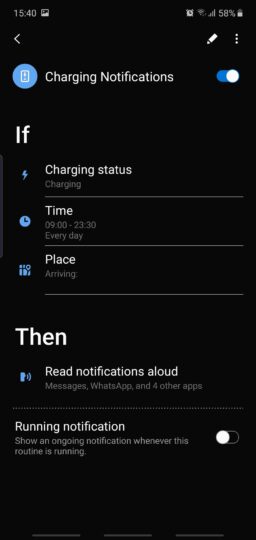
Another useful Routine can read your notifications out loud whenever your phone is charging, as long as you’re in the privacy of your home. You can also set specific times when this Routine is active to avoid loud notifications at night.
You can also create a Night Battery Saver routine that switches to Medium Power Saving at certain hours of the night, especially if you prefer keeping your phone’s Power mode on High performance throughout the day and you don’t want to rely on Adaptive power saving. Or you can create an alternate night Lock Screen with different shortcuts in place of Phone and Camera. Shortcuts like Clock and Reminders might make a bit more sense after a certain hour of the day, but you can mix and match the shortcuts and find the perfect combination for your use cases.
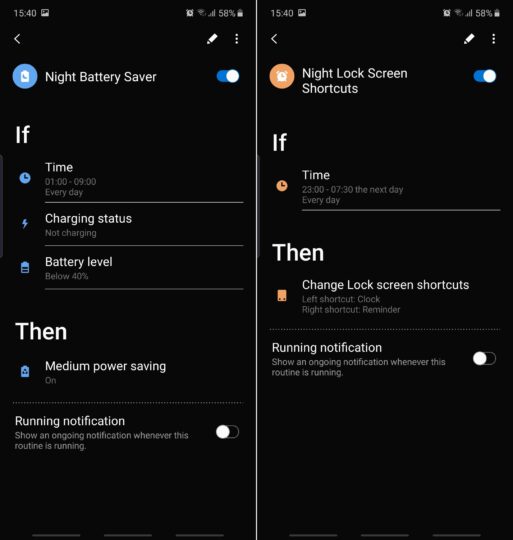

The 7 Bixby Routines shared above are just a preview of what you can do with this Samsung feature. You can also create less automated Routines based on the simple condition of tapping a dedicated home screen shortcut called a Start button. You’ll find the Start button condition at the very bottom of the If list. These types of routines are perhaps less exciting as they only activate manually when you tell them to, but the Start button condition comes with a very comprehensive list of Then actions so there’s even more customization to be had if you want to dig deep enough.

Do you use Bixby Routines? If so, join us in the comment section and share your favorite ones. If not, let us know if you’re going to try any of the Routines listed above.

The post Here are 7 examples of how to use Bixby Routines on a Samsung phone appeared first on SamMobile.


from SamMobile https://ift.tt/2Xmsvvg
via IFTTT

You can now rent select Samsung smartphones in India

The model of subsidizing smartphones through carrier contracts doesn’t exist or work in many markets around the world, and that includes India as well. This makes it difficult for most customers in the subcontinent to buy flagship smartphones, resulting in lower sales for established brands like Samsung, Apple, and others.

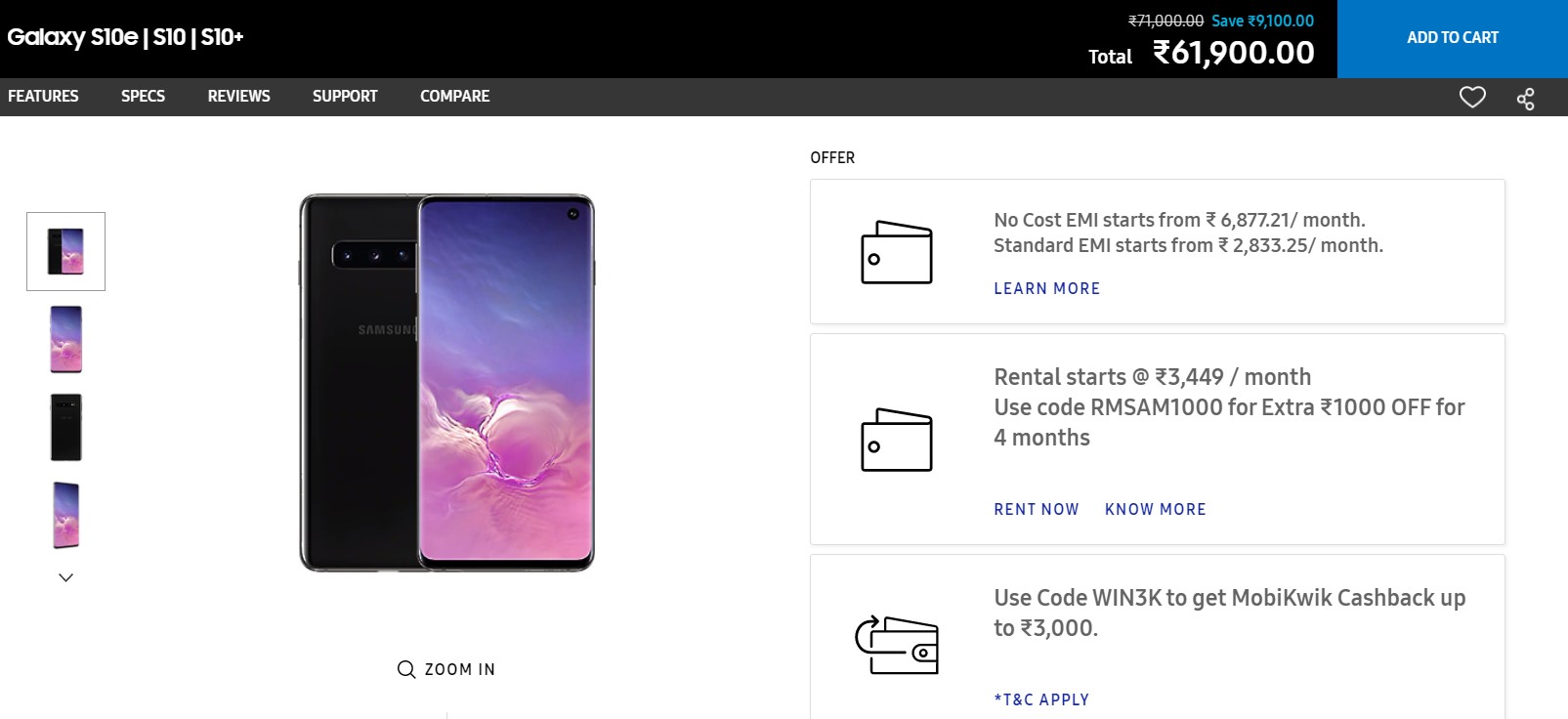
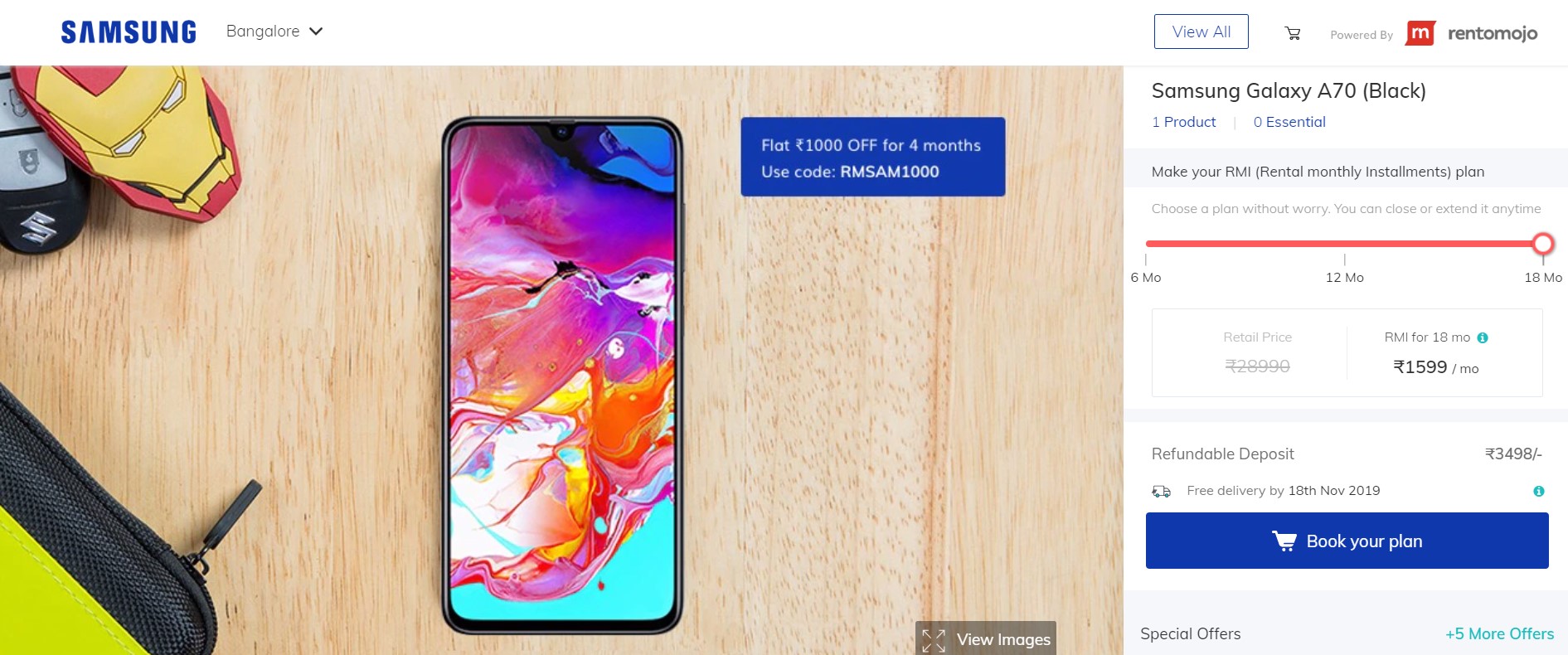
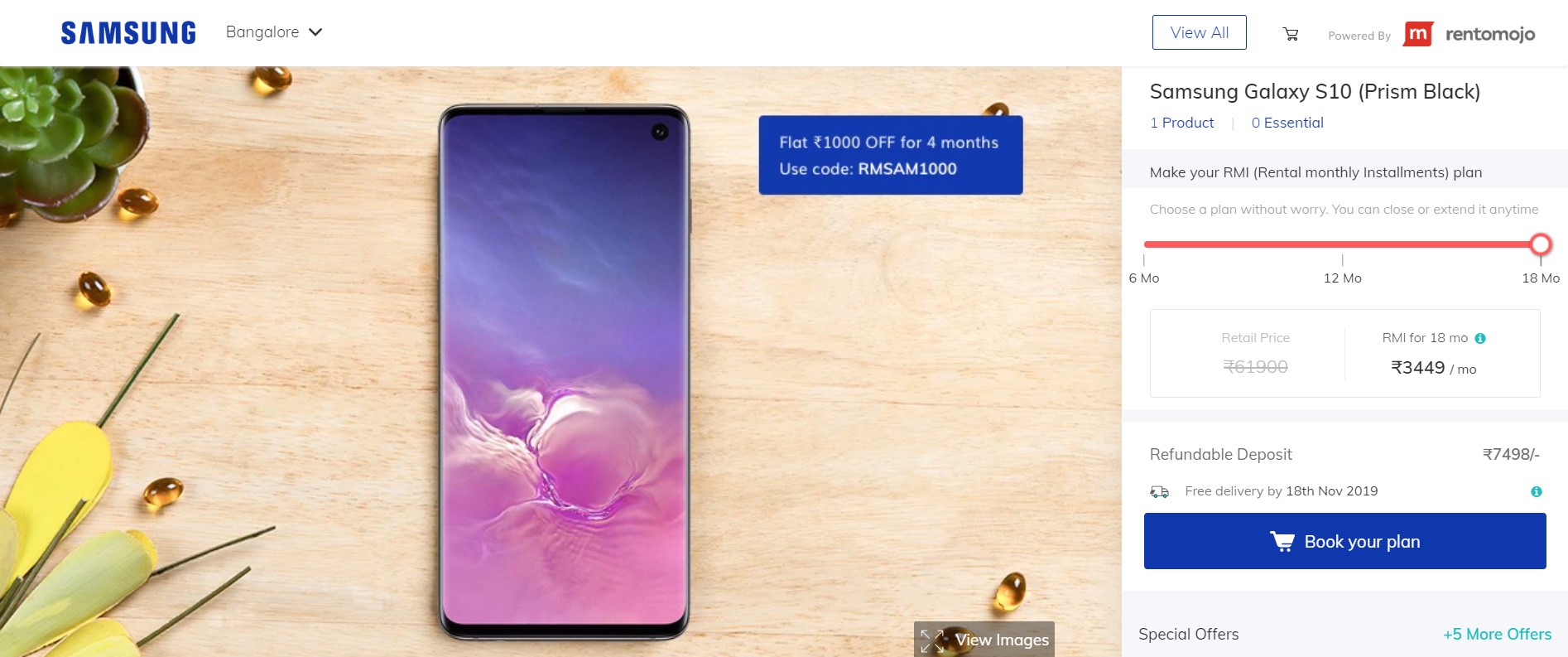
To overcome this challenge, Samsung already offers its products on easy monthly installments. It appears the company is now experimenting with a rental option as well with select devices on its Indian website displaying a ‘Rent now” option. The Korean tech giant seems to have added this option towards the end of September this year in partnership with Rentmojo, an online rental start-up in which Samsung Ventures invested recently.

The entire smartphone rental process is handled by Rentmojo and is currently available only Bangalore, Delhi, Gurgaon, Mumbai, Noida, Chennai, Hyderabad, and Pune cities. Even in these cities, Galaxy S10/S10+, Note 10/10+, Note 9, and Galaxy A70 are the only Galaxy smartphones available on rent currently.

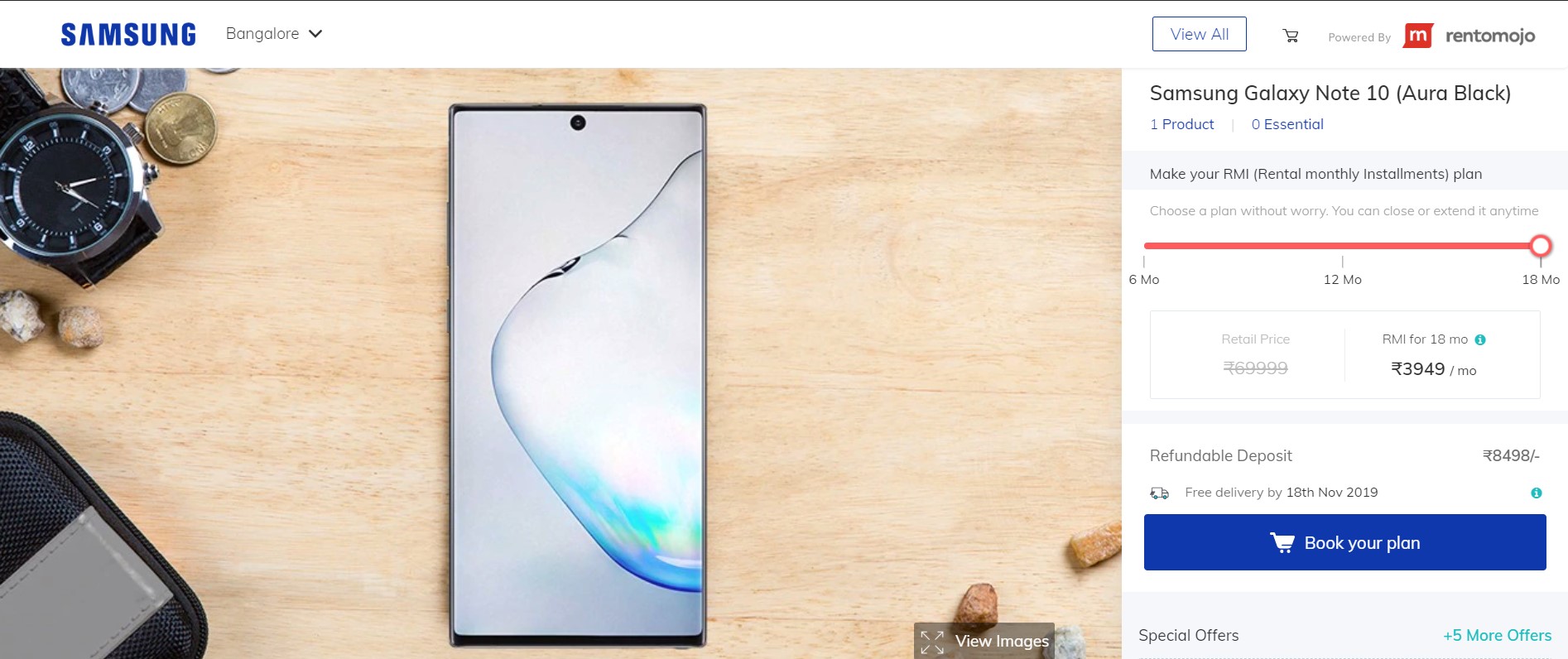
Obviously, RMI (Rental Monthly Instalment) varies by models and the length of the subscription. For example, you can rent a Galaxy Note 10 in Bangalore at Rs. 5549/month for a minimum commitment of six months. The per month rental payment drops to Rs. 4249 and Rs. 3949 if you opt for 12 and 18-month subscriptions, respectively. In each of these cases, customers have to pay a refundable deposit of Rs. 8498. If you rent a Note 10 for 18 months, the total rental payment comes to Rs. 71,082, which is more than the retail price (Rs. 69,999) of the device. If you cancel your subscription before the chosen period, there is a cancellation fee as well.

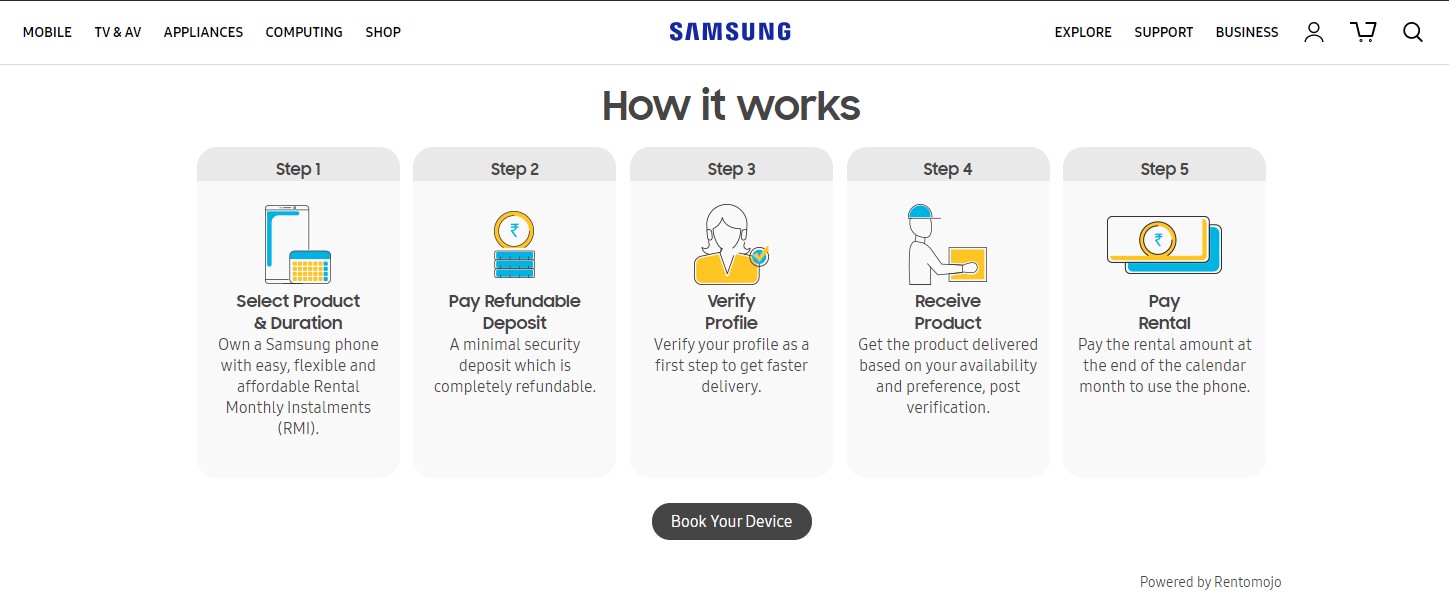
Clearly, renting a smartphone is not a good financial decision for most users. But for those who are interested, the process is relatively simple: select the product and the duration, pay the refundable deposit, and receive the product once your profile is verified. The rental service also comes with a 7-day free trial and a free upgrade after 12 months. If any of this impressive, you can find more details here.

The post You can now rent select Samsung smartphones in India appeared first on SamMobile.


from SamMobile https://ift.tt/2O99QP2
via IFTTT

Samsung’s Q3 market share in Japan increased threefold year-on-year

Samsung’s smartphone market share in Japan was three times larger in Q3 2019 compared to a year ago, according to a recent report from domestic media outlet The Korea Herald citing Strategy Analytics. Samsung reportedly shipped 500,000 smartphones throughout the July-September period, or 100,000 fewer units compared to the previous quarter.

The company’s market share in Japan stood at 6.7 percent at the end of September. It’s a considerable improvement compared to the 2.4 percent market share topped in Q3 2018, but it also isn’t quite as high as the 9.8 percent share registered at the end of June of this year.

Apple is still ahead, but Samsung beats all other rivals

Apple maintains its top spot in Japan with a whopping 63 percent share of the market, up from 50.8 percent in the previous quarter. Given the huge gap between Apple and Samsung in Japan, the latter is threatened more by smaller domestic companies than it is by its biggest rival. Fortunately for Samsung, the company maintained its second place in Japan and continues to be followed by Sharp and Sony in the third and fourth places, respectively.

Neither the Galaxy Note 10 nor the Galaxy Fold have contributed in Q3

It’s important to note that Samsung has achieved a 6.7 percent market share over the third quarter without any help from the Galaxy Note 10 series or the Galaxy Fold. The Galaxy Note 10 lineup launched in August and it was followed by the Galaxy Fold in September in many markets. However, this wasn’t the case for Japan where both the Galaxy Note 10 and the Galaxy Fold have arrived in the country no earlier than October. As a result, their sales figures will count towards the results for the fourth quarter of the year.

You could say that Samsung’s market performance in Japan throughout Q3 was quite good, especially considering the lack of flagship options. But whether or not the figure will improve by the end of Q4 with the help of the Galaxy Note 10 and the Galaxy Fold remains to be seen.

The post Samsung’s Q3 market share in Japan increased threefold year-on-year appeared first on SamMobile.


from SamMobile https://ift.tt/2QnYcTe
via IFTTT

First Galaxy Fold 2 support pages appear on Samsung’s website

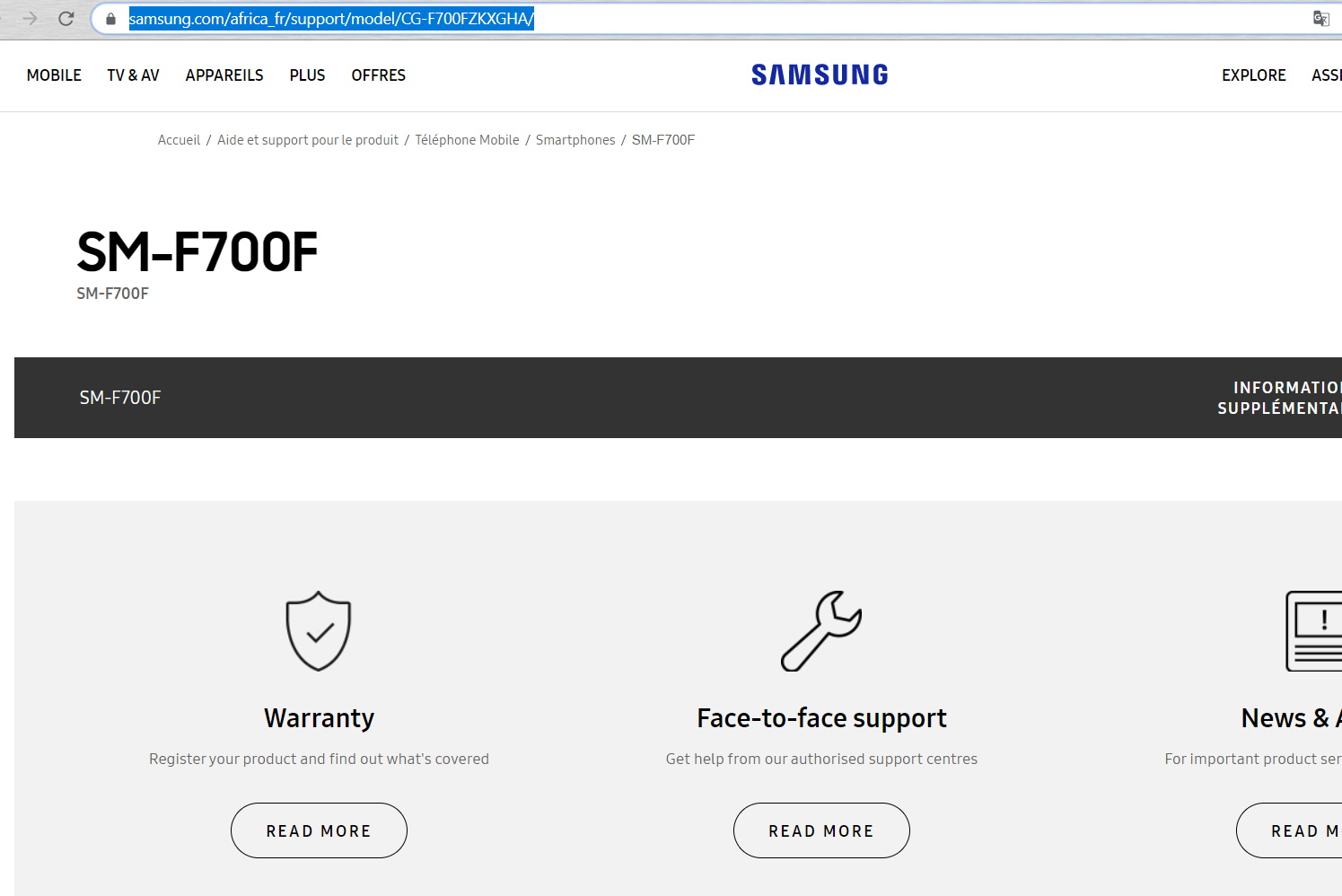
Sooner than expected, Samsung has started adding support pages to its own website for the Galaxy Fold 2, or to be more precise, for the SM-F700F.

First Galaxy Fold 2 support pages go live

It is no secret Samsung is working on a folding phone with a clamshell design, not dissimilar to that of the recently launched Motorola Razr 2019. This device is codenamed Bloom and will carry model number SM-F700F, as we confirmed a while back. And though the device is expected to launch shortly after the upcoming Galaxy S11, it has already been spotted by GalaxyClub on Samsung’s own website.

Samsung Africa has gone ahead and started publishing a number of support pages for the SM-F700F. We can confirm the SM-F700F will indeed be released in several African markets. The support pages do little else than mention the model number, so we are left without any new information about the device itself.

However, the fact that a local Samsung branch has already started gearing up for the launch of the Fold 2 is notable in and of itself. That said, the chance of the device actually being named Galaxy Fold 2 is slim, as the model number reminds us this phone will be part of a different product series than the first Galaxy Fold (SM-F900F), which we reviewed earlier this year.

samsung galaxy fold 2 sm-f700f support page

The post First Galaxy Fold 2 support pages appear on Samsung’s website appeared first on SamMobile.


from SamMobile https://ift.tt/32LlQeV
via IFTTT

جميع الحقوق محفوظة لمدونة الغريب 2013