الخميس، 25 فبراير 2021

One UI 3.1 update makes its way onto the Galaxy S10 series in Europe

It hasn’t been that long since the Galaxy S10 series got updated to Android 11 and One UI 3.0. Samsung began the initial rollout in early January, and the S10 trio made the jump to Android 11 in the USA last week. But despite these recent releases, One UI 3.0 is already old news, at least from the perspective of the Galaxy S10 series. In mid-February, Samsung confirmed that One UI 3.1 will be widely available for more Galaxy devices soon, and sure enough, the Galaxy S10+ (SM-G975F) is now getting One UI 3.1 in Europe.

The One UI 3.1 update is now officially out for the Galaxy S10 series in Switzerland. More specifically, it’s only available for the Galaxy S10+ variant as of this writing, but the Galaxy S10 and Galaxy S10e should follow shortly. The new One UI 3.1 update can be identified by firmware version G97xFXXU9FUBD.

Aside from a refreshed UI, the latest update brings support for wireless DeX and should include the March 2021 security patch. It was released earlier today for the original Galaxy Fold as well as the Galaxy Note 10 series.

Galaxy S10+ owners in Switzerland should have the option of downloading the One UI 3.1 firmware update from the Settings app or by tapping the notification once it arrives. Alternatively, they can refer to our firmware archive where they can download and install the update manually.

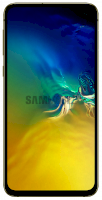
  • Model: SM-G970F
  • Dimensions: Bar: 142.2 x 69.9 x 7.9 mm
  • Display: 5.8 inch / 147.32 mm Dynamic AMOLED Display
  • CPU: Exynos 9820
  • Camera: 12MP

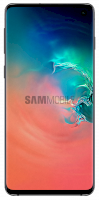
  • Model: SM-G973F
  • Dimensions: Bar: 149.9 x 70.4 x 7.8 mm
  • Display: 6.1 inch / 162.5 mm Dynamic AMOLED Display
  • CPU: Exynos 9820
  • Camera: 12MP

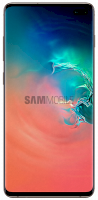
  • Model: SM-G975F
  • Dimensions: Bar: 157.6 x 74.1 x 7.8 mm
  • Display: 6.4 inch / 162.5 mm Dynamic AMOLED Display
  • CPU: Exynos 9820
  • Camera: 12MP

The post One UI 3.1 update makes its way onto the Galaxy S10 series in Europe appeared first on SamMobile.


from SamMobile https://ift.tt/3knxYNG
via IFTTT

Microsoft may hold the keys to a better Galaxy Z Fold 3

Samsung is leading the way to foldables less than two years after the launch of the original Galaxy Fold. Its closest rival in the foldable segment, Huawei, is now following in its footsteps with a new flagship that’s shaped almost exactly like the Galaxy Z Fold 2. Samsung has set the tone for the emerging foldable segment and other OEMs are borrowing the Galaxy Fold form factor, but this doesn’t mean that Samsung’s formula is perfect. It only shows that Samsung has developed the most optimal form factor for foldable display technology thus far, but we’re thinking Samsung can do better, and we think we know how.

I’ve been using the original Galaxy Fold ever since it was released in 2019. The first-generation phone-tablet hybrid impressed me enough to want to continue supporting Samsung’s vision, and several SamMobile team members, myself included, have purchased the Galaxy Z Fold 2 a year later. Needless to say, we’re all fans of the book-like form factor and the internal flexible display, but we’ve also discovered that we all share one common gripe, namely the aspect ratio.

The Galaxy Z Fold 2 is the most adaptable mobile devices on the market. It can be used as a smartphone or a tablet, and the flexible display together with the clever hinge and Flex Mode allow users to push mobile multitasking to a new level. In theory, at least…

The one gripe about the Galaxy Z Fold 2 we all continue sharing after using it for nearly six months is that it has an unusual aspect ratio in two of the three modes in which it can be used. As a tablet, the 7.6-inch, HDR10+ certified Dynamic AMOLED 2X display with support for 120Hz works well enough, though it has a somewhat odd 22.5:18 aspect ratio. As a phone and / or a multitasking machine, though, the Galaxy Z Fold 2 could’ve benefitted greatly from a more conventional aspect ratio.

The Galaxy Z Fold 2’s Cover Screen has a 25:9 aspect ratio and it’s too narrow and tall to use comfortably as a phone. As for multitasking, splitting the inner display in half to run two apps simultaneously leads to a similar problem. The 22.5:18 flexible screen now has a relative aspect ratio of 22.5:9, which isn’t really that helpful for serious productivity work. Once again, the two halves of the flexible display become too tall and narrow, hindering the experience.

Samsung’s Galaxy Fold formula offers enough screen real estate for users to get productive or creative, and we don’t think the phone-tablet hybrid should be getting any bigger or have a different form factor. But after using the Galaxy Fold and its sequel for more than a year combined, we all agree that these phone-tablet hybrids would’ve been far better if they had a more conventional, squarer aspect ratio. And funnily enough, one of Samsung’s software partners, Microsoft, might be holding the key to a better Galaxy Z Fold of the future.

The Galaxy Z Fold design team should take note of the Microsoft Surface Duo

The Galaxy Z Fold 2 and the Microsoft Surface Duo have very little in common aside from the fact that they run Android OS and have a hinged design, though even the hinges are very different in both functionality and execution. The Galaxy Z Fold 2 has a foldable display, whereas the Surface Duo has two screens separated by a hinge. And even though Samsung’s ambitions for the foldable scene may have inspired Microsoft to think outside the box, these two devices aren’t in the same class.

So, why do I bring up the Microsoft Surface Duo then, and why am I suggesting that it might hold the key to Samsung creating the best Galaxy Z Fold and foldable yet? You guessed it: it’s the aspect ratio! Each of the Surface Duo displays has a 4:3 aspect ratio, and when unfolded, the two screens combined have a 3:3 aspect ratio.

As a fan of the Galaxy Z Fold 2, it may be difficult to admit this, but the conventional aspect ratio of the Microsoft Surface Duo opens up a lot more opportunities for creating apps and tools for productivity and multitasking. A squarer display allows for more conventional UIs, and it’s also a much better fit for the S Pen once it will be added to the Galaxy Z Fold.

Perhaps Samsung shouldn’t borrow the exact same aspect ratio from the Surface Duo, as it could make the Galaxy Z Fold too unwieldy for a smartphone, but we’re thinking that the sweet spot is somewhere in-between and Samsung has yet to hit it.

What are your thoughts on the matter? Are you a Galaxy Fold or Galaxy Z Fold 2 owner? Would you agree with us in saying that Samsung’s flagship foldable could benefit from a squarer shape? What has been your experience with Samsung’s foldables so far?

The post Microsoft may hold the keys to a better Galaxy Z Fold 3 appeared first on SamMobile.


from SamMobile https://ift.tt/3pXZ5Qt
via IFTTT

More Galaxy Tab S7 Lite info leaks, RAM not looking too hot

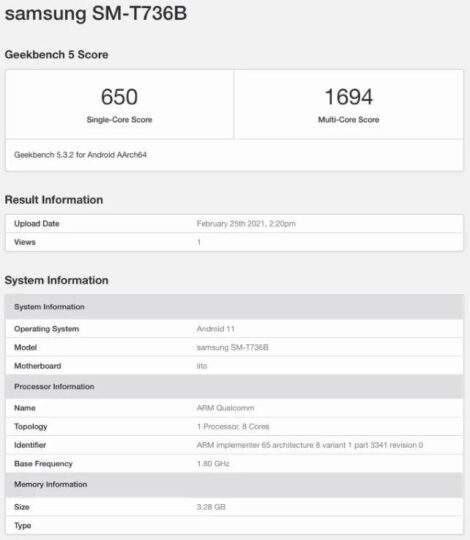
The Galaxy Tab S7 Lite is pretty much guaranteed to be real, by now. We exclusively reported on its existence last month, and references to at least one of its variants were discovered just last week. One such device has now made its way to GeekBench, where it was identified as the SM-T736B.

That designation matches the model number we learned about in January and ostensibly belongs to the 5G-ready version of the Galaxy Tab S7 Lite.

Will this be a huge downgrade compared to the Galaxy Tab S7?

Keep in mind that it’s completely possible Samsung intends to release multiple configurations of the device, beyond the expected LTE/5G split. With that said, the model that made its way to GeekBench featured only 4GB of RAM, which seems to be dancing near the bottom of what we’d expect from a mid-range Android tablet in 2021.

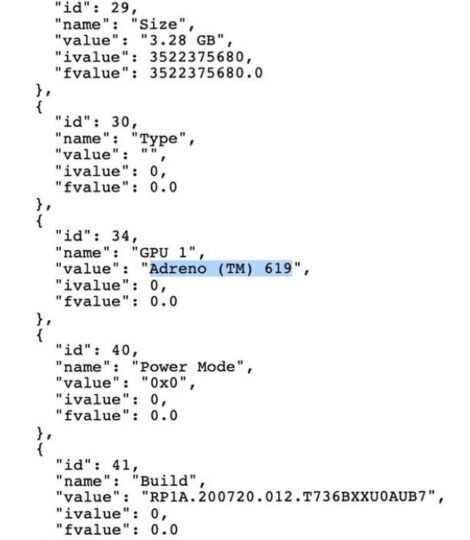
This potential Galaxy Tab S7 Lite looks more promising on the SoC front, with the newly emerged info pointing to the direction of the Snapdragon 750G. Qualcomm launched this mid-range 5G chipset in September but Samsung took a while to adopt it before eventually unveiling the Galaxy A42 5G. The scenario was doubly so intriguing given how Samsung’s the one actually producing the Snapdragon 750G, Adreno 619 in tow.

For the sake of context, this level of performance puts the suspected Galaxy Tab S7 Lite roughly on par with the Galaxy Note 10+. But synthetic benchmark ratings are never a reliable indicator of real-world performance.

Samsung isn’t expected to launch the Galaxy Tab S7 Lite before summer, so it might be a while until we hear about it again.

The post More Galaxy Tab S7 Lite info leaks, RAM not looking too hot appeared first on SamMobile.


from SamMobile https://ift.tt/3knPDET
via IFTTT

Samsung expands Vevo TV partnership beyond the U.S.

Samsung (TV Plus) and media giant Vevo are expanding their existing content distribution partnership beyond the United States, the duo revealed this week. More specifically, the Vevo Pop channel just launched on Samsung TV Plus in the United Kingdom. The British version of the service offers the same ad-supported Internet TV experience that’s been available stateside since 2019.

That said, we won’t have to wait another year and a half until the partnership’s next milestone is official. Vevo intends to keep integrating its programming into Samsung TV Plus in the immediate future. The company hence confirmed this European expansion will continue sometime before the year’s end.

Is Vevo Samsung’s MTV?

As popular as Vevo Pop is stateside, it would be unfair to label it the new MTV or anything of the sort. Not just from a standpoint of global success, but also due to the fact Samsung’s Internet television service offers an actual MTV property in its portfolio – MTV Pluto TV.

Vevo’s content network also happens to span way more than just a single pop music channel. Like, five of them, to be exact. But the media company’s also not interested in any kind of exclusivity binding it to Samsung’s over-the-top solution. That’s why it’s debatable who’s benefitting from this deal more. Samsung, for its part, admits Vevo properties are some of its best-performing channels in the U.S.

In reality, Vevo and Samsung hardly need each other to keep doing what they’ve been doing. But that doesn’t mean this distribution deal won’t continue to yield results.

The post Samsung expands Vevo TV partnership beyond the U.S. appeared first on SamMobile.


from SamMobile https://ift.tt/2NDRPMH
via IFTTT

One UI 3.1 brings wireless DeX on PC support to all Galaxy flagships

With the Galaxy S21 series, Samsung introduced One UI 3.1 with various new features. One of those new features includes Wireless DeX on PC, which allows users to cast the DeX experience wirelessly from their Galaxy devices to compatible PCs. The South Korean firm is now is rolling out the feature to older Galaxy devices with the One UI 3.1 update.

The Wireless DeX on PC feature is now available on all recent Galaxy flagship devices running One UI 3.1, starting from the Galaxy S10 series. It is available on the Galaxy S10e, Galaxy S10, Galaxy S10+, Galaxy Note 10, Galaxy Note 10+, Galaxy S20, Galaxy S20+, Galaxy S20 Ultra, Galaxy S20 FE, Galaxy Note 20, Galaxy Note 20 Ultra, Galaxy Fold, Galaxy Z Flip, Galaxy Z Flip 5G, and the Galaxy Z Fold 2.

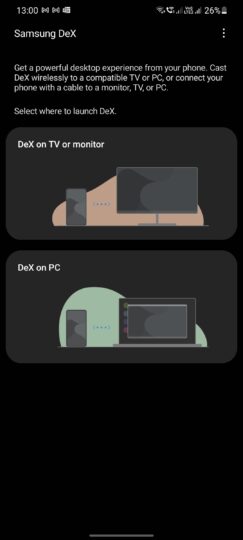
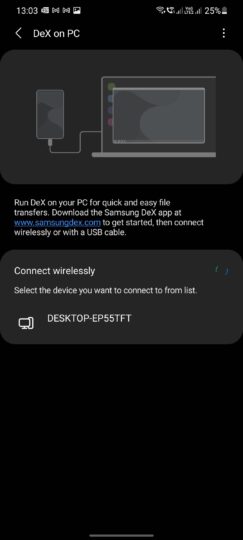
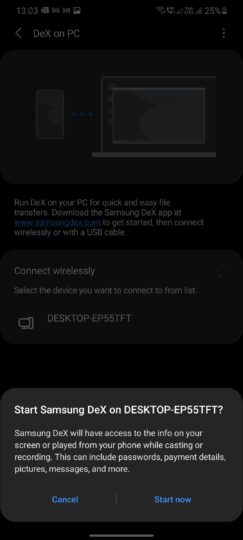
You’ll have to install the Samsung DeX for PC app on your macOS or Windows 10 computer to run Wireless DeX on PC. The compatible PC and the Galaxy device need to be connected to the same Wi-Fi network for the feature to work. Once you start Samsung DeX on your Galaxy device, tap on DeX on PC, select your PC from the list of wireless devices, and then tap on Start now.

Samsung’s desktop mode can be used on a monitor or a TV using a USB Type-C to HDMI cable (or adapter). It can also be used wirelessly on devices that have the Miracast feature. It can also be used on macOS and Windows PCs using the Samsung DeX for PC app.

Samsung Dex Wireless On PC Samsung Dex Wireless On PC Samsung Dex Wireless On PC

The post One UI 3.1 brings wireless DeX on PC support to all Galaxy flagships appeared first on SamMobile.


from SamMobile https://ift.tt/3qV2Qrh
via IFTTT

Galaxy Fold starts getting the One UI 3.1 update

Samsung had recently announced that it will release the One UI 3.1 update to older Galaxy devices. The update has already reached the Galaxy S20 series, Galaxy Note 20 series, Galaxy Z Fold 2, Galaxy Z Flip, Galaxy Z Flip 5G, and the Galaxy Note 10 series. Now, the update has reached the original Galaxy Fold.

The company has started rolling out the One UI 3.1 update to the Galaxy Fold in France, and it should gradually reach other markets soon. The latest update carries firmware version F900FXXU4EUBF. While we don’t have the official changelog and the security patch information yet, the new update could come with minor UI changes, Private Share, Object Eraser Tool, Google Home smart devices controls, and the ability to remove GPS location data from images while sharing them. It won’t get the Google Discover Feed feature, though.

If you are a Galaxy Fold user in France, and if you haven’t received the One UI 3.1 update yet, you can manually search for it by navigating to Settings » System updates and tapping on Download and install on your device.

The Galaxy Fold was Samsung’s first foldable smartphone, and it was launched in February 2019 with Android 9 on board. It received the Android 10 update last year and the Android 11-based One UI 3.0 update last month.

The post Galaxy Fold starts getting the One UI 3.1 update appeared first on SamMobile.


from SamMobile https://ift.tt/3uy8NfU
via IFTTT

الأربعاء، 24 فبراير 2021

Samsung starts rolling out One UI 3.1 update to Galaxy Note 10+

Samsung debuted One UI 3.1 with the Galaxy S21 series and then rolled it out to older devices within a matter of weeks. Over the past few days, the One UI 3.1 update was released to the Galaxy S20 series, Galaxy Note 20 series, Galaxy Z Flip, Galaxy Z Flip 5G, Galaxy Z Fold 2, and the Galaxy Tab S7 series. Now, the update has started rolling out to the Galaxy Note 10 series.

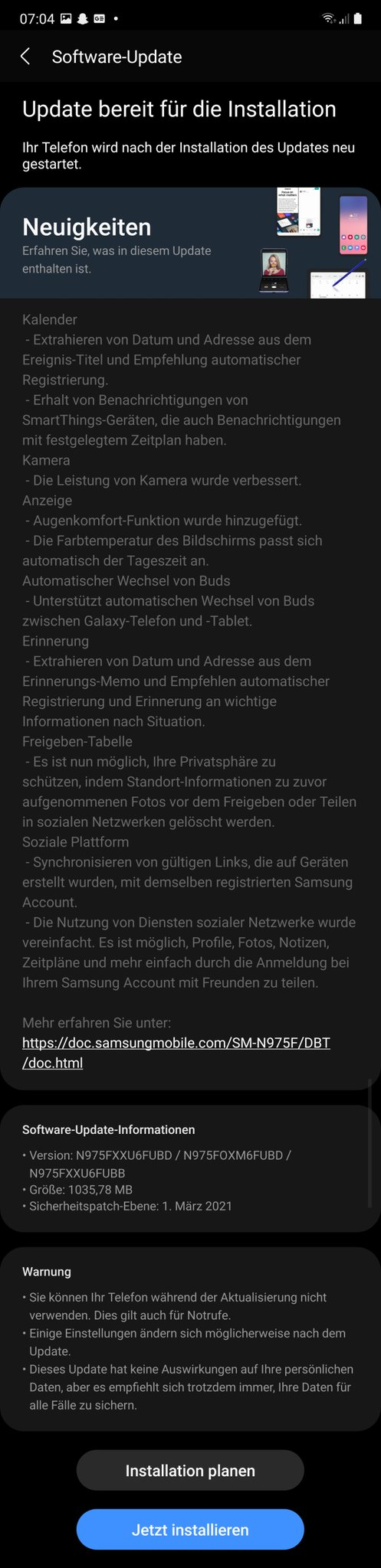
The Galaxy Note 10+ has started receiving the One UI 3.1 update in Germany. The latest update, which carries firmware version N975FXXU6FUBD, also brings along the March 2021 security patch. The update has a file size of more than 1GB, so we advise you to use a Wi-Fi network to download it. The update could gradually reach the Galaxy Note 10 and the Galaxy Note 10+ in other markets as well.

The latest update brings Private Share, Eye Comfort Shield, the ability to remove GPS location data from images while sharing them, automatic switching of Galaxy Buds between compatible Galaxy devices, and minor UI changes. It also lets users automatically extract the date and address from the event title in the Calendar app and the Reminder app. Samsung states in the changelog that the performance of the camera has been improved as well.

The Galaxy Note 10 series had received the Android 11-based One UI 3.0 update in December 2020. If you haven’t received the latest update yet, you can check for it manually by navigating to Settings » System update and tapping on Download and install. Once this update is available in our firmware database, you can download it from there to flash it manually.

Samsung Galaxy Note 10+ One UI 3.1 Update Changelog

The post Samsung starts rolling out One UI 3.1 update to Galaxy Note 10+ appeared first on SamMobile.


from SamMobile https://ift.tt/2ZPg8tC
via IFTTT

جميع الحقوق محفوظة لمدونة الغريب 2013