الاثنين، 17 مايو 2021

Galaxy Tab S7 FE gets same battery as Samsung’s most expensive tablet

It’s been in the news for a while that Samsung is going to launch a new tablet. This device is going to be a stripped-down version of the Galaxy Tab S7+. There have been a few reports about what this tablet might end up being called.

The tablet was initially expected to be unveiled as the Galaxy Tab S7 Lite. We later heard that it would hit the market as the Galaxy Tab S7+ Lite. Last week, it was rumored that this tablet will actually be called the Galaxy Tab S7 XL Lite. None of that may have been true.

Samsung is now making a “Fan Edition” tablet

The Google Play Console listing for this tablet refers to it as the Galaxy Tab S7 FE. Samsung brought the Fan Edition branding back last year with the Galaxy S20 FE. It also said that new Fan Edition models will now be released regularly.

So while we wait for the Galaxy S21 FE, Samsung is going to extend this branding to its tablet lineup. Another crucial detail has surfaced today. The Galaxy Tab S7 FE is going to have the same battery capacity as the Galaxy Tab S7+, the most expensive tablet Samsung sells.

The battery inside the Galaxy Tab S7 FE bears part number EB-BT975ABY. Its rated capacity is 9,800mAh and the advertised capacity is 10,090mAh. This is exactly the same as the Galaxy Tab S7+. Its charging speed will also be as high as that of the Galaxy Tab S7+.

This is shaping up to be quite an interesting product. Earlier reports have revealed that the Galaxy Tab S7 FE will feature a 12.4-inch TFT LCD display with S Pen support. It will run on the Qualcomm Snapdragon 750G processor with 4GB RAM. Android 11 will be installed out of the box. Samsung is expected to unveil the tablet in the coming months.

The post Galaxy Tab S7 FE gets same battery as Samsung’s most expensive tablet appeared first on SamMobile.


from SamMobile https://ift.tt/3y9N1RA
via IFTTT

Samsung’s new foldable and UDC panels reveal an exciting future

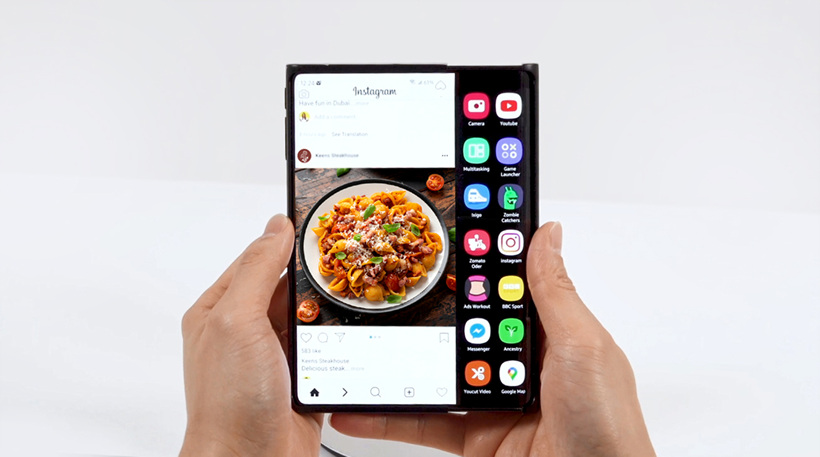
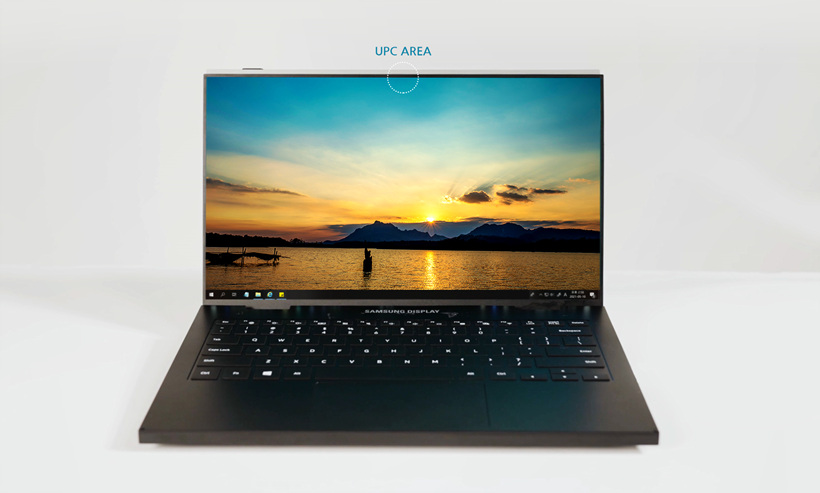
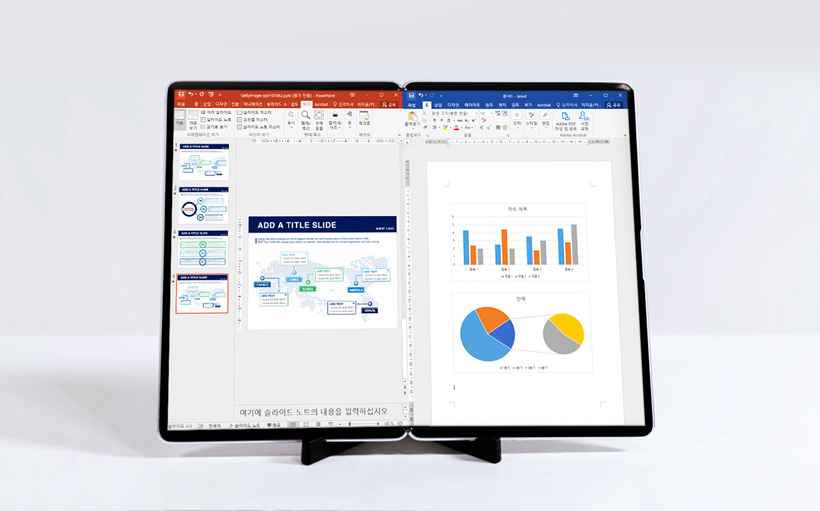
Samsung Display today unveiled a range of new OLED panel options. This gives us a glimpse of the kind of devices that we can expect from the company in the future. The new options include significantly larger foldable panels in addition to an Under Display Camera panel.

The new display panels were unveiled as part of the Display Week 2021 exhibition. Much as you’d expect, it’s an online exhibition in which Samsung is participating virtually.

Samsung has some exciting devices up its sleeve

It has long been rumored that Samsung is going to introduce a bi-folding Galaxy device. Samsung Display’s new S-Foldable OLED panel is going to make that happen. This panel can be part of an in-folding or out-folding device. When folded twice, the device can be used like a smartphone and when it’s unfolded, it reaches a maximum size of 7.2-inches.

Samsung’s slidable displays have long been the subject of much speculation as well. The company has a ton of patents on the technology as well. A prototype of the Slidable OLED display has now been revealed. This technology makes it possible to extend the screen horizontally without requiring any folds.

In what might be an indication that foldable Samsung tablets are coming, Samsung Display has shown off a 17-inch foldable panel today. It provides the screen real estate worthy of a tablet in the 4:3 aspect ratio when unfolded. A tablet with this display panel will certainly be a lot more versatile than anything on the market today.

Lastly, the company has unveiled its Under Panel Camera display. The solution it has showcased today is for notebooks, something that we’ve seen it tease previously as well. The front camera is mounted under the panel to allow for a truly edge-to-edge panel.

However, it’s expected that we’ll see this technology on Samsung’s phone in the near future. The Galaxy Z Fold 3 is likely to feature an Under Display Camera.

The post Samsung’s new foldable and UDC panels reveal an exciting future appeared first on SamMobile.


from SamMobile https://ift.tt/3w8lTAE
via IFTTT

الأحد، 16 مايو 2021

Galaxy A72 May 2021 update brings video call effects feature

The May 2021 security update is rolling out to more and more Galaxy devices as the month progresses, as Samsung continues to show the competition how to lead in the software support game, and the Galaxy A72 is now joining the club. A new update is rolling out to the Galaxy A72 with the latest security patch in tow, along with a One UI 3.1 feature that has, so far, been exclusive to Samsung’s 2021 flagship devices.

Taking Zoom calls from home? You can now remove your unkept room from the background

This feature is called video call effects and lets you add custom backgrounds to video calls made using third-party apps such as Zoom, Microsoft Teams, and Google Duo. You can use a basic blur effect (like the blur effect you get in the camera’s portrait mode), add an opaque color to the background (the color is selected automatically by the phone), or set a custom image from your gallery. It works great, and now that it’s arriving on the Galaxy A72, we can expect more mid-range and non-flagship Galaxy phones to get the feature as well.

The May update for the Galaxy A72 also includes improvements to camera performance, call quality, and file sharing via Quick Share (similar to the May update for many other Galaxy devices). It’s available in Russia at the moment but is likely to reach more countries within the next week or two, though some markets may have to wait longer as the Galaxy A72 falls in the quarterly update schedule and that means availability of new updates isn’t as consistent as it is for devices in Samsung’s monthly schedule.

You can check if the update — firmware version A725FXXU2AUE1 — is available for your Galaxy A72 by opening the phone’s Settings app, navigating to Software update, and selecting Download and install. You will also find the latest firmware in our archive and can download it to manually upgrade your phone using a Windows PC. Just be sure to do a data backup if you take that route and follow the instructions carefully.

The post Galaxy A72 May 2021 update brings video call effects feature appeared first on SamMobile.


from SamMobile https://ift.tt/33LynSu
via IFTTT

السبت، 15 مايو 2021

Galaxy A30’s Android 11 update is out, that’s it for this phone

The Android 11 update is hitting yet another mid-range model in Samsung’s smartphone lineup. On the receiving end this time around is the Galaxy A30. The update has been released in China and comes with software version A3050ZCU4CUE1. The included security patch isn’t the absolute latest, but it is dated April 1, 2021, which is pretty solid for a phone that completed its second birthday two months back.

Speaking of which, Android 11 is the last major update for the Galaxy A30. It launched running Android Pie and is not included in Samsung’s new software update policy. The new One UI version accompanying Android 11 should be 3.1, though we can’t confirm that at the moment since the update is only available in China. Also, Samsung China follows its own schedule for software releases, so it remains to be seen how soon Android 11 will reach the Galaxy A30 in other markets.

Still, given Samsung’s recent track record, a global release shouldn’t take too long, and we’ll be sure to let you know once availability of the update expands to cover more regions. If you live in China, you can download the update over the air right away by going into the phone’s Settings app, selecting Software update, and tapping Download and install. The Android 11 firmware can also be manually flashed on the phone with a Windows PC using the relevant file that you can download from our firmware archive.

The post Galaxy A30’s Android 11 update is out, that’s it for this phone appeared first on SamMobile.


from SamMobile https://ift.tt/3bp5xvF
via IFTTT

Weekly SamMobile Quiz 73 – Come test your Samsung knowledge!

Fancy yourself as a Samsung superfan? Take our quiz and see how many answers you can get right! This is a fun activity that we do with our readers every week to test their knowledge of the Korean giant. The quiz has a mix of easy and difficult questions that most fans should be able to answer without turning to Google.

We make a new quiz for you every weekend so we hope that you’ll participate and learn a thing or two about Samsung in the process! Don’t forget to share the results of the quiz with your friends and see if you can outscore them. A little competition never hurt anybody!

Remember, if the quiz isn’t loading properly, please access the non-AMP version of this webpage.

The post Weekly SamMobile Quiz 73 – Come test your Samsung knowledge! appeared first on SamMobile.


from SamMobile https://ift.tt/3hwMfrY
via IFTTT

May 2021 security update reaches Galaxy Note10 Lite

The Galaxy Note 10 Lite is the newest Samsung smartphone to have received the May 2021 Android security update. Well, the newest to have started receiving it, to be exact. This month’s over-the-air upgrade for the iconic smartphone – identified by PDA version N770FXXU7EUE2 – has just been spotted in Spain several hours back. Much like that build number suggests, this OTA package is intended for the international variants of the device (SM-N770F).

No other country joined the deployment just yet, at least none that we can presently confirm. Still, the timing of this release coincides with the urgent manner in which Samsung tends to update the Galaxy Note 10 Lite every month. Meaning you should expect another swift international rollout to take place any day now.

The May 2021 update is guaranteed to reach you shortly, but we can’t say the same about another Galaxy Note Lite…

As per usual, the security patch level dated May 1st, 2021 has already been reaching several dozen Samsung devices since the turn of the month. This particular firmware that’s sanctioned for the Galaxy Note 10 Lite also appears to be bundled with some user-facing additions beyond the scheduled cybersecurity improvements. At least based on the aforementioned PDA and Samsung’s long-established software versioning practices.

Either way, anyone who’s not thrilled with the idea of waiting for the new security update to hit their device can also try triggering the installation manually. The way to do so starts by navigating to Settings > Software update > Download and install. Of course, that trick is unlikely to work outside of Spain right now, but it never hurts to try. And if it does hurt, our firmware archives are here to assist by providing you with yet another alternative for procuring the Galaxy Note 10 Lite May 2021 patch.

In less awesome news for fans of the Galaxy Note series… whelp, there is no Galaxy Note series. Not any longer, at least. As some temporary consolation, however, Samsung has at least cut the price of the entire Galaxy Note 20 range to some rather ridiculous levels as part of a perpetually refreshing deal that’s still fairly easy to take advantage of. So, how about it – one more Note for old time’s sake?

  • Model: SM-N770F
  • Dimensions: Bar: 163.7 x 76.1 x 8.7 mm
  • Display: 6.7 inch / 170.18 mm Super AMOLED Plus
  • CPU: Exynos 9810
  • Camera: 12MP

The post May 2021 security update reaches Galaxy Note10 Lite appeared first on SamMobile.


from SamMobile https://ift.tt/3uP1dO0
via IFTTT

الجمعة، 14 مايو 2021

Two Samsung Internet features I wish were on Google Chrome

Samsung Internet is the most popular Samsung app on Android, because it’s one of the few Samsung apps that work on non-Galaxy devices and because the Korean giant’s browser app is pretty amazing. However, I stick to Chrome on both phone and desktop thanks to the cross-syncing support enabled by having a Google account, something that you don’t get with Samsung Internet (partly because Samsung Internet doesn’t have a desktop version).

That does mean that I miss out on some of the nice features that you get on Samsung Internet, and there are two in particular — rather simple ones at that — I wish Google would adopt for Chrome on Android.

One-click disabling of autoplaying videos

I’m pretty sure no one out there likes websites that start playing videos on their pages automatically, especially those that also automatically play sound instead of autoplaying videos on mute and leaving it up to the viewer to turn on the sound. Many websites are guilty of this, including some popular gaming websites that I frequent, and it can become quite frustrating after a while.

Samsung Internet, however, has a great solution to this: You can simply go into its settings and toggle the button that says Allow autoplay videos (located inside the Useful features submenu). Chrome has no such provision. It does allow you to mute websites from playing audio, but there’s no setting to disable autoplaying videos. The mute setting is customizable and lets you mute audio on individual sites or disable audio completely, but a separate option for simply preventing all sites from autoplaying videos would be a lot better.

Automatic dark mode on websites that have a dark theme

We here at SamMobile give our readers the option of selecting a dark theme (which looks great, if we may say so ourselves), and there are many websites out there that let you toggle between a light and dark theme. Galaxy devices (and pretty much every smartphone) come with a system-wide dark mode as well, and Samsung Internet automatically switches between light and dark themes for a website based on the dark mode setting for your phone or tablet.

This is something Chrome cannot do, and that can mean you cannot turn on the dark theme on some websites at all, because some websites do not let the reader switch themes on the fly and/or require the user to login before they can do so. With Samsung Internet, that is not the case. Samsung Internet simply loads a website in its light or dark theme based on your device setting, while giving you the option to switch between the two through the browser’s quick access menu.

Considering a dark mode is present on pretty much every Android device out there, it shouldn’t be hard for Google to bake in automatic syncing of a website’s theme with Android’s dark mode. All Chrome has right now is a theme selector for the browser’s user interface, which just isn’t enough.


What Samsung Internet features would you like to see on Google Chrome (or one of the many other browsers available on Android)?

The post Two Samsung Internet features I wish were on Google Chrome appeared first on SamMobile.


from SamMobile https://ift.tt/3eKYE9R
via IFTTT

جميع الحقوق محفوظة لمدونة الغريب 2013