الاثنين، 2 أغسطس 2021

[List] Galaxy devices that will be eligible for One UI 4.0 (Android 12) update

One UI 4.0 has yet to be officially confirmed, but unless Samsung decides to make drastic changes to the design philosophy around its software platform, then One UI 4.0 will be based on Android 12, and it will represent a major evolutionary step over One UI 3.5. The latter version is expected to debut in August with the Galaxy Z Fold 3 and Galaxy Z Flip 3.

One UI 4.0 will be Samsung’s ninth One UI version upgrade. As expected, some Galaxy phones and tablets will be eligible for this future Android 12-based firmware update, while others will be left behind. Furthermore, Android 12 will be the last major firmware update for some of those Galaxy devices, and they were labeled accordingly in the list below.

This is a comprehensive list of Galaxy phones and tablets that are expected to receive Android 12 together with One UI 4.0 at some point in the future, according to Samsung’s Android update policy.

As a reminder, Samsung is now offering three major Android OS updates to select Galaxy phones and tablets instead of two. This policy is valid for Galaxy devices that were released 2019 onwards with Android 9 or later. The list below accounts for this new firmware update policy.

Please note that the list isn’t final and could change in the future. We will keep it updated in the coming months as we get closer to the release of Android 12 and One UI 4.0.

Galaxy devices that should be getting Android 12 / One UI 4.0

Galaxy S series

Galaxy Note series

Galaxy Z series

Galaxy A series

Galaxy M series

Galaxy F series

Galaxy Xcover series

Galaxy Tab series

The post [List] Galaxy devices that will be eligible for One UI 4.0 (Android 12) update appeared first on SamMobile.


from SamMobile https://ift.tt/3fFPQBl
via IFTTT

الأحد، 1 أغسطس 2021

Really old Galaxy devices will soon lose access to Google services

If you are someone who is still using a Galaxy device running Android 2.3.7 (Gingerbread) or an even older operating system version, you will soon lose access to Google services. The internet search giant has announced that it won’t let you sign in to your Google account on such devices starting September 27, 2021.

Android 2.3.7 was released ten years ago, and it runs on devices like the Galaxy S, Galaxy 3, Galaxy 5, Galaxy Epic 4G, Galaxy Mini, Galaxy Pop, Galaxy M Pro, Galaxy Y Pro, Galaxy S II, and the Galaxy Tab. You can still access some Google services on such Galaxy devices via the web browser, but the experience will likely be less than satisfactory.

Google mentioned on its official forum, “As part of our ongoing efforts to keep our users safe, Google will no longer allow sign-in on Android devices that run Android 2.3.7 or lower starting September 27, 2021. If you sign into your device after September 27, you may get username or password errors when you try to use Google products and services like Gmail, YouTube, and Maps.”

Since Samsung sold millions of Galaxy devices running Android before 2012, there will likely be more than few users who are still using devices that will be severely affected by Google’s latest move. The company recommends updating the software on such devices (if possible), moving to a device running newer software, or using a web browser to access Google services.

Are you still rocking any Galaxy device running Android 2.3.7 or know someone who does? Let us know in the comments section below.

The post Really old Galaxy devices will soon lose access to Google services appeared first on SamMobile.


from SamMobile https://ift.tt/3A5cqMF
via IFTTT

New leaked live photos offer a close-up view of the Galaxy Watch 4 Classic

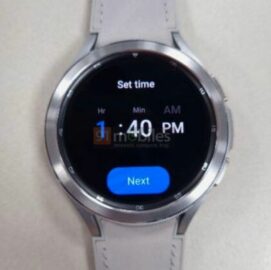
The upcoming Galaxy Watch 4 series has so far been leaked in spades, not only through unofficial channels but also by Samsung executives and brand ambassadors. The amount of leaked renders so far makes it virtually impossible to be taken by surprise by anything related to the design of the Galaxy Watch 4 and Galaxy Watch 4 Classic, but the latter model was recently leaked in a couple of live photos, just in case you needed another reminder of what to expect come August 11.

The live photos depict the Galaxy Watch 4 Classic, in particular, and showcase the wearable in black and silver with leather straps to match. As explained before, Samsung’s naming convention has changed this year, and the Galaxy Watch 4 Classic is the model that features a physical rotating bezel around the circular display. Samsung is expected to unveil the Galaxy Watch 4 model without a rotating bezel on the same day as the Classic variant.

Two Galaxy Watch 4 Classic variants are on their way

The Galaxy Watch 4 Classic is expected to go on sale in two sizes: 42mm and 46mm. The model captured in these live photos is seemingly the larger of the two, though it’s difficult to be certain without a direct point of comparison.

Regardless of size, the Galaxy Watch 4 Classic should be powered by a new Exynos W920 chipset that’s more powerful and energy-efficient than the Exynos 9110. Depending on size, the wearable should be powered by a 247mAh or 340mAh battery.

Samsung is expected to unveil the Galaxy Watch 4 Classic at Galaxy Unpacked next week. Pricing details remain unclear but rumors hint at a price range of 470-530 euro.

The post New leaked live photos offer a close-up view of the Galaxy Watch 4 Classic appeared first on SamMobile.


from SamMobile https://ift.tt/3A1ft8C
via IFTTT

Galaxy Buds 2 price in Europe is reportedly 15% lower than the Buds Pro at launch

Alleged pricing details for the upcoming Galaxy Buds 2 earbuds have emerged once again, and by the sound of it, Samsung intends to price the upcoming wearables lower than it did the Galaxy Buds Pro at launch.

According to the latest leak passed along the Twitter grapevine, the Galaxy Buds 2 earbuds will be available in Europe for around 170 euro, which would make them 30 euro cheaper than the Galaxy Buds Pro at launch. However, there’s no concrete information as to whether or not this alleged 170 euro price tag includes taxes, so we’ll reserve judgement until Samsung breaks the silence.

Nevertheless, this isn’t the first report to suggest that the Galaxy Buds 2 could be priced lower than the Galaxy Buds Pro, even if the upcoming earbuds also boast ANC (Active Noise Cancellation). Past rumors have priced the Galaxy Buds Pro in the USA at anywhere between $149 and $169.

Galaxy Buds 2 will be Samsung’s third attempt at TWS with ANC

The Galaxy Buds 2 are rumored to become Samsung’s third pair of wireless earbuds to feature Active Noise Cancellation (ANC) after the Galaxy Buds Live and the Galaxy Buds Pro. Word on the street is that the Galaxy Buds 2 will last for around 20 hours on a single charge with ANC enabled, or up to 29 hours without ANC.

Samsung’s upcoming earbuds are said to be able to gain 1 hour of battery life in a short 5-minute charging session. Other than that, the earbuds are expected to have three microphones, Bluetooth 5.2 connectivity, and an IPX2 rating.

IPX2 means that the Galaxy Buds 2 haven’t been tested for dust resistance, but offer a water resistance rating of 2 (out of 9) on the ingress protection rating guide. A “2” means that the earbuds are protected against water drops for up to 10 minutes, but this rating doesn’t make them waterproof. Technically, it doesn’t even make them splash proof, but it’s better than nothing.

Samsung has confirmed that its next Galaxy Unpacked event is scheduled to take place on August 11, and that’s when we’ll see the Galaxy Buds 2 on stage for the first time. Stay tuned.

The post Galaxy Buds 2 price in Europe is reportedly 15% lower than the Buds Pro at launch appeared first on SamMobile.


from SamMobile https://ift.tt/3jaqxJz
via IFTTT

السبت، 31 يوليو 2021

Weekly SamMobile Quiz 84 – Come test your Samsung knowledge!

Fancy yourself as a Samsung superfan? Take our quiz and see how many answers you can get right! This is a fun activity that we do with our readers every week to test their knowledge of the Korean giant. The quiz has a mix of easy and difficult questions that most fans should be able to answer without turning to Google.

We make a new quiz for you every weekend so we hope that you’ll participate and learn a thing or two about Samsung in the process! Don’t forget to share the results of the quiz with your friends and see if you can outscore them. A little competition never hurt anybody!

Remember, if the quiz isn’t loading properly, please access the non-AMP version of this webpage.

The post Weekly SamMobile Quiz 84 – Come test your Samsung knowledge! appeared first on SamMobile.


from SamMobile https://ift.tt/3C48JZ6
via IFTTT

Galaxy Z Fold 3 and Galaxy Z Flip 3 wallpapers now available for download

There has been no shortage of leaks concerning the Galaxy Z Fold 3 and the Galaxy Z Flip 3. Samsung has already confirmed its August 11 Unpacked event so we may not have to wait for long until these devices are unveiled.

The leaks are going to continue right up until the event. The latest only today brings us the Galaxy Z Fold 3 and Galaxy Z Flip 3 wallpapers.

Download Galaxy Z Fold 3 and Galaxy Z Flip 3 wallpapers

Samsung has gone for an impressionist vibe with the new wallpapers for the upcoming foldable devices. It’s keeping that butterfly silhouette for the Galaxy Z Fold 3’s wallpapers as we’ve seen with the Galaxy Z Fold 2. It just appears to be more ornate and as if it’s been painted by hand.

We get similar vibes from the Galaxy Z Flip 3 wallpapers. The colors are vibrant and the abstract design really makes them look quite unique. The Galaxy Z Flip 3 wallpapers are available in four different color combinations.

You can download them now and start using them on your existing foldable devices should you so desire. They’ll only really fit the Galaxy Z Fold 2 and the Galaxy Z Flip. This leak includes the wallpaper for the Galaxy Z Fold 3’s cover display as well. The color and design is consistent with the wallpaper for the internal foldable display.

The post Galaxy Z Fold 3 and Galaxy Z Flip 3 wallpapers now available for download appeared first on SamMobile.


from SamMobile https://ift.tt/3rJPSOk
via IFTTT

الجمعة، 30 يوليو 2021

A few potential fixes to WhatsApp chat backup getting stuck on your Galaxy phone

Many WhatsApp users are reporting an issue related to the backup function getting stuck at 100%. The problem seemingly affects Android users, Galaxy smartphone owners, and iOS customers in equal measure. It crosses all mobile platforms, and as of this writing, there doesn’t seem to be a definitive solution in sight. Nevertheless, WhatsApp users can try to work around the problem with a bit of tweaking.

The WhatsApp chat backup problem

WhatsApp has a backup option that syncs data with Google Drive. Users have to opt-in before using it, and once they do, they can allow WhatsApp to perform regular backups of chat messages and media files to Google Drive.

A notification — complete with a progress bar — is sent to the user when a backup starts. So far, so good. But the problem that many WhatsApp users face is a progress bar that gets stuck at 100%.
From our own experience using WhatsApp on various Galaxy smartphones, the backup process finishes eventually, though it’s painfully slow and can take hours.

Various solutions have been attempted to fix this issue permanently, but none seem to have worked. There are, however, several possible temporary solutions that could help you get past the stuck backup process faster.

The problem is very likely to reoccur later on, and some fixes might not always work. But if you’re one of the many WhatsApp users getting nagged by this issue, then there’s not much else you can do except for waiting or trying to work around the issue. So, here are a few fixes that Galaxy smartphone owners and affected WhatsApp users can try.

Ways to try getting WhatsApp chat backup unstuck

First things first, let’s get the more obvious possible solution out of the way by making sure that you’re using the latest version of WhatsApp from the Google Play Store. It’s up to you if you want to update your existing app or uninstall it first, but if you’re looking for a clean install, you’re more likely to get results from clearing the app’s cache.

Clear WhatsApp cache

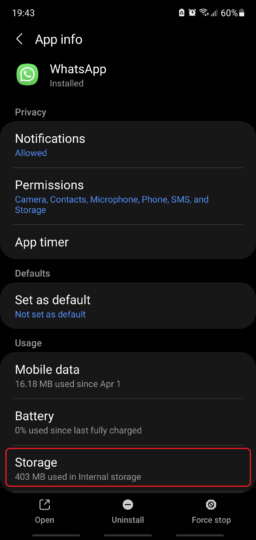
Tap and hold the WhatsApp shortcut and tap the small “i” (info) button. Alternatively, you can open the Settings app on the phone, go to Apps, scroll all the way down to and tap WhatsApp.

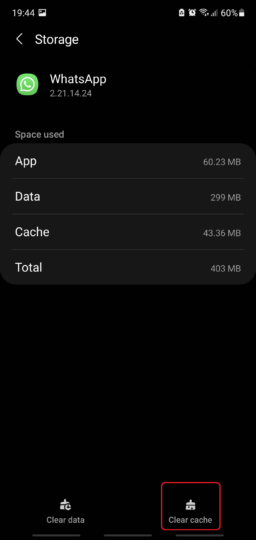
Then, go to Storage and tap the Clear Cache button in the lower-right corner of the screen.

Make sure you have the right Google account linked with WhatsApp

WhatsApp uses Google Drive to sync data, which means that a Google account is required to perform automated backups. And while this is unlikely to be the root of your problem, there’s a theory that if the Google account linked to WhatsApp is inactive, the backup-to-Google Drive function could run into issues.

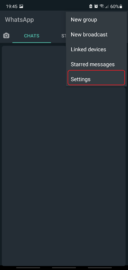
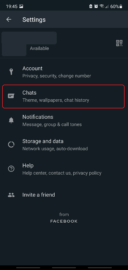
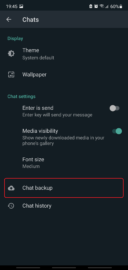
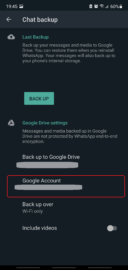
To check if you have the right Google account linked with WhatsApp, open the app and tap the three-dot button located in the upper-right corner. Go to Settings and access the Chats category. From there, tap Chat backup and make sure you have the right Google account.

It could be as easy as closing WhatsApp from recent apps

If the backup process runs in the background for long enough, it could be that the system puts WhatsApp to sleep as the backup process continues. It might look like the process is stuck at 100%, but it might’ve been completed already while the app was asleep. What you’re seeing could be a leftover notification.

If you want to test this, simply close WhatsApp from recent apps when you think that the chat backup process is stuck, and then reopen the app. Notice if the backup process completes or hangs again.

Back up WhatsApp chat over Wi-Fi only

4G is fast enough for backing up WhatsApp chats, not to mention the fact that 5G is becoming more widespread, but if your app decides to perform a backup when you’re not connected to a Wi-Fi network, then poor cellular coverage might lead to the WhatsApp backup progress bar slowing down or even getting stuck.

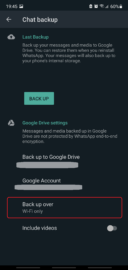
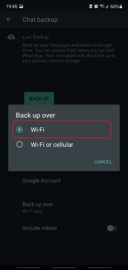
You can set WhatsApp to back up chat data only when the phone is connected to a Wi-Fi network. To do this, open the Settings menu in WhatsApp, access the Chats category and Chat backup section, and tap Back up over. Select Wi-Fi only from the drop-down menu.

Lower the amount of data WhatsApp has to back up by excluding video

WhatsApp lets users back up not only text chat to Google Drive but video messages as well. Evidently, videos take a lot more data than text, and this could make the progress bar look like it’s stuck, or it might even cause the backup process to freeze.

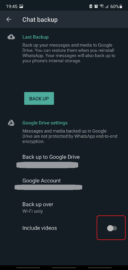
You can try lowering the amount of WhatsApp chat data being backed up to Google Drive by excluding video data. To do this, go to WhatsApp settings and access Chats, tap Chat backup, and turn off Include videos.

Delete existing WhatsApp chat backups from Google Drive

And lastly, you can try deleting your WhatsApp chat backup files from Google Drive and start fresh with a new backup, assuming you’ve taken the proper precautions in case you need to preserve your data.

To delete WhatsApp chat backups in Google Drive, open your Google Drive account in your browser, click the cog icon in the top-right corner to access Settings, then click Manage Apps and look for WhatsApp Messenger. Click the Options drop-down menu and clear the app data.

The post A few potential fixes to WhatsApp chat backup getting stuck on your Galaxy phone appeared first on SamMobile.


from SamMobile https://ift.tt/3zSpiFz
via IFTTT

جميع الحقوق محفوظة لمدونة الغريب 2013