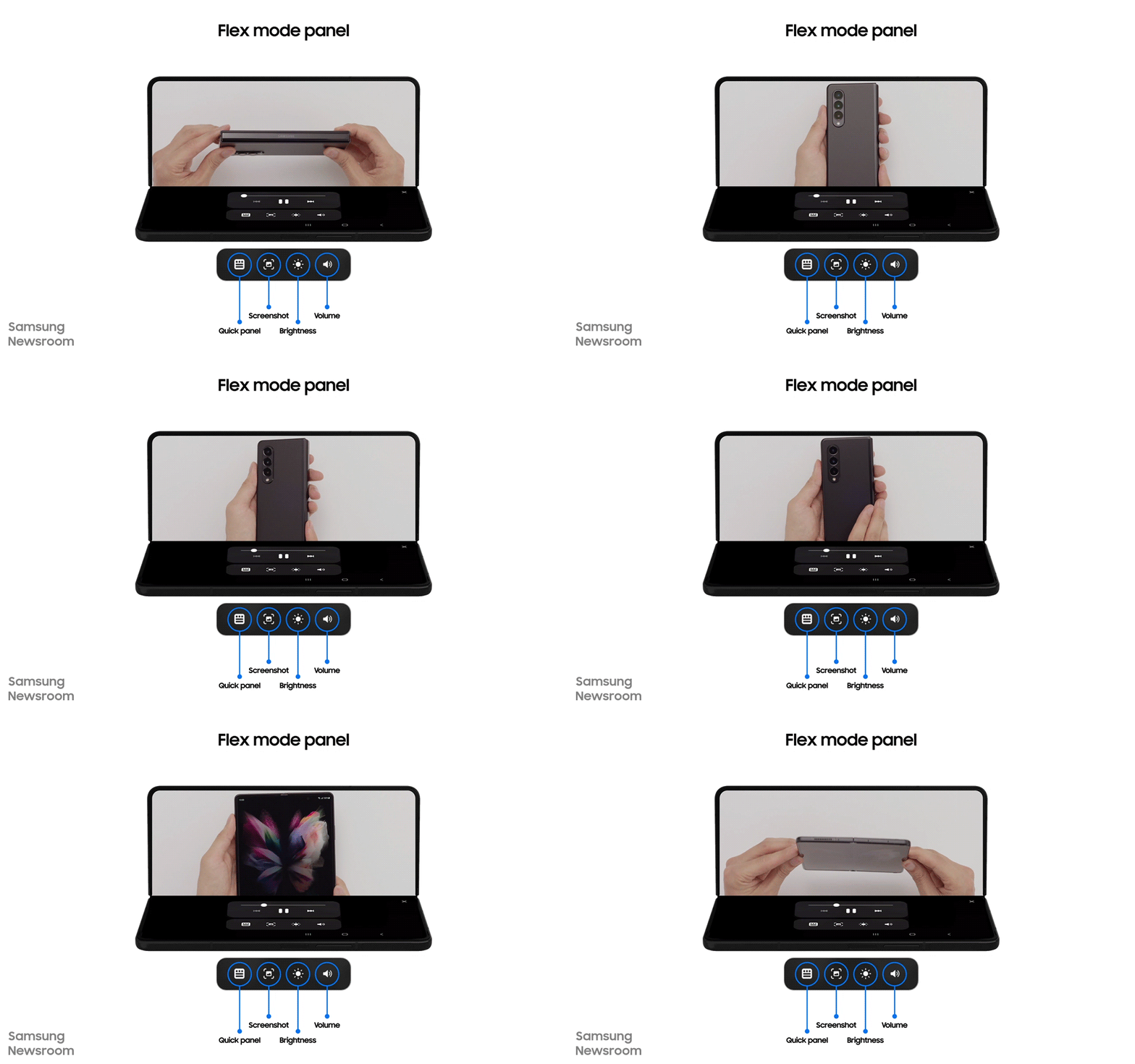
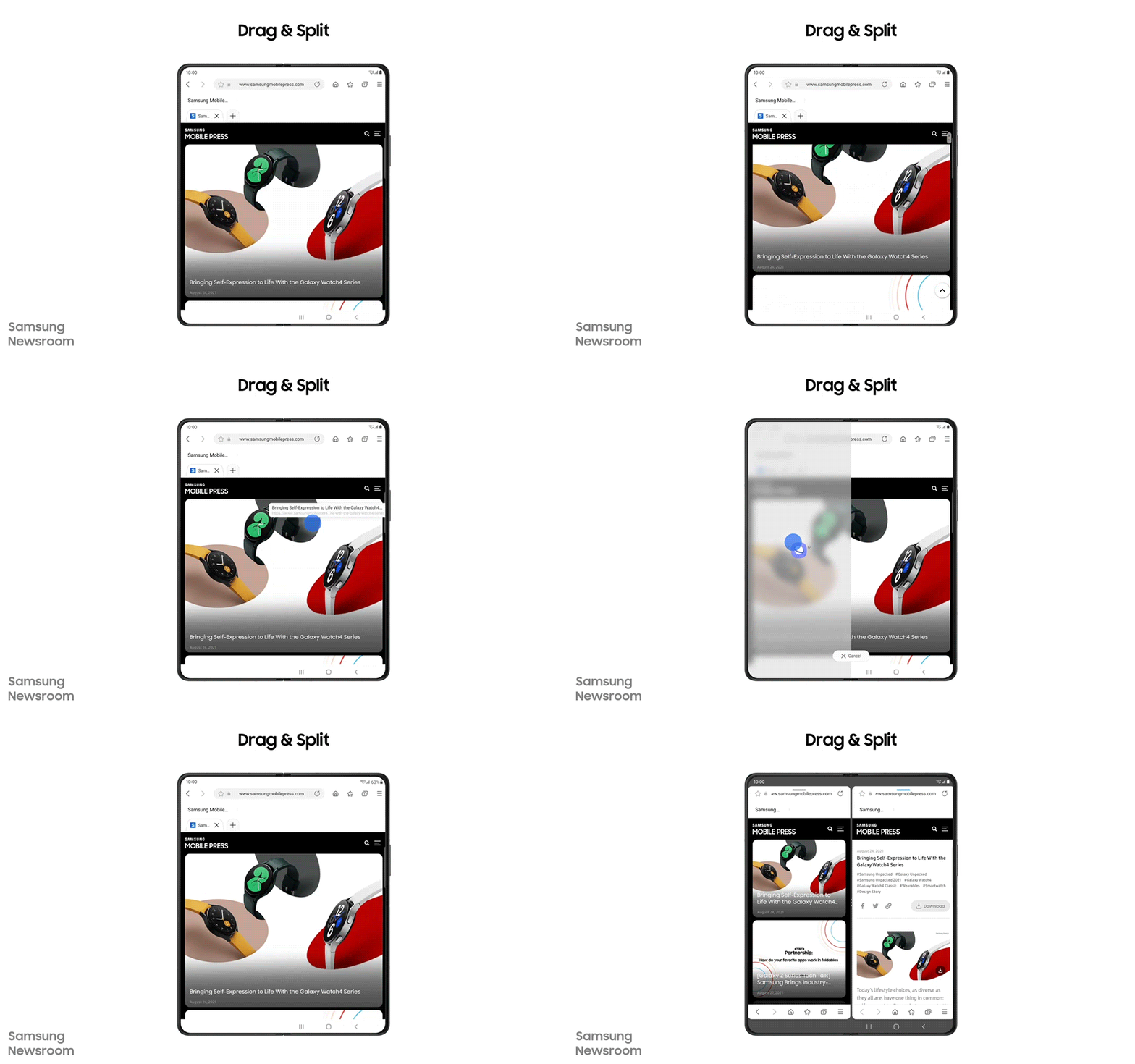
The Galaxy Z Flip is getting the One UI 3.1.1 update with firmware version F700FXXU8EUH5 in various European markets. The clamshell foldable smartphone will get Flex Mode Panel and Drag & Split support, but not much else. Other features include Bedtime Mode quick setting toggle, faster pop-up menus, and slightly improved stock app designs. The update also includes the September 2021 security patch, which fixes various bugs and vulnerabilities.
With the Flex Mode Panel feature, you can force apps to support Flex Mode even if they don’t support it by default. You can do that by turning on Flex Mode Panel in the ‘Labs’ section on the Galaxy Z Flip and then enabling it for the apps of your choice. The Drag & Split feature allows you to open links on the other half of the foldable screen. It works on Samsung Internet, Samsung Notes, My Files, Messages, MS Office, OneNote, and OneDrive.
If you are a Galaxy Z Flip user in Europe, you can check for the latest software update by navigating to Settings » Software update and clicking on Download and install. You can also download the latest firmware file from our firmware database and flash it manually.
Drone shows are still somewhat of a rarity, despite the widespread availability of drones. Samsung even uses them to deliver some of its smartphones. Coordinating one can be especially frustrating, given that there are quite literally a lot of moving parts involved. Samsung Netherlands put up one hell of a drone show centred around its newest foldables, the Galaxy Z Fold 3 and Galaxy Z Flip 3.
It starts off with the drones spelling the Samsung logo, which then morphs into the Galaxy Z Fold 3. It proceeds to ‘unfold’ itself and an S Pen emerges from thin air and proceeds to tap the screen. The first section of the show is quite short and ends with the drones spelling out “Galaxy Z Fold 3”.
Things begin to get a lot more exciting once the Galaxy Z Flip 3 is introduced. We can see two clamshell-like devices orbiting each other before unfolding into two Galaxy Z Flip 3s, which proceed to text each other and even manage to capture a selfie.
The show ends with the drones forming to what appears to be a scannable QR code and then implores users to find out more about the foldables at Samung.com.
So far, the Galaxy Z Fold 3 and Galaxy Z Flip 3 have been fairly well-received, even in budget-conscious markets like India. Given the tepid Galaxy S21 series sales and the fact that there is no Galaxy Note device due this year, Samsung’s mobile division is banking on foldable sales to make up for the deficit. Things look good so far, but only time will tell if they met Samsung’s sales expectations.
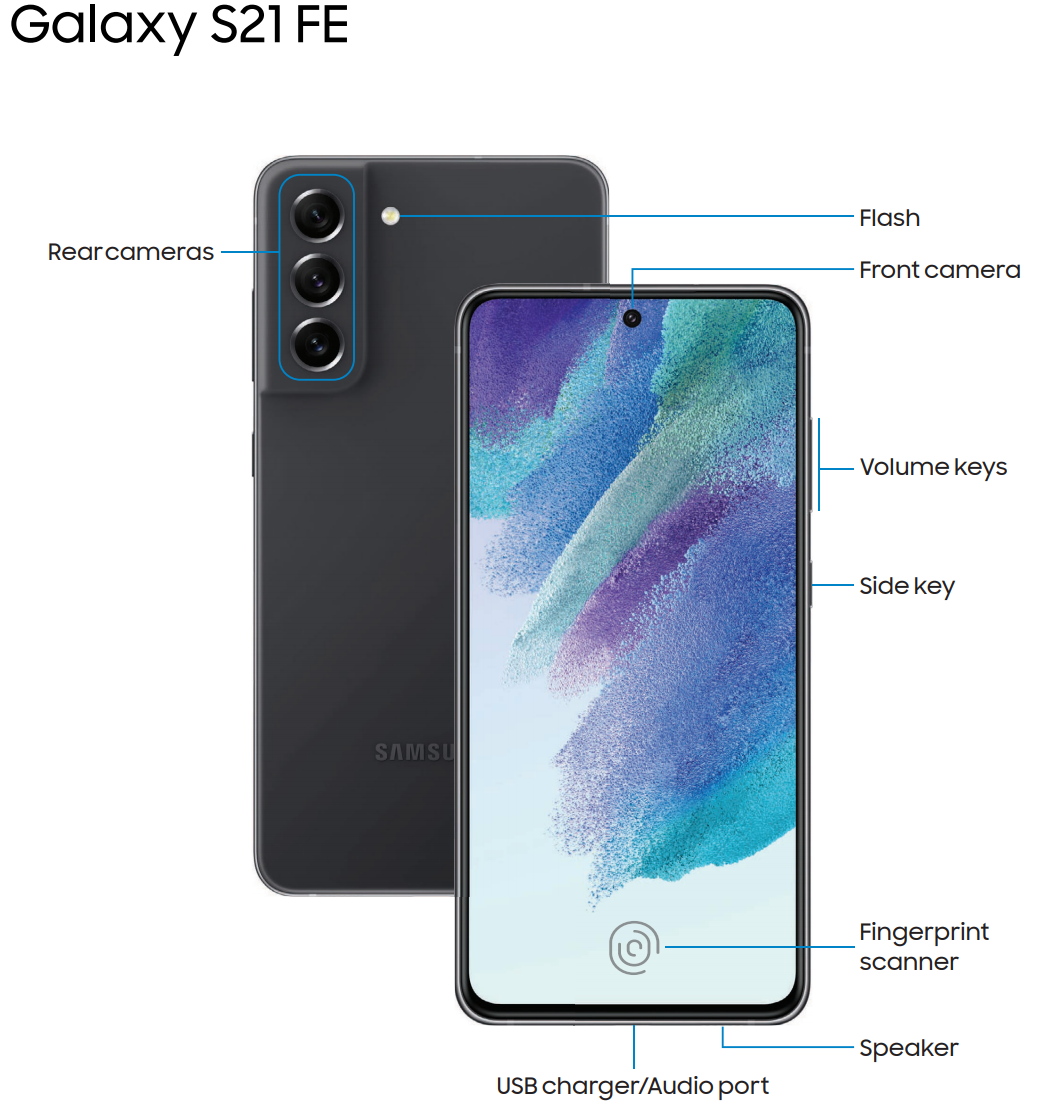
The Galaxy S21 FE is almost here, as has been evident from the tons of mounting evidence these past couple of weeks. And we can now add another one to the pile: We’ve obtained the user manual for the Galaxy S21 FE (5G). And those who were hoping to find a microSD slot on the Galaxy S21 FE will be sorely disappointed, as the user manual doesn’t mention anything about it.
The user manual does confirm other features, though, such as water and dust resistance, an ultrasonic fingerprint scanner, a high refresh rate screen, and a design similar to the original Galaxy S21 flagships. Naturally, it doesn’t go into detail about the phone’s specs, which is not unexpected as that’s not what user manuals are meant for.
Samsung is bringing 5G access to more affordable Galaxy devices with each passing year. Last year, the most affordable 5G Galaxy smartphone was the Galaxy A42 5G. This year, the company’s cheapest 5G smartphone is the Galaxy A22 5G. Next year, the most affordable 5G smartphone from Samsung could cost even lower.
According to a new report from GalaxyClub, Samsung is working on a new 5G smartphone with model number SM-A136B. The company could launch it as the Galaxy A13 5G. Since the Galaxy A12 costs less than $180 in the US and €170 in Europe, we expect the Galaxy A13 5G to carry a price tag that’s lower than $200. The Galaxy A12 was launched in December 2020, so we can expect Samsung to unveil the Galaxy A13 towards the end of 2021 or in early 2022.
Not much else is known about the Galaxy A13 5G. The Galaxy A12 features a 6.5-inch HD+ LCD display, a MediaTek Helio P35 processor, 2GB/3GB/4GB/6GB RAM, and 32GB/64GB/128GB internal storage. It has a 48MP quad-camera setup at the rear and an 8MP selfie camera. It has a 5,000mAh battery with 15W fast charging. We can expect the Galaxy A13 5G to feature a faster processor, higher RAM in the entry-level version, and maybe a better screen.
We expect more information about the Galaxy A13 5G to surface over the next few months. What do you expect to see in Samsung’s cheapest 5G smartphone? Let us know in the comments section below.
According to reports coming out of South Korea, Samsung is planning to launch the Galaxy S22 series in January 2022. The company used to unveil its Galaxy S series smartphones in February every year, but that changed with the Galaxy S21 series. Samsung has reportedly started producing some of the parts that will be used in Galaxy S22 devices.
Regarding the Galaxy S21 FE, the report states that the phone’s mass production will start next month, but this is contrary to most other reports. We had reported a few days ago that the Galaxy S21 FE could be unveiled on September 8 and could go on sale as soon as the end of this month. In fact, Samsung has already started preparing stores for the launch of the Galaxy S21 FE.
Due to a shortage of chips, Samsung’s smartphone production and sales have taken a hit. The sales numbers of the Galaxy A52 and the Galaxy A72 are reportedly well below Samsung’s initial targets. Usually, the company’s Galaxy A5x and Galaxy A7x series smartphones account for around 30 million units, but that won’t be the case this year. Samsung could fail to reach the 300 million shipment mark in 2021.
Beginning today, One UI 3.1.1 is no longer exclusive to the latest Samsung foldable phones — the Galaxy Z Fold 3 and Z Flip 3. The company is now rolling out the One UI 3.1.1 firmware update to every one of its previously-released foldable devices, including the original Galaxy Fold.
Samsung designed One UI 3.1.1 to improve the user experience for foldable device owners with additions like Drag & Split, Natural Window Switching, better Multi-Active Window, Cover Screen Mirroring, and more.
We previously detailed these One UI 3.1.1 characteristics in our Galaxy Z Fold 3 review and our story detailing its best features. They have certainly elevated the user experience to new heights, and thankfully, every foldable device enthusiast should now benefit from these changes, more or less, depending on the model they own.
Which One UI 3.1.1 features are coming to which foldable phones?
The best features in One UI 3.1.1 are Drag & Split, Multi-Active Window and Natural Window Switching, Auto Rotate Apps, Customized Aspect Ratios, Flex Mode Panel, Taskbar, and Cover Screen Mirroring.
Drag & Split lets you open a URL in split-screen mode while browsing the web without having to reopen another browser instance. It works by dragging and dropping the desired link to the edge of the screen.
Multi-Active Window and Natural Window Switching now provide a better experience with options to readjust the height and width of opened apps when using three app split-screen mode.
Rotate All Apps allows users to enable landscape orientation for apps that natively work only in portrait mode.
Custom Aspect Ratio for Apps lets you choose a different aspect ratio for apps that don’t fill the whole screen. Options include full screen, 16:9, 4:3, and App default.
App Split View enables a more tablet-like UI for the Z Fold series, or more specifically for various apps. Now, this feature works with apps that don’t natively support it.
Similarly, Flex Mode Panel adds Flex Mode compatibility to apps that don’t offer native support.
The Taskbar is a fine addition to the Galaxy Z Fold series. It’s somewhat reminiscent of the original Edge Screen for the Galaxy Note Edge. It’s a persistent taskbar containing your favorite apps. It makes for much easier app switching.
Cover Screen Mirroring lets you easily transfer — or mirror — the layout of your cover screen home screen to the main foldable display. It lets users have a more unified UI design across both home screens without having to do all the work manually.
Most of these features were designed for the book-like form factor, which means they won’t be available for the Z Flip series. The clamshell foldable phones will have access to Flex Mode Panel and Drag & Split, but not much else. Still, these additions are appreciated.
As for the Galaxy Fold series, both the Galaxy Z Fold 2 and the original Galaxy Fold will benefit from most of these new additions in One UI 3.1.1. In fact, the Galaxy Z Fold 2 will take advantage of every one of these new features, while the original Galaxy Fold will be missing out on two: Cover Screen Mirroring and Flex Mode Panel.
The One UI 3.1.1 update for these foldables is already rolling out in the US and will also be reaching other markets starting today. As always, you should be able to download it from your phone’s Settings » Software update menu, but you can also skip the wait and download new updates from our firmware database.
If you want to see these new One UI 3.1.1 features in action, make sure you check our in-depth video below.
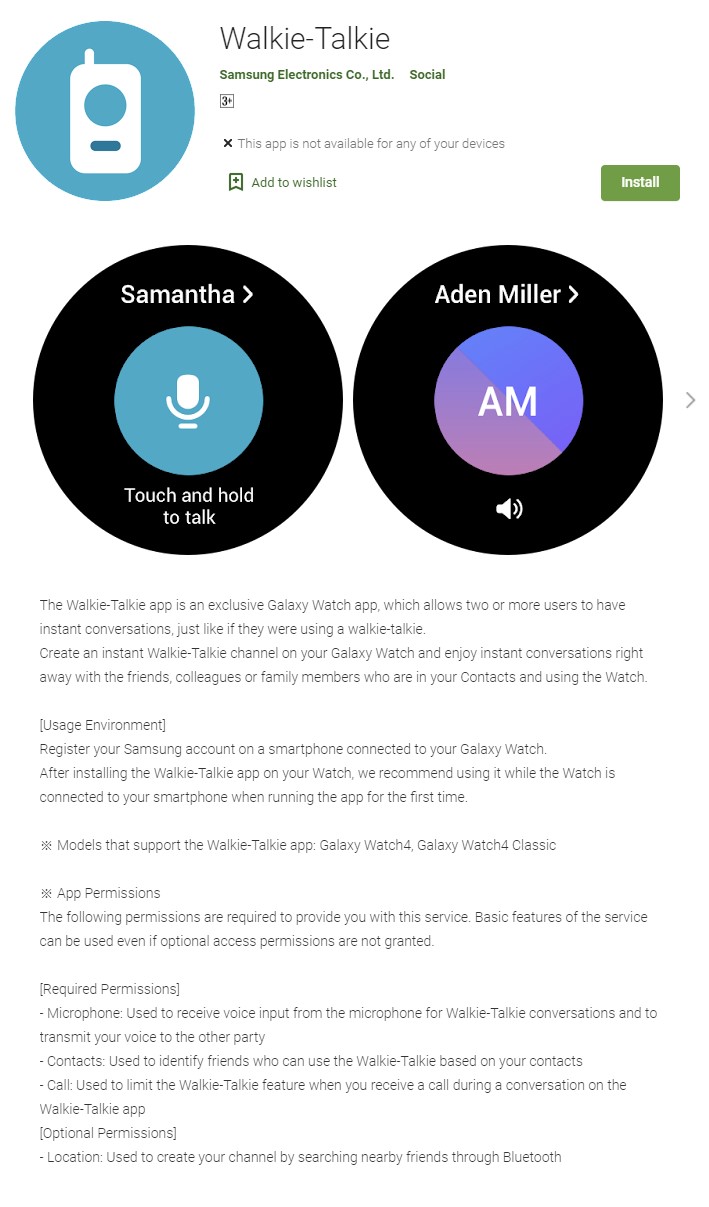
Earlier this year, we had exclusively reported that Samsung’s new smartwatches could be used as walkie talkies. However, that feature was missing from the Galaxy Watch 4 and the Galaxy Watch 4 Classic during the launch. The South Korean firm has now released a new app that activates the feature and allows its new watches to be used as walkie talkies.
Samsung’s new Walkie-Talkie app can be used for instant two-way voice communication. You can use it to send short voice messages that are relayed in real-time. You can create channels where multiple contacts can simultaneously communicate. However, this app only works on the company’s Wear OS devices, which means that it can’t be used on Tizen-based smartwatches like the Galaxy Watch 3 or Wear OS devices from other brands.
The app has a file size of 23MB, and you can download it on your Galaxy Watch 4 series smartwatch from the Google Play Store. You will also need to have a Samsung account on a smartphone connected to your Galaxy Watch. Future Wear OS-based smartwatches can use this app as well.