السبت، 23 فبراير 2019

Galaxy S10 wallpapers now available for download from SamMobile

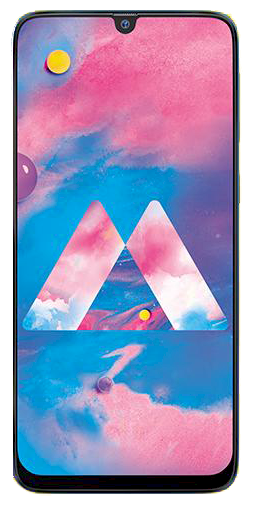
Galaxy S10 wallpapers are now available for download from SamMobile. Samsung’s new flagships always bring new wallpapers, and with the Galaxy S10 the tenth-anniversary Galaxy S flagship, Samsung has added a number of diverse and colorful options to match that new Dynamic AMOLED display. And now, you can have these wallpapers on any other device, Galaxy or otherwise, by downloading them from SamMobile.

You can grab individual wallpapers from our Galaxy S10 wallpapers page by long-pressing (or right-clicking if you’re on a PC) an image and selecting the save/download option. To download all of the wallpapers together, just hit the download button at the bottom of the page to get them in a ZIP package. We also have wallpapers from other Galaxy devices, so don’t forget to take a gander at our wallpapers section.

The post Galaxy S10 wallpapers now available for download from SamMobile appeared first on SamMobile.


from SamMobile https://ift.tt/2Vj8vYe
via IFTTT

Galaxy M30 and Galaxy A50 firmware go live ahead of launch

Samsung is going to launch multiple new phones in India next week. One of them is the Galaxy M30, and the rest will be part of the new Galaxy A lineup. The Galaxy A50 may be one of those new A series phones, as firmware for the device have gone live for India and Sri Lanka in our firmware database. Firmware for the Galaxy M30 are now live as well.

Sadly, Samsung will launch the M30 with Android 8.1 Oreo and the Galaxy A50 with Android Pie. For devices that are expected to go official around the same time, it’s disappointing to see that Samsung has chosen to not bring one of them with the newest version of Android. The Galaxy M30 will get Pie later this year, just like the Galaxy M10 and Galaxy M20, but not having it out of the box is a major point of contention and will make the M30 an outdated device on the software front compared to the Galaxy A50.

The M30 will be outdated compared to even the cheapest new Galaxy A phone, the Galaxy A10. Of course, the fact that Samsung wants to focus on making its 2019 Galaxy A lineup a force to reckon with in the Indian market may have something to do with the A50 getting newer software. It may be the Galaxy M30 that sells in higher numbers, though, as it’s likely to be priced aggressively like the Galaxy M10 and M20.

  • Model: SM-A505F
  • Dimensions: 158.5 x 74.5 x 7.7mm
  • Display: 6.4"(162.5mm) Super AMOLED
  • CPU: Exynos 9610
  • Camera: 25 MP, CMOS F1.7 & 5MP, CMOS F2.2 Depth & 8MP, CMOS F2.4 Ultrawide
  • Model: SM-M305F
  • Dimensions: 159 x 75.1 x 8.4mm
  • Display: 6.38"(162mm) LCD
  • CPU: Exynos 7885
  • Camera: 13 MP, CMOS

The post Galaxy M30 and Galaxy A50 firmware go live ahead of launch appeared first on SamMobile.


from SamMobile https://ift.tt/2Iy7tWG
via IFTTT

الجمعة، 22 فبراير 2019

Yes, the Galaxy S10 has an option to hide the front camera cutout

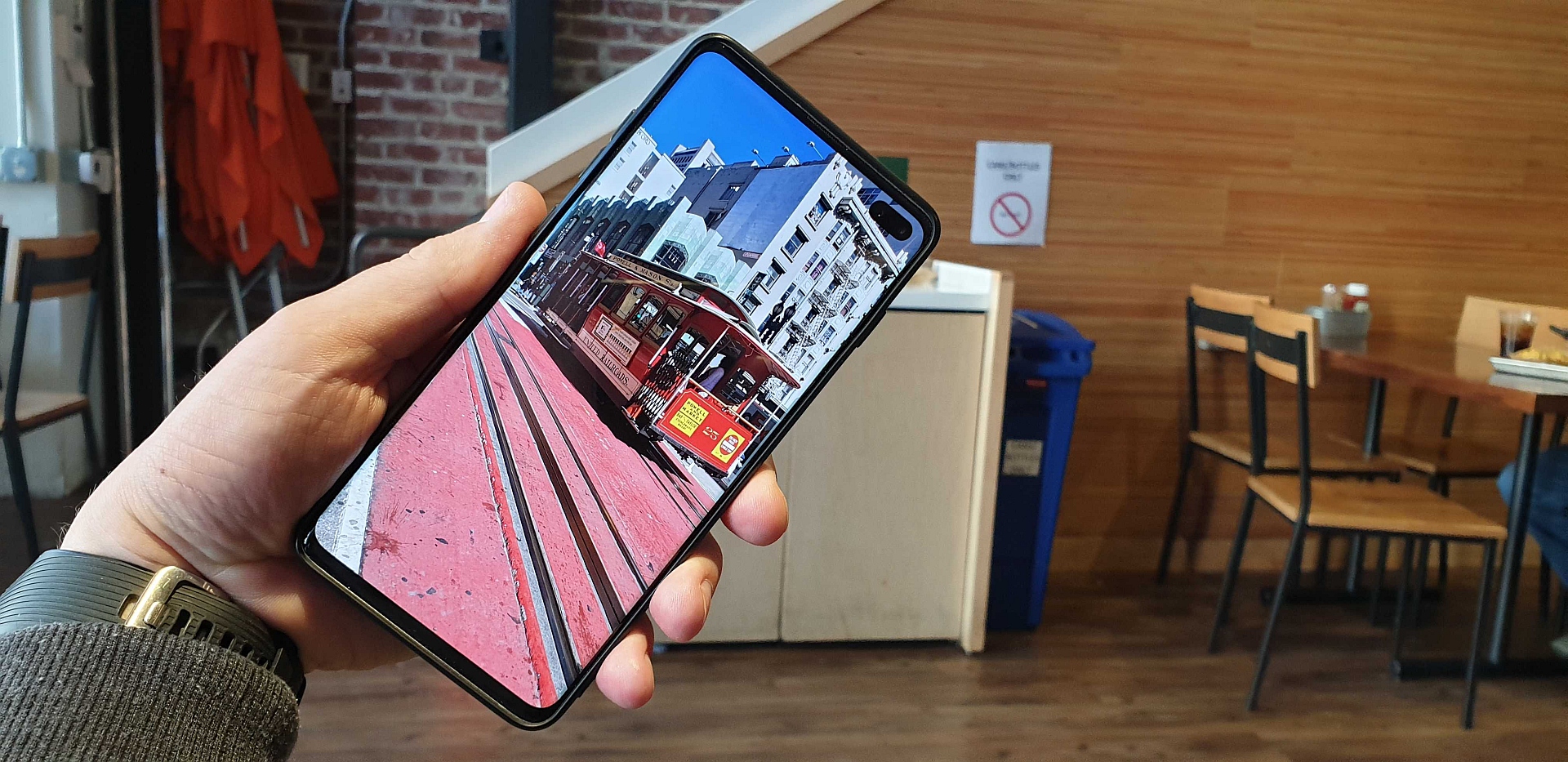
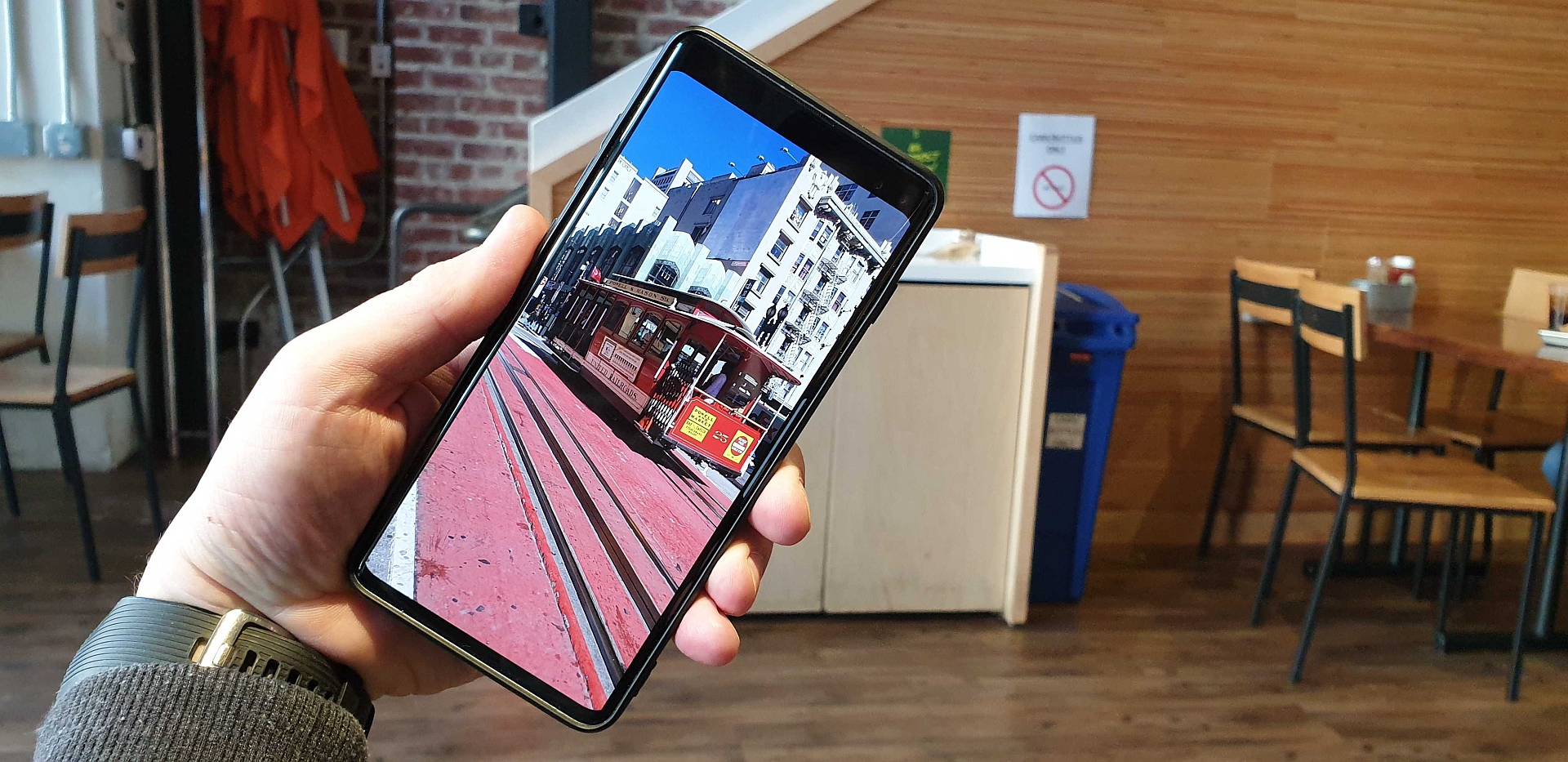
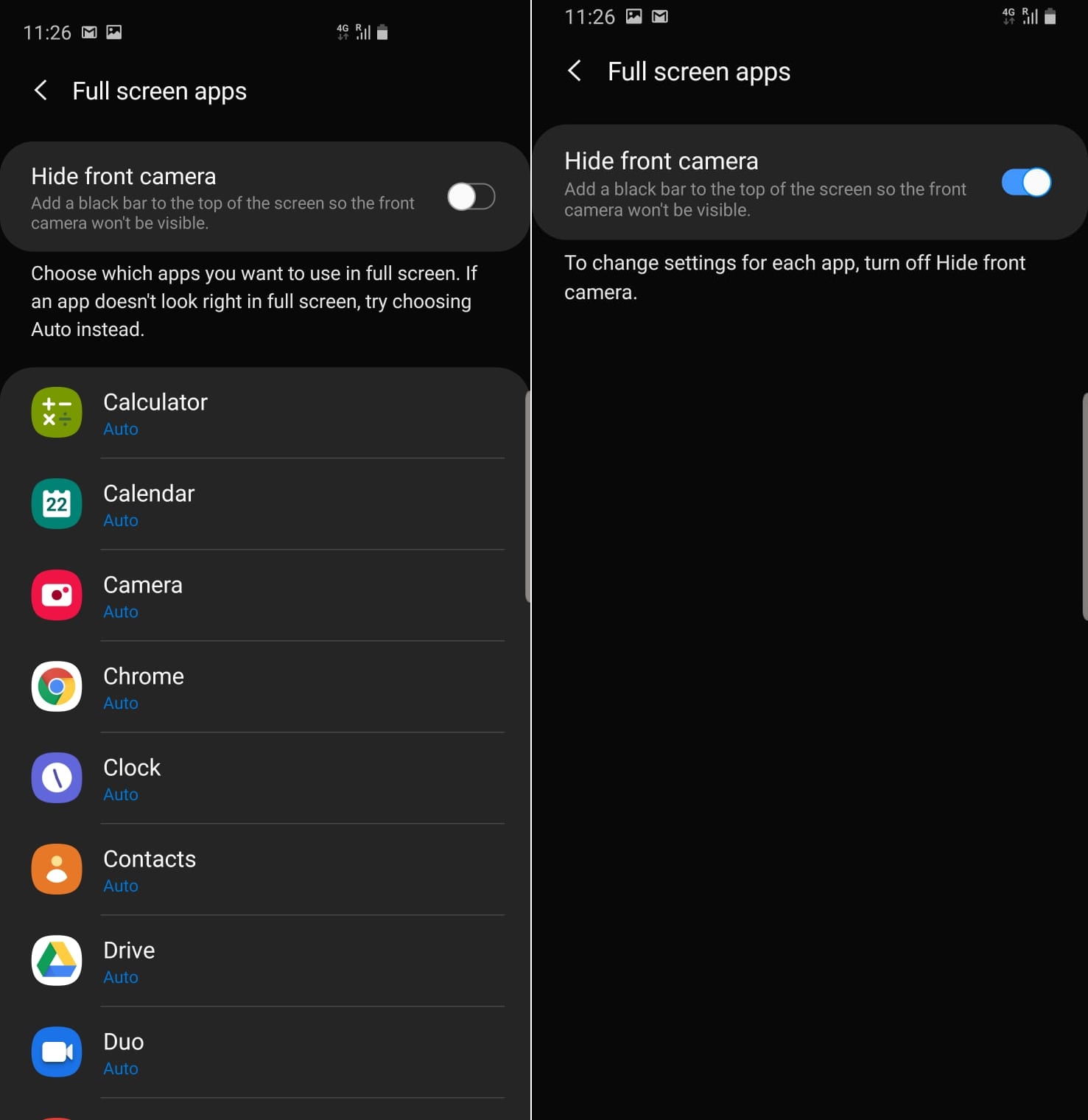
Yes, the Galaxy S10’s front camera cutout can be hidden with a software tweak. A number of our readers have questioned whether that’s possible, and some of them have commented that the Galaxy S10 has an option to introduce a virtual bezel at the top of the display. We took a look inside the phone’s settings, and indeed, Samsung does give you an option to hide the front camera.

The setting can be found in the Full screen apps section of the Display menu in the phone’s settings. It’s simply called Hide front camera and adds a black bar to the top of the screen, effectively reducing the screen estate available for your apps while hiding the camera cutout in the process. Doing that gives you bigger bezels at the top than Samsung’s current flagships, though, so it’s an option we’d recommend using sparingly if you’ve ordered a Galaxy S10 but aren’t down with the idea of the front camera eating into the right side of the display.

Here’s a comparison that shows you how the display looks with and without the fake black bar at the top (swipe left to see it with the black bar enabled):

← SLIDE →

Of course, some people might want to keep the option enabled at all times in the initial few weeks (or even months), as it’s going to take some time for developers to update their apps to accommodate the corner cutout on Samsung’s newest flagships. It’s similar to how Samsung had added the option to force apps to run in full screen mode when the Galaxy S8 came out, as the Infinity display’s uncommon screen ratio (18.5:9) resulted in apps not using some of the space above the software navigation keys.

The option to hide the front camera would be especially useful on the Galaxy S10+. It’s the first phone on the market to have dual front cameras built into the side of the display and not the center, so developers will be adapting their apps to such a wide display cutout for the first time. Alas, even if developers move quickly to optimize their apps for the Galaxy S10 trio, those who don’t want to see that front camera cutout when watching videos or playing games will have to depend on turning on that virtual bezel.

What do you think? Would you hide the front camera, will you simply try and get used to it, or will you not buy the Galaxy S10 at all because of the display cutout?
galaxy s10 hide notch

Thanks to everyone who sent this in!

  • Model: SM-G970F
  • Dimensions: 69.9 x 142.2 x 7.9mm
  • Display: 5.8” (146.5mm) Super AMOLED
  • CPU: Exynos 9820 Octa
  • Camera: 12 MP, CMOS F1.5/F2.4 (77) & 16MP, CMOS F2.2 (123)Ultra Wide
  • Model: SM-G973F
  • Dimensions: 70.4 x 149.9 x 7.8mm
  • Display: 6.1"(157.5mm) Super AMOLED
  • CPU: Exynos 9820 Octa
  • Camera: 12 MP.CMOS F2.4 45° Telephoto & 12MP F1.5 77° & 16MP F2.2 123° Ultra-wide
  • Model: SM-G975F
  • Dimensions: 74.1 x 157.6 x 7.8mm
  • Display: 6.4"(162.5mm) Super AMOLED
  • CPU: Exynos 9820 Octa
  • Camera: 12 MP.CMOS F2.4 45° Telephoto & 12MP F1.5/F2.4 77° & 16MP F2.2 123° Ultra-wide

The post Yes, the Galaxy S10 has an option to hide the front camera cutout appeared first on SamMobile.


from SamMobile https://ift.tt/2XjwSqo
via IFTTT

SamMobile Daily Recap, February 22, 2019: Galaxy S10 camera samples, security updates, and more

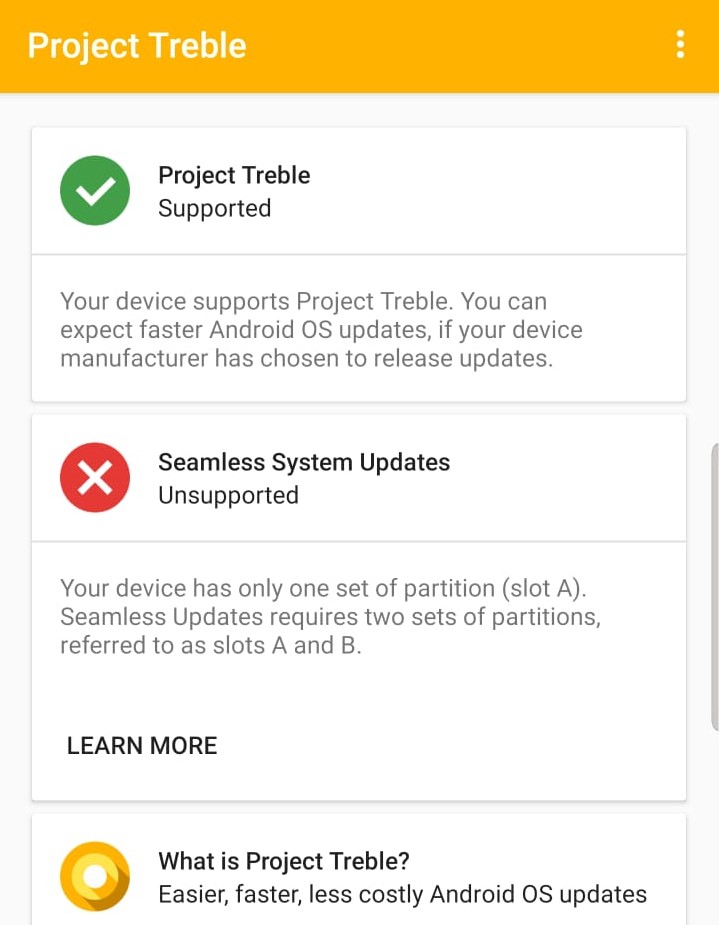
PSA: Galaxy S10 doesn’t support Seamless System Updates

Google has introduced many new features and changes in the Android operating system in recent years to make developing, releasing, and installing system updates easier and faster. Project Treble and Seamless System Updates are two such notable changes Google brought to Android. While Treble is aimed at cutting down the efforts and time required to develop and push system updates by OEMs, Seamless System Updates, also referred to as A/B (Seamless) System Updates, is focused on making installation of these updates easier and less risky.

Unlike Treble, which is supported by every Google-certified device launching with Android 8.0 Oreo and above, the Seamless System Updates feature is optional for device manufacturers. For reasons best known to Samsung, it hasn’t adopted the A/B System Updates for any of its devices so far and seems to be sticking with its decision for the Galaxy S10 lineup as well. One thing to note is that Samsung isn’t the only manufacturer not adopting the feature and it seems to be mostly devices that run stock Android that support it.

Takes up more storage space

Borrowed from Chromebooks, the Seamless Updates feature enables Android devices to download and install updates in the background without any device downtime. This is achieved by having two system partitions that are copies of each other – one online (A) and the other offline (B), with the updates being installed on the latter even as the user continues to operate the device.

Post installation, the device simply boots into the partition with the updated OS without any additional prompts or time-consuming steps. The partition that was online (A) before the update then becomes the offline partition (B) and is used to install the next update that comes along. Apart from making installation of updates simpler, this method also makes it safer as there is always a partition to fall back on if the update fails.

The major disadvantage of this system is that it takes up more space, almost double, as there are two partitions. Given that Samsung’s latest flagship phones come with plenty of storage, it would have been a welcome change if the company equipped them with Seamless System Updates. Perhaps there is a technical limitation preventing Samsung from doing so? We are not sure.

  • Model: SM-G970F
  • Dimensions: 69.9 x 142.2 x 7.9mm
  • Display: 5.8” (146.5mm) Super AMOLED
  • CPU: Exynos 9820 Octa
  • Camera: 12 MP, CMOS F1.5/F2.4 (77) & 16MP, CMOS F2.2 (123)Ultra Wide
  • Model: SM-G973F
  • Dimensions: 70.4 x 149.9 x 7.8mm
  • Display: 6.1"(157.5mm) Super AMOLED
  • CPU: Exynos 9820 Octa
  • Camera: 12 MP.CMOS F2.4 45° Telephoto & 12MP F1.5 77° & 16MP F2.2 123° Ultra-wide
  • Model: SM-G975F
  • Dimensions: 74.1 x 157.6 x 7.8mm
  • Display: 6.4"(162.5mm) Super AMOLED
  • CPU: Exynos 9820 Octa
  • Camera: 12 MP.CMOS F2.4 45° Telephoto & 12MP F1.5/F2.4 77° & 16MP F2.2 123° Ultra-wide

The post PSA: Galaxy S10 doesn’t support Seamless System Updates appeared first on SamMobile.


from SamMobile https://ift.tt/2IvwOk2
via IFTTT

Here are some pictures we took with the Galaxy S10+’ cameras

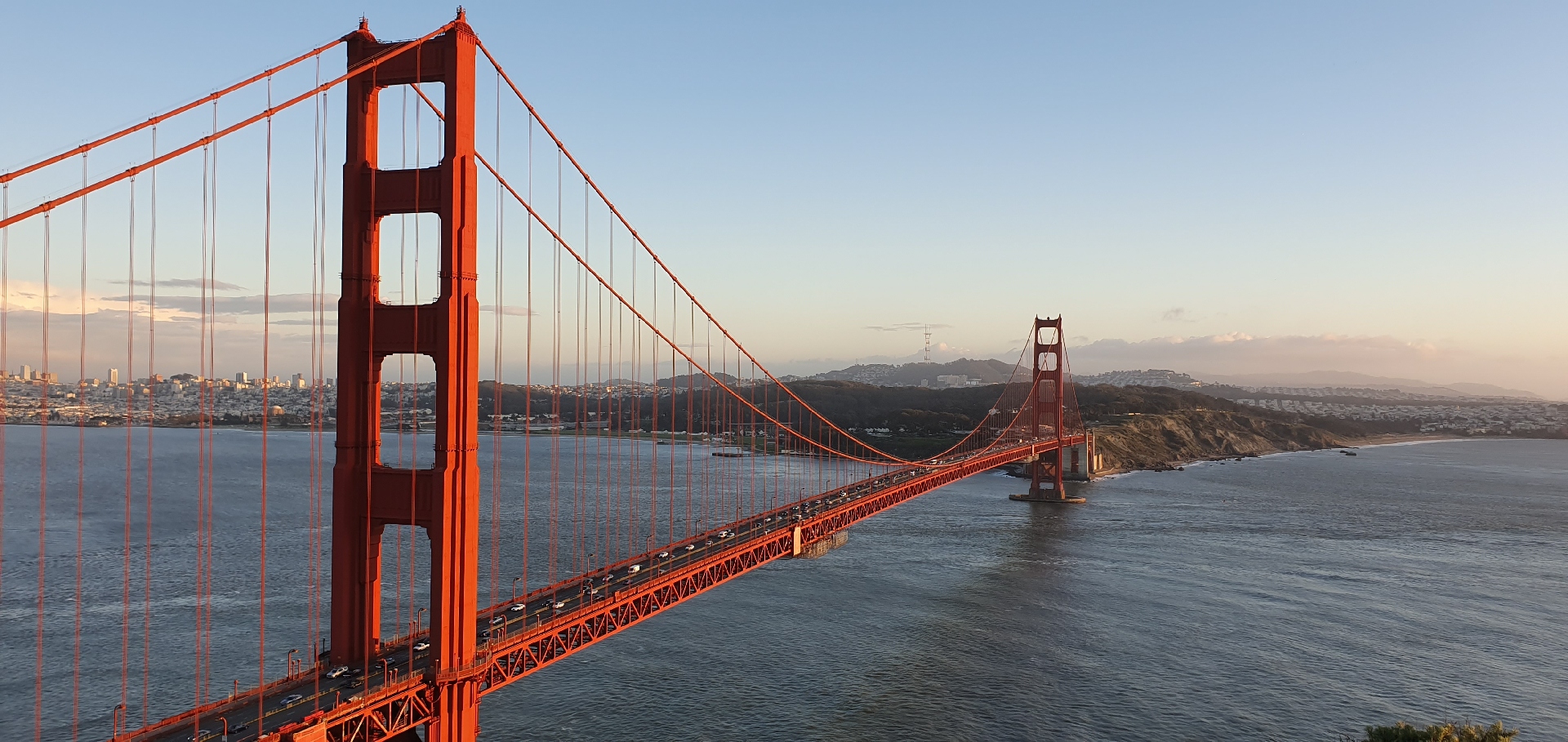
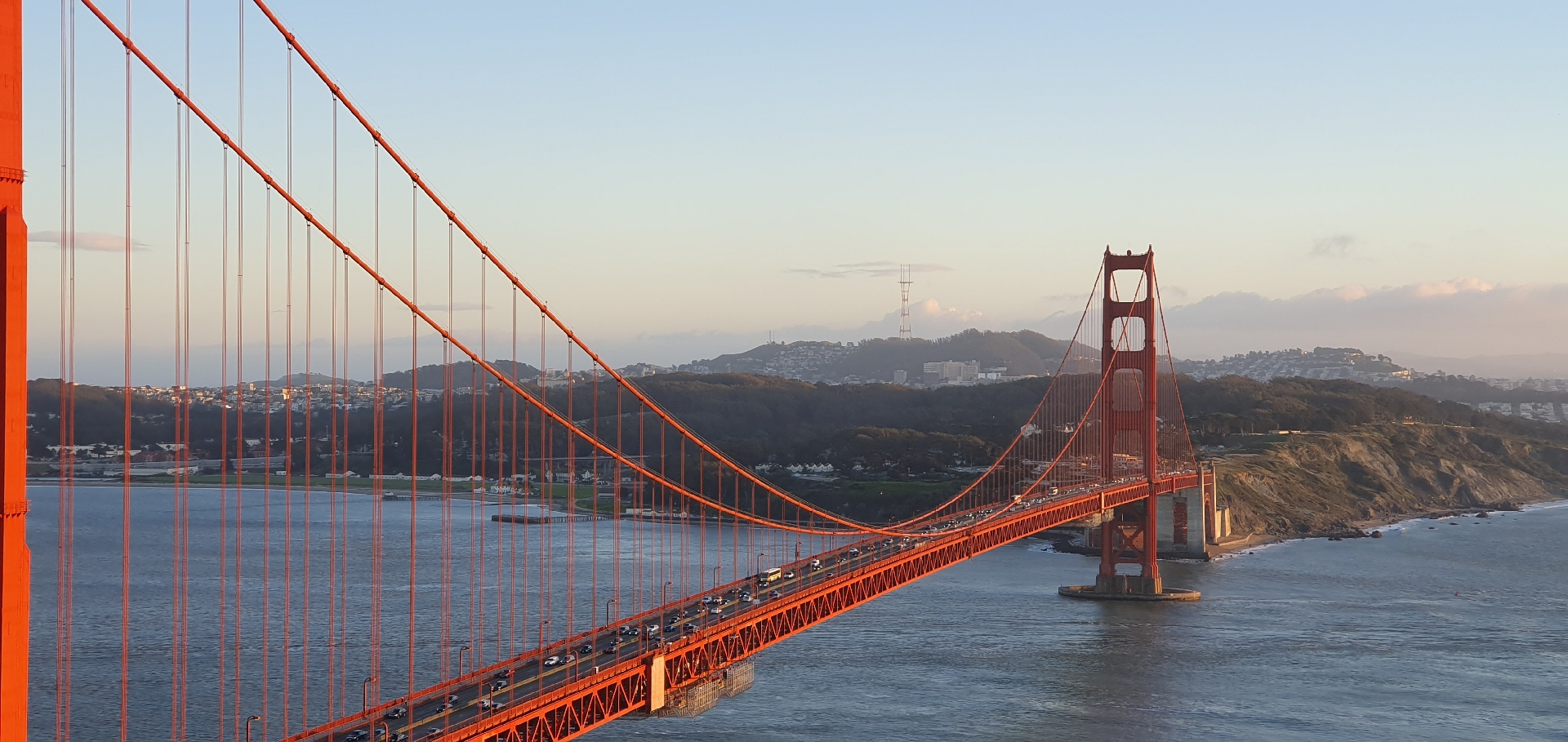
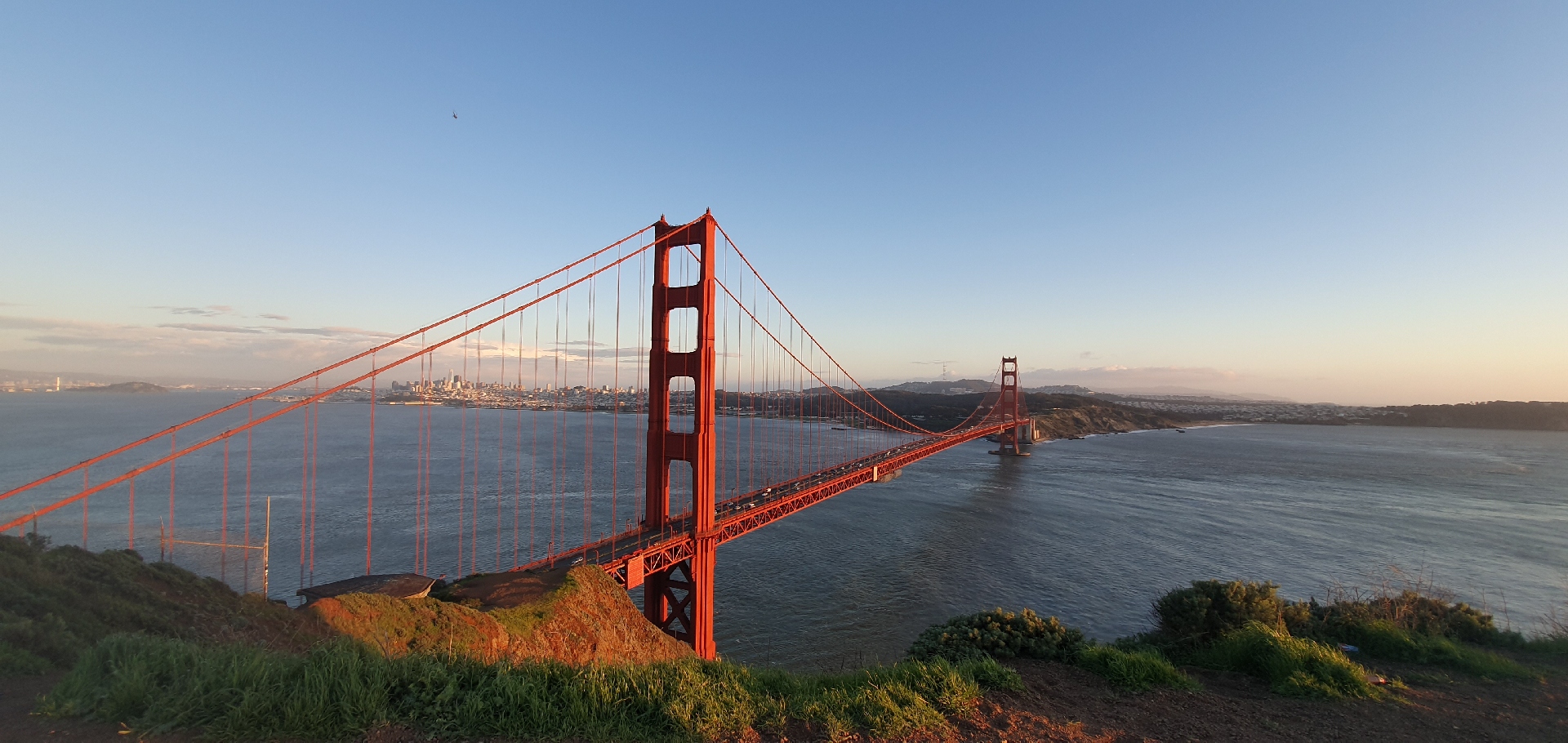
The Galaxy S10+ has just won top marks in the DxOMark camera tests, so we decided to put up a few camera samples of our own that we took in San Francisco. We took these pictures with the rear cameras on the S10+ and have tried to capture each scene with the primary, ultra-wide and telephoto lenses. We have also added a Super Slow-mo video and a regular video recorded at an NBA game.

Naturally, we can’t comment on the quality of the pictures at this point, since the camera software might not be final on the review devices Samsung has handed out to the media. We will also test the camera in a wider variety of situations, and you’ll have to wait for our full Galaxy S10 review for an actual verdict. We will add a couple of selfie samples here in the next few hours, but for now, check out the rear camera pictures and videos below.

The first one is a comparison of the same scene shot with the primary and telephoto lens, followed by a comparison between the primary and ultra-wide lenses. Just slide left for the telephoto/ultra-wide picture and right for the regular picture.

← SLIDE →
← SLIDE →

The post Here are some pictures we took with the Galaxy S10+’ cameras appeared first on SamMobile.


from SamMobile https://ift.tt/2SQdbYJ
via IFTTT

Galaxy S8 Android Pie update out in the Netherlands and Nordic countries

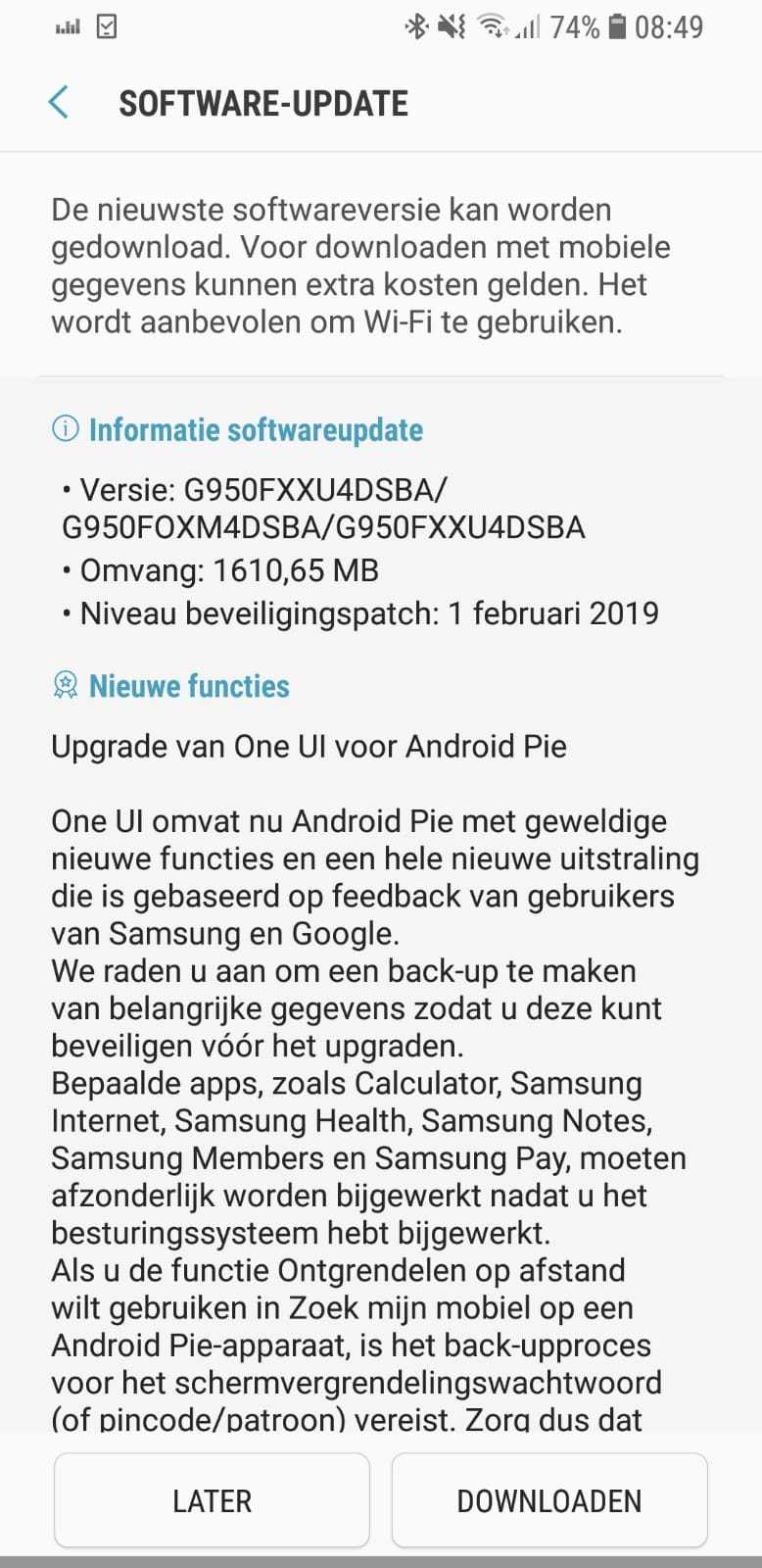
The Galaxy S8 Android Pie update has been released in a few more European markets, following its debut in Germany earlier this week. Samsung isn’t rolling out the Galaxy S8 update as quickly as it has released the update for the Galaxy Note 8, and the reason is perhaps the fact that the company currently targets March as the release time frame for the Galaxy S8 Pie update in many markets. That’s not to say everyone will have to wait until March. Samsung has shown that it can release the stable Pie update for devices ahead of schedule, although the worldwide rollout is likely to take a few weeks to complete.

For now, those in the Netherlands and the Nordic countries should be able to download Pie over the air from the Software update menu of the Settings app on the Galaxy S8 or S8+. The software version is G950FXXU4DSBA and G955FXXU4DSBA for the S8 and S8+ respectively, and the update includes the February 2019 security patch. The download size is around 1.6GB. Android Pie firmware for the S8 and S8+ are also available in our database for those who would like to manually upgrade.

Don’t forget to check out everything your Galaxy S8 or S8+ will get with the Android Pie update in addition to the new Samsung One UI interface. If you receive the update in a country not mentioned here, do tell us in the comments.

galaxy s8 pie netherlands

  • Model: SM-G950F
  • Dimensions: 148.9 x 68.1 x 8.0mm
  • Display: 5.8” (146.5mm) Super AMOLED
  • CPU: Exynos 8895
  • Camera: 12 MP, Dual Pixel F1.7 OIS
  • Model: SM-G955F
  • Dimensions: 159.5 x 73.4 x 8.1 mm
  • Display: 6.2” (158.1mm) Super AMOLED
  • CPU: Exynos 8895
  • Camera: 12 MP, Dual Pixel F1.7 OIS

The post Galaxy S8 Android Pie update out in the Netherlands and Nordic countries appeared first on SamMobile.


from SamMobile https://ift.tt/2XfwdWR
via IFTTT

جميع الحقوق محفوظة لمدونة الغريب 2013