الأحد، 22 سبتمبر 2019

Galaxy J7 Pro, Galaxy A70, Galaxy A20 get September security update

Owners of the Galaxy J7 Pro, Galaxy A70, and Galaxy A20 can now grab the September security update in some countries. The Galaxy J7 Pro is being updated in more markets than the other two devices combined – these markets include Brazil, Bolivia, Trinidad and Tobago, Chile, Mexico, and Puerto Rico. The Galaxy A70 update is out in Tunisia and Ukraine, while the Galaxy A20 update is rolling out in the US for Sprint users.

The software versions will be bumped up to A705FNXXU3ASI2, A205USQU2ASI1, and J730GMUBS7CSI1/J730GUBS7CSI1 on the A70, A20 and J7 Pro respectively. The updates for all three devices seems to be a minor one with no new features and changes other than the latest security patch. The September patch brings fixes for four critical Android OS vulnerabilities and 17 vulnerabilities and exploits discovered in Samsung’s software that runs on all Galaxy devices.

To see if the update is available for your device over the air, open the Settings app, tap Software update, then tap the Download and install option. You might have to do this a couple of times before the update shows up. If it doesn’t, you can upgrade by downloading the latest firmware from our website and flashing it on your device.

Thanks for the tip, Mohamed Saaidiya!

The post Galaxy J7 Pro, Galaxy A70, Galaxy A20 get September security update appeared first on SamMobile.


from SamMobile https://ift.tt/2AD4e9o
via IFTTT

Verizon, T-Mobile release Galaxy Note 10/10+ September security update

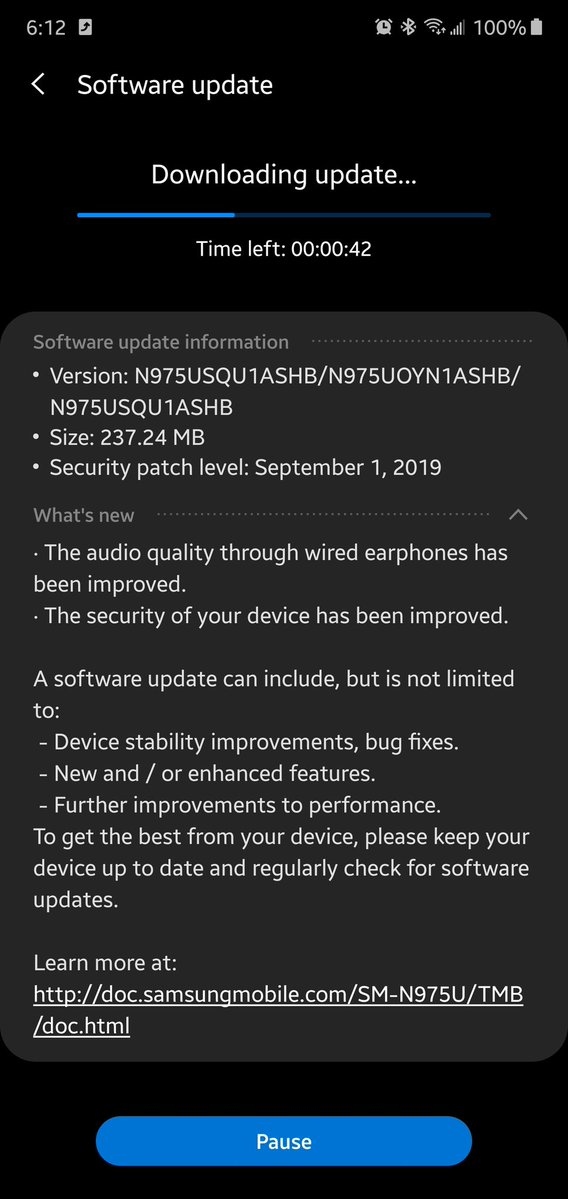
Verizon and T-Mobile are rolling out a new software update for the Galaxy Note 10 and Note 10+, bringing the September 2019 security patch to Samsung’s newest flagships. Sprint had released a similar update two weeks ago – the build number is N97*USQU1ASHB for the updates on all three carriers. In addition to the latest security patch, the update includes improvements to audio quality over wired earphones, at least for devices on T-Mobile. Verizon doesn’t list the audio improvements on its support page for either the Note 10 or Note 10+.

The September update for the Note 10 and Note 10+ on T-Mobile and Verizon is available over the air – you can download it from the Settings » Software update menu on your phone. It can take some time for the over-the-air release to reach all users, so if you don’t see any update right away, you should just try again after some time. Or, if you don’t like to play the waiting game, you can grab the firmware for the update from our firmware archive (Note 10 | Note 10+) and flash it on your phone manually. You will need a Windows PC to do so.

Both Samsung and North American carriers have been moving quickly when it comes to Galaxy Note 10 updates, which is par for the course for flagship Galaxies in the initial few months after they hit retail shelves. At least T-Mobile has already been testing Android 10 for the Note 10/10+ and the Galaxy S10 lineup, and we have it on good authority that the Android 10 beta program for both flagship series will be announced by the end of this month. The beta release should be available for users sometime in October, although an exact date is currently unknown.

  • Model: SM-N970U
  • Dimensions: 151.0 x71.8x7.9mm
  • Display: 6.3"(160.02mm) Super AMOLED
  • CPU: Qualcomm Snapdragon 855
  • Camera: 12 MP, CMOS F2.2 Telephoto & 12MP F1.5/F2.4 77° & 16MP F2.2 123° Ultra-wide

  • Model: SM-N975U
  • Dimensions: 162.3 x 77,2 x 7.9mm
  • Display: 6.8" (172.7mm) Super AMOLED
  • CPU: Qualcomm Snapdragon 855
  • Camera: 12 Ultra Wide: 16MP F2.2 (123°) & Wide-angle: 12MP 2PD AF F1.5/F2.4 OIS (77°) & Telephoto: 12MP F2.1 OIS (45°) & DepthVision Camera: VGA

The post Verizon, T-Mobile release Galaxy Note 10/10+ September security update appeared first on SamMobile.


from SamMobile https://ift.tt/2VcU1KC
via IFTTT

الجمعة، 20 سبتمبر 2019

Reasons why you should buy the Samsung Galaxy Fold

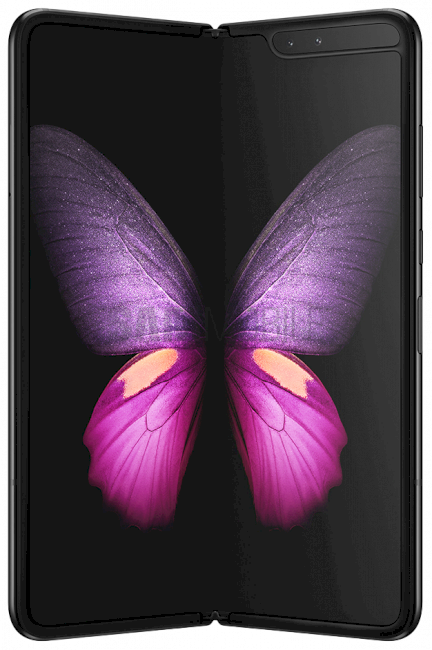
If you have been wondering why you should buy the Samsung Galaxy Fold, you must have poured over countless specs comparisons by now. You will have also watched many videos on YouTube and read a dozen blogs just to make up your mind. While there are quite a few reasons one should opt for this device based on just specs alone, let’s discuss some other reasons.

After all, this won’t be a decision that many will make lightly. The Galaxy Fold is perhaps the most expensive smartphone on the market right now, not counting outrageous custom creations that include pristine leather and jewels. Ideally, you’d not want to feel buyer’s remorse after picking up the Galaxy Fold.

Why you should buy the Galaxy Fold

You wouldn’t need much convincing if you are someone who always likes to be on the bleeding edge of technology. The Galaxy Fold represents the best in smartphone display technology. If you’re someone who appreciates technological advancements, you’ll likely be the first in line to pick one up.

Smartphones have also become an extension of our personalities. That’s why the accessory market has become a billion-dollar industry. There are all kinds of skins, covers, cases, pop sockets, rings, etc that you can attach to your device just to make it stand out. If you’re someone who likes to be unique, who wants to stand out in a crowd, be the person with a foldable smartphone among the sea of people with their boring old candy bar form factor smartphones.

The Samsung Galaxy Fold is going to be a conversation piece at least for the foreseeable future. Not only because of its price but because of how limited the supply is going to be. Nobody is going to double back to look at a brand new Galaxy Note or iPhone in your hand. But you can bet good money that they will do that for the Galaxy Fold.

You need to be absolutely sure of what you’re going to get with the device so that you don’t feel buyer’s remorse later. The app situation has been improved since the device was first unveiled. Samsung has worked with partners like Facebook, Twitter and Google to optimize their apps for the foldable experience. It continues to work with other developers as well. What you get with the Galaxy Fold is a perfect compact tablet device.

You can use it fine with the external cover display and when you open it up, you have a fully capable 7.3-inch tablet. It’s perfect for getting work done, watching content and playing games. You wouldn’t want to take your eyes off it. If you only need a smartphone to mindlessly text with people all day then going through the motions of folding and unfolding the device every time you want a more comfortable typing experience might not make you like it very much.

Granted, this is a first-generation product, and it did have a rocky start. So perhaps don’t get rid of your current smartphone when you buy it just in case you spill your drink on it. The Galaxy Fold isn’t water-resistant.

Ultimately, it comes down to money. The Galaxy Fold costs $2000 and you’re getting a very capable smartphone and tablet combo for that price. If you have the money and can understand the reasons mentioned above, then there’s no reason why you shouldn’t be ordering one right now.

What other reasons do you have for reaching the conclusion that you should buy the Galaxy Fold? Share them with us in the comments below.

The post Reasons why you should buy the Samsung Galaxy Fold appeared first on SamMobile.


from SamMobile https://ift.tt/351GSIS
via IFTTT

Samsung takes a dig at Huawei Mate 30 series for lacking Google services

Huawei has emerged as a major threat to Samsung’s smartphone dominance in the last couple of years. The Chinese company’s recent flagships have done exceedingly well in the market to be a cause of concern for Samsung. Right when Huawei was trying to make a mark in the Western markets, it has been hit with a debilitating US trade ban that bars American companies from doing any kind of business with the Chinese tech giant.

The biggest setback to Huawei from these restrictions is that Google cannot license its apps and services to Huawei, making the latter’s Android devices practically useless in markets outside China. Because of this, the company’s latest Mate 30 series lacks access to Google’s ubiquitous Android apps and services.

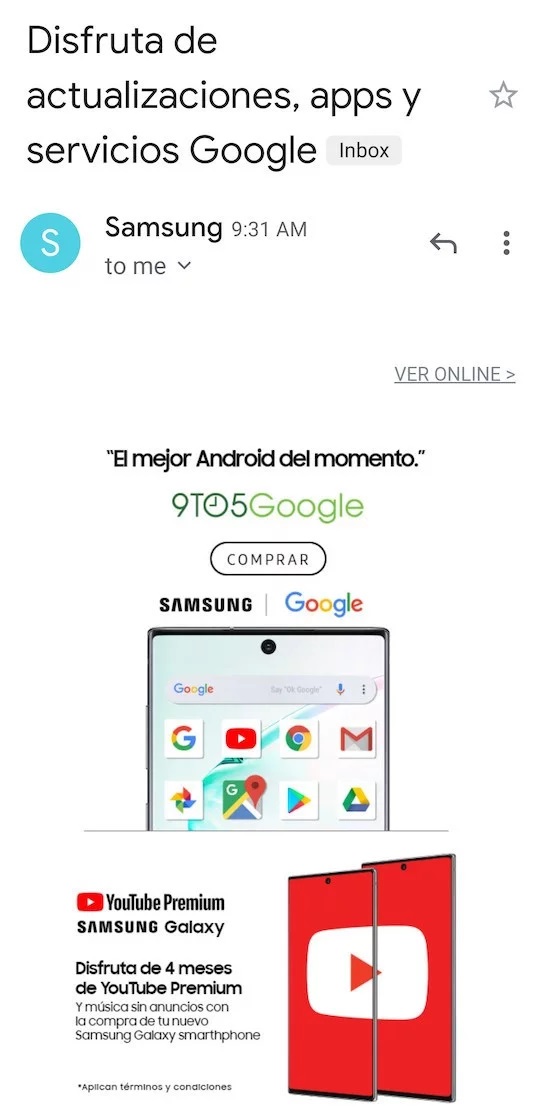
This is an unexpected opportunity for Samsung and, naturally, the company is taking advantage of it. When Huawei was unveiling the Mate 30 lineup in Munich yesterday, Samsung sent promotional emails in Spanish to its customers in Latin America taking a subtle dig at the Mate 30 series for lacking Google services.

The subject line reads “Disfruta de actualizaciones, apps y servicios Google,” which translates to “Enjoy updates, apps and Google services.” The email contains an image of a Galaxy Note 10 with app icons of various Google apps and services. Though there is no mention of Huawei or its devices anywhere, the timing of the email blast and Samsung’s track record in mocking rivals make the target obvious.

Samsung rarely touts its relationship with Google while marketing its devices, but given the situation Huawei is in, it has sensed an opportunity.

The post Samsung takes a dig at Huawei Mate 30 series for lacking Google services appeared first on SamMobile.


from SamMobile https://ift.tt/32V5npc
via IFTTT

Samsung highlights how to care for your Galaxy Fold in new video

With the launch of the “redesigned” Galaxy Fold comes a new YouTube video from Samsung. Unlike the company’s most other promotional videos that generally go live after a new product launch, the latest one focuses mainly on highlighting how customers should care for their newly-acquired Galaxy Folds.

Samsung’s first foldable device earned a bit of a bad reputation early on, and readers must know the entire backstory by now. The first sample units had a protective film covering the foldable panel, which gave most early reviewers the wrong impression that it can be removed. And removed it was, by a lot of reviewers who found out the hard way that the protective layer was, in fact, a vital component of the screen. In other cases, the fairly large gaps between the foldable screen’s edges and hinge mechanism allowed foreign objects to infiltrate the device and wreak havoc to the foldable panel from the inside.

Samsung not only changed key aspects of the device before its recent market release, but the company also included new warnings in the box. They inform users not to press too hard on the foldable display or else the panel could sustain damage. They also remind users that the Galaxy Fold is not water-resistant. And as if to hammer home the fact that the Galaxy Fold is an unconventional smartphone with unusual caveats and needs, the company launched the following video.

The video can be summarized in a few main points that must never be forgotten by Galaxy Fold users if they want their device to have a higher chance of standing the test of time:

  • Don’t ever remove the foldable screen’s built-in protective layer. It’s now been tucked under the bezels and can no longer be picked with a fingernail anyway.
  • Don’t put a protective film over the Galaxy Fold’s 7.3-inch panel. You might break it. This is not an exaggeration. There’s no glass panel protecting this display and you do not want to stick adhesives of any kind to the foldable surface.
  • Use light touches on the foldable screen, or rather, as stated by the fine print “do not apply excessive pressure to it.” Again, this is not a hard glass layer, and pressing too hard on the foldable screen or sticking your fingernail in it can damage it very easily.
  • The hinge mechanism is very complex, and even though Samsung took measures to minimize the risks of foreign objects getting inside the device, the Galaxy Fold is not dust or water-resistant. Keep it away from water and dust. This isn’t the kind of phone you’d want to take with you at the beach.
  • And finally, the Galaxy Fold is kept folded shut by several internal magnets. They are quite strong, so much so that Samsung asks users to be mindful about the objects they place next to the foldable phone. Most importantly, avoid placing magnetic credit cards next to the Galaxy Fold, as this can potentially render them useless.

Samsung concludes the video by stating that A smartphone as incredible as this deserves care like no other and this is the reason why the Galaxy Fold Premier Service is at your disposal, as a Galaxy Fold user. The service offers support over the phone 24/7, and Fold owners can schedule one-on-one support sessions with Samsung’s experts. Premier Service customers will also benefit from a discount on their first Fold display replacement, should they end up needing one.

At the end of the day, Samsung wants to avoid any unpleasant surprises and it’s commendable that the company doesn’t beat around the bush in regards to the Galaxy Fold’s unique and sensible nature. Of course, the video tries to give a bit of a positive spin to the idea that the Fold is a relatively fragile device, but it doesn’t do this to the point of becoming disingenuous.

  • Model: SM-F900F
  • Dimensions: Unfolded: 160.9 x 117.9 x 6.9 mm Folded: 160.9 x 62.9 x 15.5 mm
  • Display: 7,3" (185.4mm) Super AMOLED
  • CPU: Qualcomm Snapdragon 855
  • Camera: 16 MP, CMOS F2.2 & 12MP, CMOS F1.5/F2.4Wide & 12MP, CMOS F2.4 Telephoto

The post Samsung highlights how to care for your Galaxy Fold in new video appeared first on SamMobile.


from SamMobile https://ift.tt/30x6g5y
via IFTTT

Daily Deal: 18% off Anker Wireless Charger

Wireless charging has proven to be good way of charging your smartphone without having to deal with cables. This means less dealing with plugging cables in and out, so fewer instances of you having to fumble around for the cable. It will also enable you to grab your device and go where you need to go without having to unplug it and eliminates the risk of grabbing it while the charger is still plugged in. This wireless charger by Anker is now available at 18% off, making this the perfect time to get a couple of them in for use at home or at the office. With 10W fast-charging it takes little time to fill your battery as well.

Hit the Buy Now button below to grab them while they’re still available!

The post Daily Deal: 18% off Anker Wireless Charger appeared first on SamMobile.


from SamMobile https://ift.tt/2Nn39v2
via IFTTT

PSA: You need to enable the Galaxy Watch Active 2 touch bezel manually

The Galaxy Watch Active 2 was first released in South Korea. It’s gradually making its way to more markets across the globe. Samsung will release the new smartwatch in the United States towards the end of this month.

The touch bezel is one of the top features of this new smartwatch. It will likely be the first thing you try out when you unbox the Galaxy Watch Active 2. However, don’t think your smartwatch is broken if the bezel isn’t responding to your touch. That’s because you will need to enable the Galaxy Watch Active 2 touch bezel manually.

Enable Galaxy Watch Active 2 touch bezel

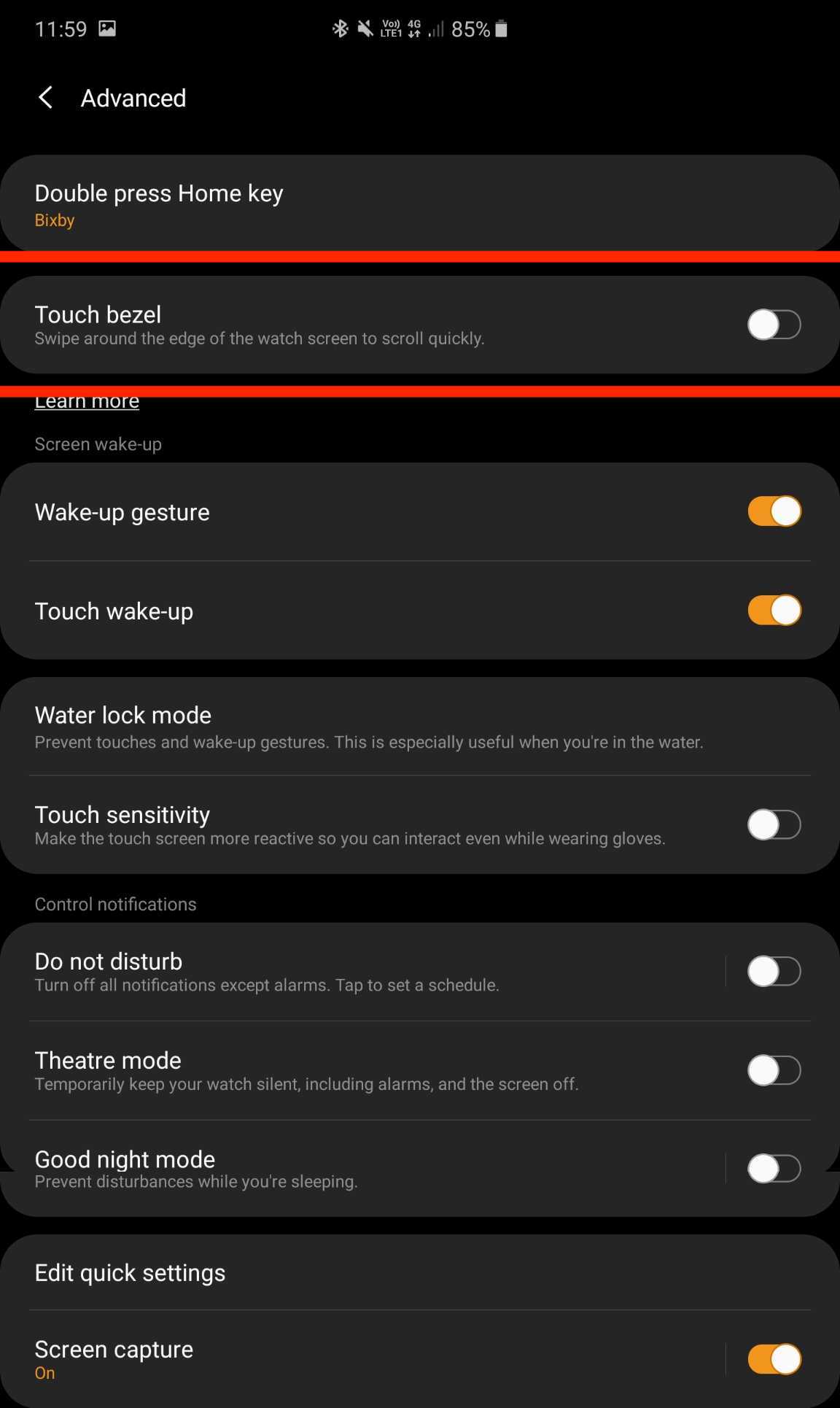
This seems counterproductive but for some reason, Samsung has decided to keep the Galaxy Watch Active 2’s touch bezel disabled by default. You’ll actually need to go into the Galaxy Wearable app to enable it yourself.

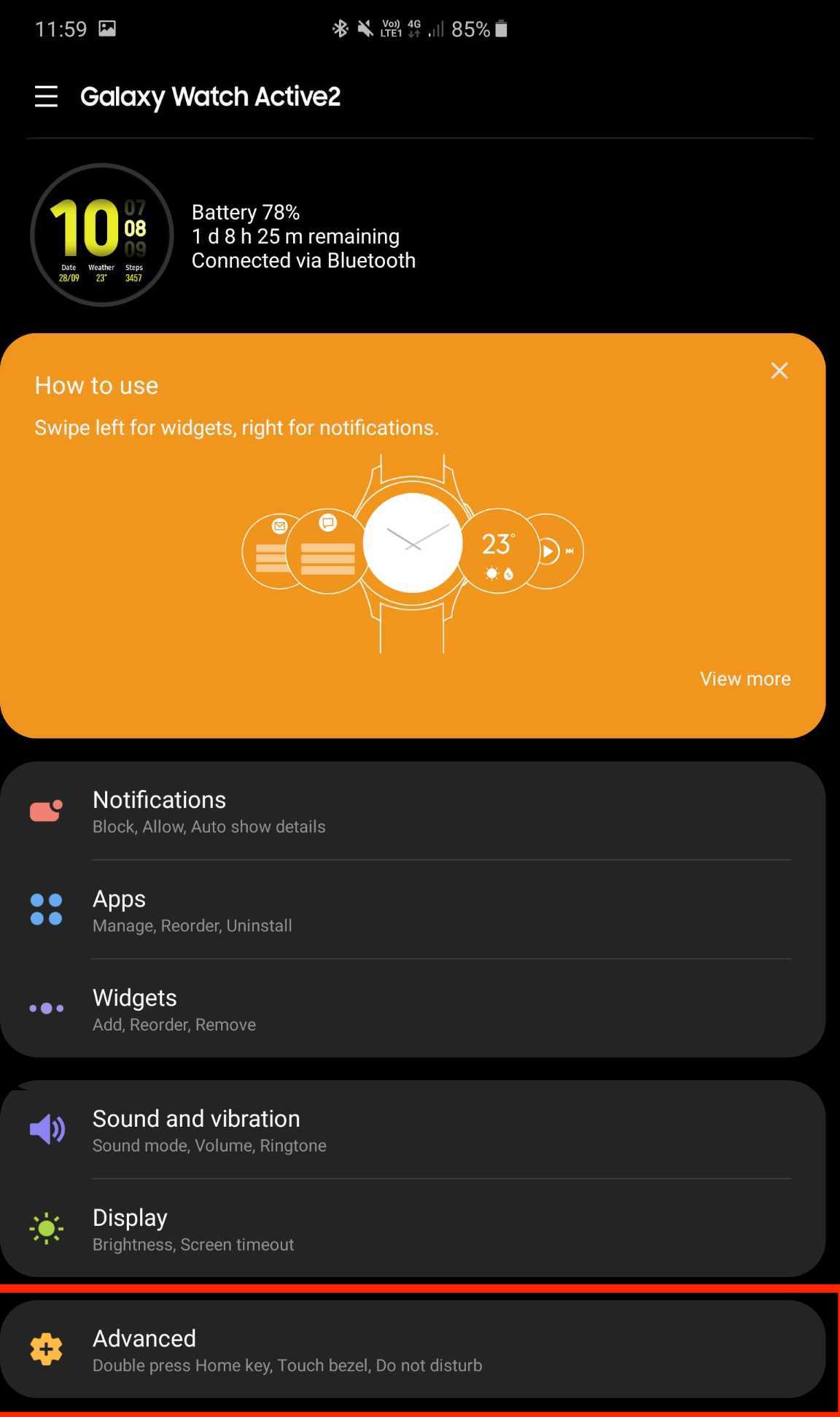
Fortunately, it’s a rather simple process. Once you have the Galaxy Watch Active 2 paired with your device, launch the Galaxy Wearable app and access the menu for your smartwatch. Tap on Advanced and you’ll immediately see that the Touch bezel toggle is disabled. Just tap on the toggle to enable the smartwatch’s touch bezel. That’s all you need to do.

One would imagine that Samsung wouldn’t disable this feature out of the box but the company has made this odd decision for some reason. Once you do enable the Galaxy Watch Active 2 touch bezel, you’ll fall in love with it rather quickly. As we highlighted in our Galaxy Watch Active 2 hands-on, the touch-sensitive bezel works really well. Just slide your finger around it to navigate the UI. The transitions are very smooth and quick with the smartwatch also giving you gentle haptic feedback.

Do stay tuned as we’ll have a full review of the Galaxy Watch Active 2 up for you in no time. Are you looking forward to picking up Samsung’s latest smartwatch? Do share your thoughts with us in the comments below.

The post PSA: You need to enable the Galaxy Watch Active 2 touch bezel manually appeared first on SamMobile.


from SamMobile https://ift.tt/2IcKM7B
via IFTTT

جميع الحقوق محفوظة لمدونة الغريب 2013