الخميس، 13 مايو 2021

Ancient Wi-Fi security flaw ‘FragAttacks’ has been dealt with by Samsung

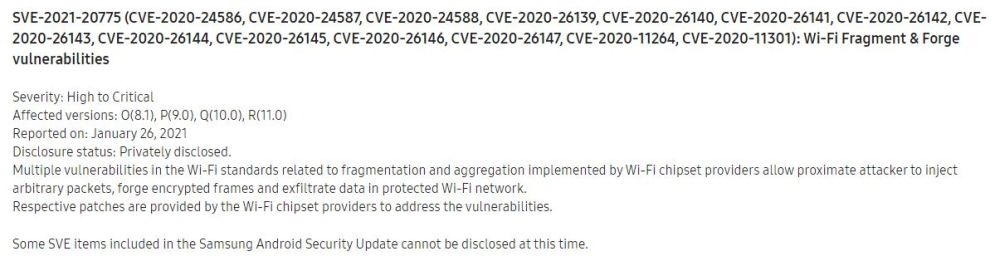
A new security flaw was discovered and recently disclosed by security researcher Mathy Vanhoef — the same researcher who had discovered the KRACK Wi-Fi vulnerability nearly four years ago — and it’s a doozy. In fact, the researcher found dozens of vulnerabilities that affect hundreds of millions of Wi-Fi devices (if not more), from phones to TVs and IoT products, regardless of their brand and year of release.

The collection of vulnerabilities was dubbed FragAttacks (short for fragmentation and aggregation attacks) and as scary as it may sound, the researcher found that these vulnerabilities affect all modern Wi-Fi security protocols including WPA3, as well as the original security protocol, WEP.

In essence, FragAttacks is a collection of security flaws that have existed since 1997 but were only recently discovered. And because they are baked into the Wi-Fi protocols, they affect virtually any devices with Wi-Fi capabilities.

These FragAttacks vulnerabilities can be abused in two ways. Firstly, if the right conditions are met, the flaws can be abused to steal sensitive data. Secondly, an attacker can exploit these flaws to attack devices connected to a home network.

The second part poses a bigger risk because, according to the researcher’s website, many smart home and IoT devices are rarely updated and they rely on the built-in security of the Wi-Fi protocols to stay impervious to malicious attacks most of the time.

Samsung began addressing all of these issues last month

Although the scope of this newfound FragAttacks vulnerability is huge, the good news is that Samsung customers might be safer than others.

It turns out that Samsung’s been quietly addressing all twelve FragAttacks vulnerabilities with the release of the April 2021 security patch, and this is probably why the company has done such an amazing job at releasing the April update for so many Galaxy devices, new and old.

The April 2021 security patch has not only addressed all the FragAttacks vulnerabilities that have been disclosed so far, but it has also includes two additional fixes for vulnerabilities labeled: CVE-2020-11264 and CVE-2020-11301. They seem to be a part of the FragAttacks collection of vulnerabilities, but they haven’t been mentioned on the security researcher’s website.

All in all, Samsung is proving once again that it’s on top of things when it comes to firmware updates and security patches. The only problem is that certain devices that have become too old will probably remain vulnerable, given that these security flaws have been around for decades.

You can use our new online tool if you want to make sure that your phone is running the latest security patch available in your region.
The post Ancient Wi-Fi security flaw ‘FragAttacks’ has been dealt with by Samsung appeared first on SamMobile.


from SamMobile https://ift.tt/33Hojdu
via IFTTT
The May 2021 security update is now live for the Galaxy S10 series

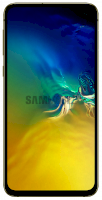
Samsung has updated roughly two dozen Galaxy devices with the May 2021 security patch over the past couple of weeks, but the company still has some work left to do before it can claim that all of its eligible devices have been brought up to date. The latest trio of smartphones to boast improved security are the Galaxy S10e, the Galaxy S10, and the Galaxy S10+.

The latest update is identified by firmware version G97xFXXUAFUE3 and Samsung is now rolling it out for the Galaxy S10 series in Europe. Switzerland appears to have been the first market to seed the latest firmware update, but you can rest easy knowing that the update’s availability should expand into other markets momentarily. Assuming, of course, that the initial rollout goes without a hitch.

As expected, the May 2021 security patch addresses dozens of vulnerabilities affecting Android OS and Samsung’s own software, but more importantly, Samsung confirmed that the new security update should also contain a critical fix for a security vulnerability affecting millions of devices powered by Qualcomm modems.

As of now, the new update is rolling out to the Galaxy S10e, S10, and S10+ with model numbers SM-G970F, SM-G973F, and SM-G975F. Eligible customers should be able to download the update via the Settings app on their phones, or they can acquire it from our firmware archive where the latest updates corresponding to each model number are now available. Just hit the links above.

  • Model: SM-G970F
  • Dimensions: Bar: 142.2 x 69.9 x 7.9 mm
  • Display: 5.8 inch / 147.32 mm Dynamic AMOLED Display
  • CPU: Exynos 9820
  • Camera: 12MP

  • Model: SM-G973F
  • Dimensions: Bar: 149.9 x 70.4 x 7.8 mm
  • Display: 6.1 inch / 162.5 mm Dynamic AMOLED Display
  • CPU: Exynos 9820
  • Camera: 12MP

  • Model: SM-G975F
  • Dimensions: Bar: 157.6 x 74.1 x 7.8 mm
  • Display: 6.4 inch / 162.5 mm Dynamic AMOLED Display
  • CPU: Exynos 9820
  • Camera: 12MP

The post The May 2021 security update is now live for the Galaxy S10 series appeared first on SamMobile.


from SamMobile https://ift.tt/3bq3UxB
via IFTTT

Do you need a Samsung account when using Galaxy devices?

Setting up a new Samsung account or logging in with an existing one is generally considered a part of the set-up process for a new Galaxy device, but is a Samsung account mandatory?

The answer is ‘no,’ it is not. Galaxy devices can be used without having to sign in with, or even create a Samsung account, but the majority of Samsung customers choose to create a Samsung account when setting up their first Galaxy device because, for one, these steps are included in the initial setup process in an intuitive manner, and secondly, a Samsung account is required for using certain services and advanced features.

Galaxy device users can choose not to log in with Samsung account, or they can skip creating one altogether. But doing so will limit the user experience in a few ways. Without a Samsung account, customers won’t have access to the following services:

Users without a Samsung account will only be able to download and update apps via the Google Play Store, assuming they’re fine with signing in with a Google account instead.

There are other limitations that may not be obvious at first

Even if a Galaxy device user may be content with not using any of the aforementioned services, they’ll still face certain limitations and they won’t enjoy the complete user experience offered by the Samsung ecosystem.

Without a Samsung account, users aren’t able to take advantage of the new integration with Microsoft OneDrive, which means they won’t be able to save their Gallery and My Files contents to the cloud.

Likewise, using a Galaxy device without a Samsung account means that services such as Find My Mobile, Samsung Pass, and Call & Text on other devices won’t work.

Find My Mobile can be used to locate your phone and protect your data in case the device goes missing. Call & Text on other devices is a service that lets customers make calls and send texts from their smartwatches using their phone’s data plans. And Samsung Pass stores the user’s fingerprints, which can later be used to easily and securely access supported apps and websites.

Ultimately, any smart feature that’s supposed to learn from the user and adapt accordingly won’t work without a Samsung account. For example, Bixby Routines will work even without a Samsung account but the AI-based platform will only be good for creating manual routines. The app won’t be able to learn from the user and adapt.

In conclusion, you don’t need a Samsung account to use a Galaxy device, but choosing to sign in with one opens up a whole ecosystem of Samsung services and smart devices.

The post Do you need a Samsung account when using Galaxy devices? appeared first on SamMobile.


from SamMobile https://ift.tt/3w2Rvrh
via IFTTT

The Galaxy A11 is Samsung’s latest budget phone to acquire One UI 3.1

Samsung’s been updating countless Galaxy devices to Android 11 for months now, but the job is still not done. Two more budget phones have joining their Android 11-power siblings this week. First, the Galaxy A02s got updated with the Android 11-based One UI 3.1 firmware update a few days ago, and now the Galaxy A11 is getting the same treatment.

As of this writing, the Galaxy A11, model number SM-A115M is receiving the One UI 3.1 update and a newer security patch in Panama. The latest release is identified by firmware version A115MUBU2BUE1, and availability will of course expand to other regions soon.

The latest firmware should include a newer security patch but, evidently, the most exciting thing about this release is Android 11 / One UI 3.1. Although Galaxy A11 owners shouldn’t expect any advanced flagship-grade features from this new firmware, they can at least look forward to a redesigned UI and a few quality of life improvements.

The update is being rolled out over the air and customers should be able to trigger the update process — where available — by opening the Settings app and accessing Software update. SamMobile offers an alternative method of acquiring updates from our firmware archive for readers who may want to skip waiting for the OTA release.

Thanks for the tip, Amin!

The post The Galaxy A11 is Samsung’s latest budget phone to acquire One UI 3.1 appeared first on SamMobile.


from SamMobile https://ift.tt/3ofoFBe
via IFTTT

Samsung is reportedly developing a 1,000 ppi OLED display for 2024

Samsung Display is reportedly working on pushing the limits of OLED / AMOLED panels by creating a display with an astonishing pixel density of 1,000 ppi (pixels per inch). Recent reports passed along by the Korean media aren’t very clear about the purpose of this 1,000 ppi display and whether or not it will be developed and used for the mobile market, but that’s a reasonable expectation.

More unusual is the fact that the company is reportedly developing new TFT (thin-film transistor) technology for OLED panels to achieve this high 1,000 ppi density. Since OLED panels don’t use a TFT backplane, it’s likely that the company is actually developing a 1,000ppi AMOLED screen, to be precise, and the finer details were lost in transit. Time will tell.

The new TFT solution for AMOLED could be a lot faster

Aside from enabling the incredibly-high 1,000ppi pixel density, Samsung’s future TFT technology is also said to be a whole lot faster than current solutions. Ten times faster, to be precise, and of course assuming that the rumors are technically correct.

Samsung also intends on making its future high-density display more power efficient and cheaper to manufacture. Exactly how the company may want to achieve this is unclear, but the 1,000ppi panel is reportedly planned to become available by 2024.

In theory, a 1,000ppi display would be a great match for VR headsets, but Samsung hasn’t really shown much interest in this product category lately. Nevertheless, 1,000ppi is the level of pixel density that Samsung’s Gear VR division was aiming to achieve nearly four years ago, claiming that once VR screens exceed 1,000ppi, any issues related to motion sickness and a false sense of reality will be negated.

However, since Samsung’s VR ambitions have apparently waned, it’s more likely that this new TFT technology will be used for future smartphone displays. And to put things into perspective, the smartphone with the highest pixel density to date isn’t made by Samsung but by Sony. It’s the Xperia 1 II with its 6.5-inch OLED that has a pixel density of 643ppi.

The post Samsung is reportedly developing a 1,000 ppi OLED display for 2024 appeared first on SamMobile.


from SamMobile https://ift.tt/3uG15Aa
via IFTTT

Verizon’s Galaxy Tab S6 has joined the One UI 3.1 family with new update

Verizon’s Galaxy Tab S6 is now catching up with the international variant, firmware wise. The USA-based operator has started seeding the Android 11-based One UI 3.1 firmware update for the Galaxy Tab S6 on its network, and since Verizon’s model is more than two months late to the punch, this means that the latest firmware update carries a newer security patch than before.

Samsung began updating the international Galaxy Tab S6 LTE with the Android 11-based One UI 3.1 firmware more than two months ago. At that time, the firmware was accompanied by the March 2021 security patch, however, the latest update released by Verizon brings the more recent April 2021 security patch with it.

Get ready for a new chapter of the Galaxy Tab S6

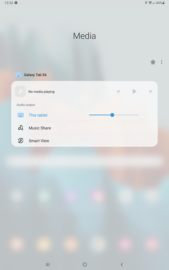
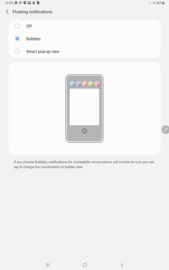
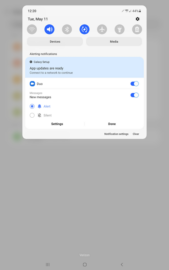
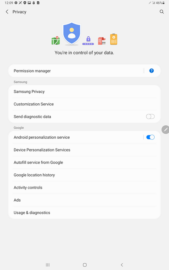
The launch of Android 11 / One UI 3.1 for the Galaxy Tab S6 is a pretty big deal given the refreshed UI design, increased performance, the numerous improvements added to Samsung’s first-party apps, and the addition of other new features such as a redesigned Control Panel with Device and Media controls, conversation bubbles that can be pinned, new privacy controls such as the ability to remove location data from images before sharing them, and a lot more.

Samsung Galaxy Tab S6 owners who have acquired the tablet on Verizon’s network should now be able to download the latest firmware OTA (over the air) by tapping the update notification once it arrives, or by opening the Settings app on the tablet and accessing the Software Update section. The update can be identified by firmware version T867VVRU4CUD3.

The post Verizon’s Galaxy Tab S6 has joined the One UI 3.1 family with new update appeared first on SamMobile.


from SamMobile https://ift.tt/3uQ3iJC
via IFTTT

A new Galaxy Buds app for Windows 10 is now live at the Microsoft Store

More Windows 10 apps designed for Samsung customers are hitting the Microsoft Store as the two tech giants continue strengthening their partnership. The latest Windows 10 app to come out of Samsung’s development labs is called Galaxy Buds, and it’s now available for download from the Microsoft Store for Windows 10 PCs, the HoloLens, and the Surface Hub.

Some of you might recall an older app for Windows and Mac OS called Galaxy Buds Manager. It was released a couple of years ago via Samsung’s download center and it offered ways to manage and update the Galaxy Buds over a PC. It wasn’t an official Microsoft Store app, and it has since been dropped, though some third-party developers continue supporting it, or at least they’ve done so up until a year ago.

In contrast, Samsung’s new Galaxy Buds app was created for Windows 10 and it can now be downloaded from the Microsoft Store, either by accessing the link or by searching for the app inside the Microsoft Store on your Windows 10 machine.

Galaxy Buds Windows 10 app quick overview

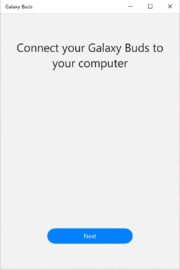
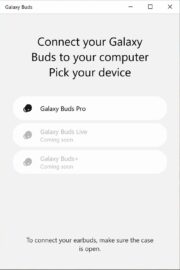
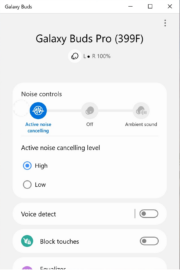
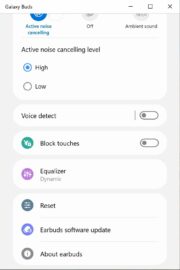
The Galaxy Buds app for Windows 10 weighs a little over 18MB and, as of this writing, it’s compatible only with the Galaxy Buds Pro. However, one of the app’s early setup screens confirms that support for the Galaxy Buds+ and the Galaxy Buds Live should be coming soon. There’s no mention of the original Galaxy Buds.

As for the app’s capabilities, it shows the battery level of each connected earbud and it lets users check for and download new firmware updates. It also includes an equalizer and options to enable or disable touch commands and voice detection. Last but not least, the app allows users to pick a level for active noise cancelling between High and Low.

Last week, Samsung also released a new SmartThings Windows 10 app to give customers better control over their IoT devices.

The post A new Galaxy Buds app for Windows 10 is now live at the Microsoft Store appeared first on SamMobile.


from SamMobile https://ift.tt/3eIVQdp
via IFTTT

جميع الحقوق محفوظة لمدونة الغريب 2013