الأربعاء، 21 أبريل 2021

Why Samsung might consider buying this $55 billion company

To say that Samsung has deep pockets would be an understatement. The company is sitting on more than $114 billion in cash and it hasn’t made any major acquisitions recently. Samsung’s largest deal was in 2016 when it acquired Harman for $8 billion.

Rumors have been circulating recently that Samsung is eyeing a major acquisition. The company reportedly wants to acquire a semiconductor manufacturer to further cement its position in the market. According to reports, there’s a $55 billion company that Samsung’s interested in.

Has Samsung found the perfect acquisition target?

Samsung’s CFO Choi Yoon-ho revealed earlier this year that the company is looking for mergers and acquisitions in the automotive semiconductor industry. It didn’t name the potential targets that it’s vetting, but market watchers have made some predictions.

NXP Semiconductors is a name that’s repeatedly being mentioned. This Dutch company has a $55 billion market cap and seems to have caught Samsung’s attention. Other companies including Texas Instruments and Microchip Technologies have also been named as potential targets. However, some analysts believe that they may not be a good fit for Samsung.

J.P. Morgan analyst JJ Park is of the view that the acquisition of NXP makes sense for Samsung. The only reason Samsung wants to buy a company in this space is to strengthen its position in the automotive semiconductor market. Around 10% of NXP’s revenue from Continental AG, a German auto-parts company.

It’s not like Samsung would simply pay $55 billion out of the $114 billion or so cash that it has in the bank. Such massive deals are rarely structured so simply. Be that as it may, it would certainly be Samsung’s biggest acquisition so far.

It would also trump many of the high-value deals in the semiconductor market. For example, NVIDIA bought ARM for $40 billion last year while AMD bought Xilinx for $35 billion. With significantly deeper pockets and financial muscle, Samsung won’t have any issues paying for a massive transaction.

However, whether a deal can be struck is another matter entirely. Interest alone isn’t an indication of an impending deal. No matter how much the market feels this is a good buy for Samsung, there’s a lot that the Korean juggernaut will consider before spending such a ridiculous amount of money.

The post Why Samsung might consider buying this $55 billion company appeared first on SamMobile.


from SamMobile https://ift.tt/3vfzJ3X
via IFTTT
Tired of lavish One UI animations on your Galaxy phone? Try this!

One UI is one of the better-looking custom Android skins out there, but Samsung’s proprietary software has also received some criticism over the years on account of feeling a bit on the slow side. Subsequent updates have made One UI even prettier and easier to navigate, but animations have also become lengthier and more lavish especially with the release of One UI 3.0.

Perhaps this was Samsung’s way of highlighting the benefits of using a 90Hz / 120Hz display, but longer animations can also lead to a perceived loss in performance, especially once the proverbial shine is off the apple.

Fortunately, there is a way to speed up One UI animations — or remove them completely if you’re feeling brave — and improve your Galaxy phone’s responsiveness without having to install any third-party apps. Animation speed options have existed for a long time now, though they’re hidden inside the Developer options menu, which means that many Galaxy smartphone owners might not be aware of them.

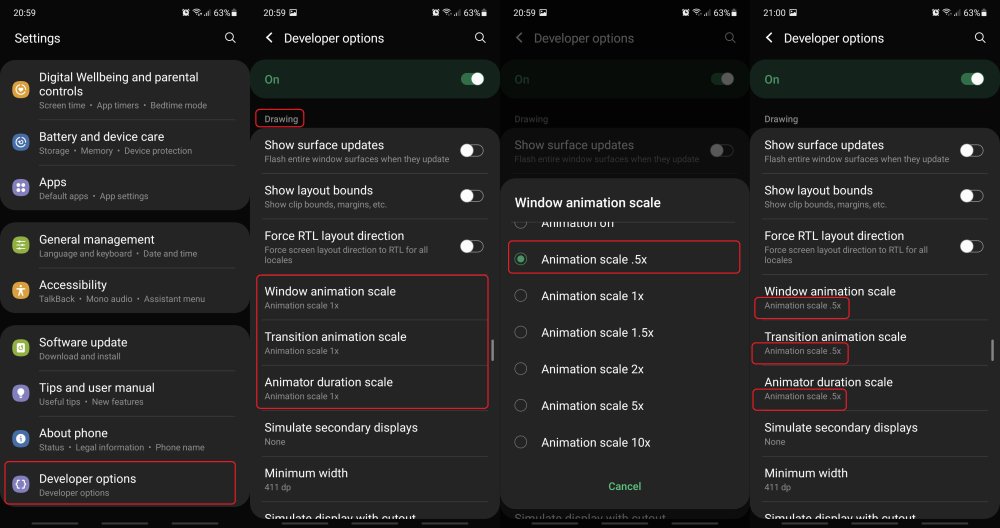
So, just in case you need a reminder of how to enable the hidden Developer options menu before we proceed with the actual tips regarding animation speeds, all you have to do is open the Settings app, swipe up and access About phone, then go to Software information and tap Build number repeatedly until you get an on-screen notice confirming that Developer options have been enabled.

How can you speed up One UI animations?

Once unhidden, the Developer options menu will appear at the bottom of the list inside the Settings app. Access it and scroll all the way to the Drawing category. Here you will find the a variety of options, but what you should be looking for, in particular, are three settings called: Window animation scale, Transition Animation scale, and Animator duration scale.

When tapped, each of these options reveal a drop-down menu which includes a handful of animation speeds (or scales), from .5x to 10x. The default value is 1.0x and animations will play slower the higher the animation scale is. So, for the purpose of this guide, i.e., speeding up your phone, you should select the .5x animation scale option for all three settings. (That’s 0.5x, not 5x).

It’s worth noting that each of the three aforementioned settings affect different parts of the UI. Window animation scale, for example, affects the animation speed of pop-up / drop down menus like the ones containing the animation scale options).

Transition animation scale affects the animation speed when going back and forward between screens inside an app, and Animator duration scale affects the speed of animations when minimizing / maximizing apps, opening folders, dragging the notification shade down and so on.

How about disabling One UI animations altogether?

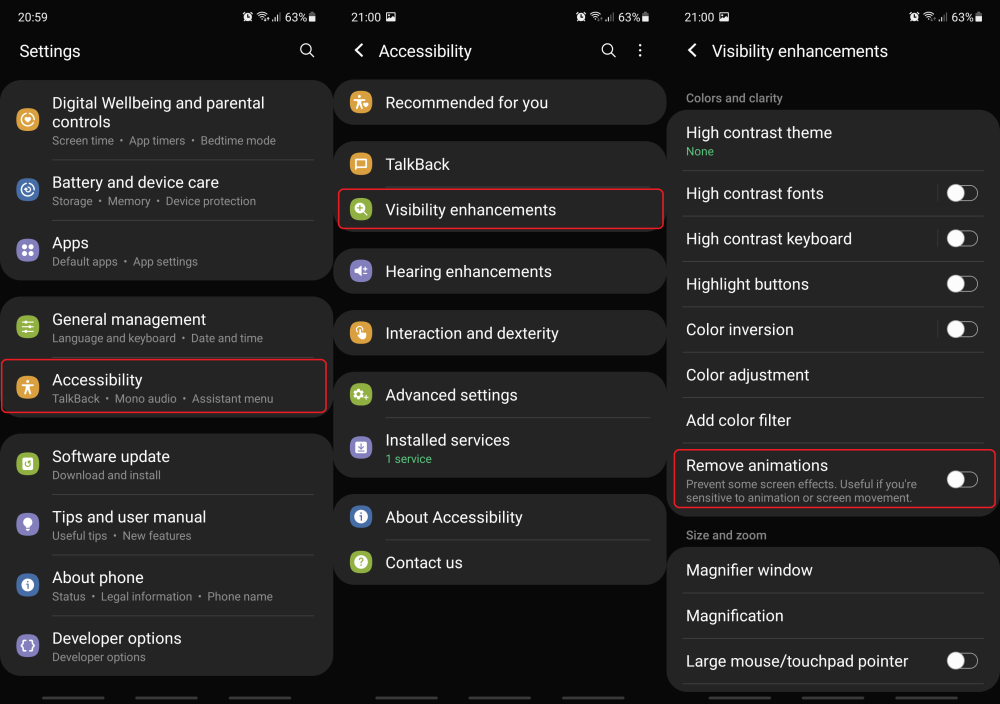
One UI animations can also be disabled entirely, as you may have already noticed if you’ve checked the animation menus mentioned above. However, Galaxy smartphone owners who may want to disable animations altogether are advised that you do this through the Visibility enhancements menu inside Accessibility instead of relying on Developer options.

There is one caveat to removing animations completely though. Doing so will have an effect not only on One UI but on certain third-party apps as well. The ‘loading’ circle animation often present when buffering online videos will be replaced by a series of dots, and sometimes we have encountered touch recognition issues when animations were entirely disabled.

NOTE: If you adjust animation scales via Developer options and then remove animations via the Accessibility menu, the animation scale values will be reset to default (1.0x) upon re-enabling animations.

Have you tried adjusting the animation speeds in One UI yet? Do you prefer them to be faster, slower, or disabled altogether? Feel free to leave a comment below.

The post Tired of lavish One UI animations on your Galaxy phone? Try this! appeared first on SamMobile.


from SamMobile https://ift.tt/2Ql4eqc
via IFTTT

Galaxy Z Fold 2 at Verizon is getting three new camera features via update

The Verizon-bound Galaxy Z Fold 2 in the USA is now catching up with the international model as the carrier has begun rolling out a new firmware update that includes the April 2021 security patch and, more importantly, a handful of new major features meant to improve the camera.

The latest update carries the F916USQU1DUCE label, and the April 2021 security patch that was detailed by Samsung a couple of weeks ago is meant to fix 21 issues found within Samsung’s software, and roughly 30 ‘high-severity’ vulnerabilities affecting Google’s platform.

The best part of the update is related to the camera, of course, though improved security is always welcomed. Nevertheless, Galaxy Z Fold 2 owners should be glad to learn that the latest update improves the camera experience thanks to three key additions.

Pro Mode for Ultrawide, new Portrait backgrounds, and auto Night Mode

All three of these new features were included in Verizon’s latest firmware update for the Galaxy Z Fold 2. As a result, the ultra-wide lens is now available in Pro and Pro Video camera modes, and new Portrait backgrounds have been added including: High-Key Mono, Low-Key Mono, and Backdrop effects.

Last but not least, the third major change to the camera introduces automatic Night Mode. The camera app can now detect low light conditions and enable Night Mode automatically in Photo, Portrait, and Hyperlapse camera modes.

Verizon customers who own the Galaxy Z Fold 2 should be able to acquire the new update OTA by opening the Settings app, accessing Software update, and tapping Download and install.

The post Galaxy Z Fold 2 at Verizon is getting three new camera features via update appeared first on SamMobile.


from SamMobile https://ift.tt/3ejEUsK
via IFTTT

You can save big on Samsung’s 8K QLED TVs with this limited-time deal

With Samsung TV Plus becoming one of the world’s most popular ad-supported streaming services, and with Tizen now being the most widespread TV platform worldwide, most prospective buyers who might be in the market for a new TV must be looking at Samsung’s portfolio with great interest. And if they’ve been waiting for a deal in order to commit to a purchase, well, we have one.

Woot!, the Amazon-owned daily deals company is selling the Samsung Q900 Series UHD QLED smart TV at a discount. The 65-inch QLED Q900 model is now available for $2,299 instead of $2,499 after an 8% discount, whereas the 75-inch variant costs $2,899 as opposed to $3,299.

As of this writing, there are 13 hours left on this 8K QLED TV deal, though the offer could always end sooner if stocks get depleted. Either way, customers are limited to a maximum of three purchases, though judging by the quantity breakdown offered by Woot!, 100% of customers so far have purchased only one unit each.

Do keep in mind that the Q900 is not Samsung’s latest 8K QLED TV model. It’s actually from 2019 but it does take advantage of a variety of modern technologies including 8K HDR, an 8K Quantum Processor, and 8K AI Upscaling. Refer to the link below for more details.

  • Buy the Samsung Q900 Series 8K QLED TV at Woot!

The post You can save big on Samsung’s 8K QLED TVs with this limited-time deal appeared first on SamMobile.


from SamMobile https://ift.tt/3v0uiWm
via IFTTT

Samsung TV Plus is getting 166 new Rakuten TV channels across Europe

Samsung Electronics and Rakuten TV are strengthening their collaboration with one common goal in mind: to deliver more content to Samsung TV Plus users across multiple European markets beginning this month.

Rakuten TV has announced that it is expanding the service on Samsung TV Plus to include 166 new channels in 16 markets across Europe. The new channels are planned to roll out this month and throughout May.

The rollout began today in Denmark, Finland, and Norway. Starting May, the new Rakuten TV channels will become available in additional markets including — but not limited to — Belgium, Luxembourg, Portugal, and Ireland.

Availability varies depending on the age of your smart TV

According to the official announcement, the new Rakuten TV channels will be available via Samsung TV Plus on Samsung smart TVs from 2016 onwards, as long as they’re in the UK, Spain, Germany, France, Italy, Austria, and Switzerland.

This means that if you happen to own a Samsung smart TV from 2016 but you don’t reside in one of the aforementioned countries, you won’t have access to the new Rakuten TV channels. Otherwise, the catalogue will be available on Samsung smart TVs from 2017 or later in the remaining European markets.

Rakuten TV was also released on the Samsung TV Plus platform in the Netherlands and Sweden earlier this week, introducing 7 premium channels. Samsung TV Plus is already live in other countries across Europe, and Rakuten TV’s Family channel was released in most of these markets last week on the 14th of the month.

The post Samsung TV Plus is getting 166 new Rakuten TV channels across Europe appeared first on SamMobile.


from SamMobile https://ift.tt/3xgi9hK
via IFTTT

The Galaxy A50 is getting a new security update weeks after Android 11

The April 2021 security patch rollout continues to no one’s surprise, though there’s never a guarantee as to which Galaxy device might be receiving it next. Well, right now it’s the Galaxy A50 that has the honors of carrying the torch and getting the latest security update.

The latest firmware is rolling out in India at the very least, but other regions should follow soon. The new update for the Galaxy A50 (SM-A505F) can be identified by firmware number A505FDDU7CUD1 and, as usual, it should be available for download from the Settings app on your phone, or more specifically the Software update menu within Settings.

Don’t expect miracles so shortly after Android 11

Though the firmware number suggests that the update could contain extra features aside from the latest security patch, you shouldn’t expect any massive changes to the user experience given that Android 11 was released for the Galaxy A50 mere weeks ago.

The April 20201 security patch, on the other hand, is supposed to address 21 Samsung exposures and vulnerabilities, as well as roughly 30 security issues found within Google’s software.

Galaxy A50 owners in India — and possibly other regions — should soon receive an update notification, but they can also refer to our firmware archive where the latest Samsung firmware can be downloaded for free.

The post The Galaxy A50 is getting a new security update weeks after Android 11 appeared first on SamMobile.


from SamMobile https://ift.tt/3v702ZV
via IFTTT

Samsung accidentally confirms Qualcomm-powered Galaxy S20 FE 4G

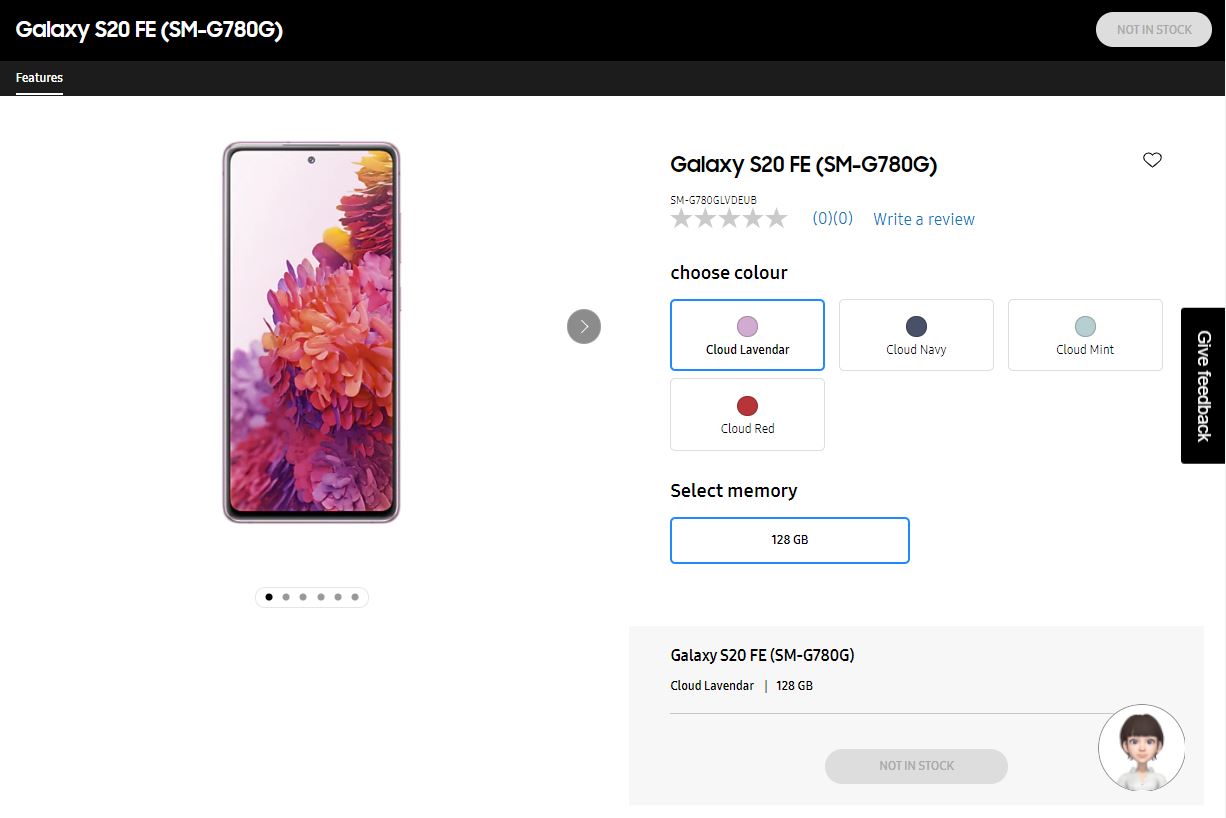
Another piece of evidence pointing at an imminent release of the internally-redesigned Galaxy S20 FE 4G fell into place today, as Samsung appears to have prematurely-published the device’s store page on its Swedish portal. The phone carries model number SM-G780G as opposed to SM-G780F, and this is due to the fact that the device in question is supposed to feature a Snapdragon 865 / 865+ chipset instead of the Exynos 990 SoC.

As many of you know, the Galaxy S20 FE 4G was originally released with an Exynos 990 SoC under the hood, while the Snapdragon 865 chipset was reserved for the 5G model. It is now believed that the upcoming Galaxy S20 FE 4G model will adopt Qualcomm’s solution instead, though the chipset will be stripped of its 5G capabilities.

The Snapdragon variant should be released in at least four colors

The premature store page doesn’t reveal much about the phone’s internal specifications, its price, or launch date. The phone is essentially listed as not being in stock, however, there is one 128GB storage option and four colors to choose from: Cloud Lavender, Cloud Navy, Cloud Mint, and Cloud Red. Additional color options could become available later or exclusively-online.

In addition, the Snapdragon-powered Galaxy S20 FE 4G will reportedly be released in a second memory configuration featuring 8GB of RAM and 256GB of built-in storage. So, it’s business as usual, and aside from a different chipset, the upcoming SM-G780G doesn’t seem to have suffered any other changes, beneficial or otherwise.

The phone’s exact launch date remains a mystery but it probably won’t be much longer before the ‘Not in stock’ button gets replaced by a ‘Buy’ option. Stay tuned.

The post Samsung accidentally confirms Qualcomm-powered Galaxy S20 FE 4G appeared first on SamMobile.


from SamMobile https://ift.tt/3vbtDBg
via IFTTT

جميع الحقوق محفوظة لمدونة الغريب 2013